Product
 Brand
Brand Articles
 Tools
Tools
What is Universal Serial Bus (USB)?
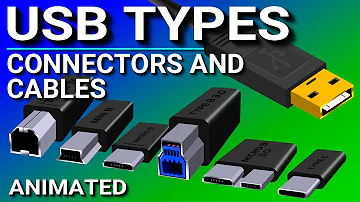
USB Ports, Cables, Types, & Connectors
USB technology has evolved into the USB4 Version 2.0 standard, offering speeds up to 80 Gbps (symmetric) and power delivery up to 240 Watts via USB Type-C. While legacy interfaces (Type-A, Micro-USB) remain in use for older peripherals, the modern ecosystem is standardized on the versatile Type-C connector for data, video, and power. This guide covers the complete architecture from legacy USB 1.1 to the cutting-edge USB4 generation.
Catalog
| Ⅰ How is the USB Software Structure Defined? |
| Ⅱ What Comprises the USB Hardware Architecture? |
| Ⅲ The Evolution of USB Standards (1996–2026) |
| Ⅳ Guide to USB Connector Types: Legacy to Type-C |
Ⅰ How is the USB Software Structure Defined?
The USB software architecture relies on a single host managing a tiered system of clients, hubs, and function drivers. It includes the following specific layers:
1. Bus interface
The USB bus interface handles the critical interconnection between the electrical layer and the protocol layer. From the perspective of interconnection, similar bus interfaces are presented by the device and the host simultaneously, such as the Serial Interface Engine (SIE). The USB bus interface is implemented physically by the main controller.
The USB system uses a host controller to manage data transfer between the host and USB devices. The interface between it and the main controller depends on the hardware definition. The USB system manages resources such as bandwidth allocation and bus energy (power management), which is critical for modern PD 3.1 standards. The USB system comprises three basic components:
Host Controller Driver (HCD): Maps different host controller devices to the USB system. The interface between HCD and USB is called HCDI.
Universal Host Controller Driver (UHCD): Located at the bottom of the software structure, it manages and controls the main controller, handling communication while remaining hidden from other system software parts.
USB Driver (USBD): Sitting on top of the UHCD, it provides a driver-level interface (USBDI) to meet existing device driver design requirements. USBD transmits data via I/O request packets (IRPs) through specific "Pipes."
2. Host software
In some operating systems, specific USB system software is not provided natively. In these legacy scenarios, the software was used to provide configuration information and loading structure to the device driver. In modern operating systems (Windows 11, macOS, Linux), the device driver uses the provided interface instead of directly accessing the USBDI structure.
3. USB client software
This is located at the highest level of the software structure and handles specific USB device drivers. The client program layer describes all software entrances directly acting on the device. When a device is detected by the system, these client programs act on the peripheral hardware. This shared feature places the USB system software between the client and its device, which is processed by the client program according to the device image formed by the USBD.
Ⅱ What Comprises the USB Hardware Architecture?
USB hardware utilizes a cascaded star topology connecting a host controller to up to 127 devices via hubs and cables. Modern USB 3.x and USB4 cables use multiple differential pairs for data and dedicated lines for power negotiation (CC lines). USB is a token-based bus where the host controller broadcasts tokens, and devices respond if the address matches. Crucially for 2026, the hardware supports advanced power states (suspend/resume) and Power Delivery (PD) up to 240W.

USB Topology: Host, Hubs, and Functions
The Host (Root): Built onto the motherboard or installed as an adapter card. It contains the main controller and a root hub, controlling data flow. Each USB system has one root hub.
The Hub: A specific component that provides "ports" to connect devices to the bus. It detects connections, manages power for attached devices, and handles bus failure recovery. Hubs can be self-powered or bus-powered.
The Function: The end peripheral (e.g., mouse, SSD, camera) connected to the bus.
Ⅲ The Evolution of USB Standards (1996–2026)
Legacy Standards (USB 1.1 & 2.0)
USB 1.0 appeared in 1996 with a speed of just 1.5Mb/s. By 1998, USB 1.1 increased this to 12Mb/s (Full Speed). USB 2.0, released in 2000, brought "High Speed" data at 480Mbps (60MB/s). While slow by 2026 standards, USB 2.0 is still widely used for keyboards, mice, and audio interfaces due to its reliability and low cost.
USB 3.x Generations (5Gbps - 20Gbps)
The USB 3.0 era introduced "SuperSpeed." It has undergone several renaming phases by the USB-IF. Here is the modern naming convention used in 2026:
USB 3.2 Gen 1 (formerly USB 3.0): Transfer rate of 5Gbps.
USB 3.2 Gen 2 (formerly USB 3.1): Transfer rate of 10Gbps.
USB 3.2 Gen 2x2: Uses two lanes to achieve 20Gbps (Requires USB-C).
USB4 & USB4 Version 2.0 (The 2026 Standard)
USB4, introduced in 2019, is based on the Thunderbolt 3 protocol. It dynamically shares bandwidth between data, video, and power. As of 2026, the ecosystem is dominated by USB4 Version 2.0.
Key Specs for 2026:
Max Speed: 80 Gbps (symmetric) or 120 Gbps (asymmetric for 8K displays).
Tunneling: Encapsulates USB 3.2, DisplayPort 2.1, and PCIe traffic.
Connector: Exclusively uses USB Type-C.
| Marketing Name | Technical Spec | Max Speed |
|---|---|---|
| USB 5Gbps | USB 3.2 Gen 1 | 5 Gbps |
| USB 10Gbps | USB 3.2 Gen 2 | 10 Gbps |
| USB 20Gbps | USB 3.2 Gen 2x2 | 20 Gbps |
| USB 40Gbps | USB4 Gen 3x2 | 40 Gbps |
| USB 80Gbps | USB4 Version 2.0 | 80 Gbps |
Ⅳ Guide to USB Connector Types: Legacy to Type-C

USB Type-A (Legacy Host Connector)
While modern devices have standardized on Type-C, legacy connectors remain in use for industrial and older consumer electronics. Below is a breakdown of these interface types.
Mini-B (Legacy)

The Mini-B 5-pin was once the standard for MP3 players, older digital cameras, and portable hard drives. It provided excellent anti-misplug performance but was relatively bulky compared to modern standards.
Micro-USB (Legacy)

Micro-USB became the global standard for mobile phones before Type-C. It supports data rates up to 480Mbps (USB 2.0). It is physically fragile compared to Type-C and supports lower charging wattages.
USB Type-C (The 2026 Standard)

Type-C is the universal interface for 2026, mandated by regulations (such as the EU Common Charger Directive) for mobile devices. It solves the "reverse insertion" problem and supports massive bandwidth.
Key Type-C Capabilities in 2026:
Reversibility: Symmetrical design allows insertion in either direction.
Power Delivery (EPR): Supports "Extended Power Range" up to 240 Watts (48V/5A), capable of powering high-end gaming laptops.
Alt Modes: Can transmit DisplayPort, HDMI, and Thunderbolt signals simultaneously with data.
Frequently Asked Questions (2026 Update)
What is the difference between USB4 and Thunderbolt 4/5?
USB4 is built on the Thunderbolt protocol. While Thunderbolt 4 guarantees minimum specs (like 40Gbps and dual 4K display support), USB4 can vary. However, the new Thunderbolt 5 and USB4 Version 2.0 both support speeds up to 80Gbps, effectively converging the high-end performance capabilities in 2026.
Can I charge my laptop with any USB-C cable?
Not necessarily. While the plug fits, cables are rated for different power levels. Standard cables support 60W, while high-performance cables support 100W. To charge a high-powered 2026 laptop, you need a cable marked "EPR" (Extended Power Range), which supports up to 240W.
Is USB Type-A obsolete in 2026?
Partially. While most new smartphones and laptops feature exclusively USB-C ports, USB Type-A is still common on desktop motherboards, gaming consoles, and industrial equipment for backward compatibility with older mice, keyboards, and flash drives.
 UTMEL
UTMEL
We are the professional distributor of electronic components, providing a large variety of products to save you a lot of time, effort, and cost with our efficient self-customized service. careful order preparation fast delivery service
1.Why is it called Universal Serial Bus?
The name "universal serial bus" stems from its historical beginnings as a specification designed to provide a mechanism for connector standardisation - basically it was a descriptor for the specification.
2.What is the uses of Universal Serial Bus?
A Universal Serial Bus (USB) is a common interface that enables the communication between devices and a host controller such as a personal computer (PC) or smartphone. It connects peripheral devices such as digital cameras, mice, keyboards, printers, scanners, media devices, external hard drives, and flash drives.
3.What is Universal Serial Bus USB )? Why it is widely used?
It can be used to connect keyboards, mice, game controllers, printers, scanners, digital cameras, and removable media drives, just to name a few. With the help of a few USB hubs, you can connect up to 127 peripherals to a single USB port and use them all at once (though that would require quite a bit of dexterity).
4.Is USB a bus?
The Universal Serial Bus (USB) is a technology that allows a person to connect an electronic device to a computer. It is a fast serial bus. It is mostly used on personal computers. USB is also used on other devices, such as smartphones and video game consoles.
5.What is the purpose of USB?
USB is used to attach keyboards, mice, printers, external storage and mobile devices to the computer. It is also used for charging a wide variety of portable products (see USB power).
 High-speed Connectors Shortage Outlook 2026: Supply, Lead Times, and Sourcing OptionsUTMEL16 July 2026728
Entering 2026, the electronics supply chain faces a bifurcated market. While standard connectors remain stable, high-speed interconnects, RF modules, and optical transceivers experience severe shortages driven by rapid AI infrastructure growth. To mitigate these bottlenecks, engineering and procurement teams must adopt proactive design-for-availability strategies, utilize multi-footprint layouts, and leverage alternative global sourcing channels like UTMEL to secure critical BOM components.
Read More The Introduction to USB Type-C Pin Signal and PCB LayoutUTMEL03 December 202127398
Hello everyone. Welcome to the new post today. USB Type-C is a smaller-volume USB interface standard than Type-A and Type-B. It can be used on a PC (master device) as well as external devices (slave devices, such as mobile phones).
Read More Everything You Need to Know about ConnectorsUTMEL07 September 20218700
Electrical connectors, as key components for current or signal connections, are also an important part of the industrial system. Connectors can be as huge as airplanes and rockets or as small as mobile phones and televisions, forming bridges between circuits or other components and serving as electric current or signal links.
Read More Network Interface Card: Types, Functions and Buying GuideUTMEL17 August 202110946
Network Interface Card (NIC, also known as a network interface controller) is one of the most basic components in the local area network. It is the hardware device connecting the computer and the network. Whether it is a twisted pair connection, a coaxial cable connection, or an optical fiber connection, data communication must be realized with the help of a network interface card.
Read More What is Universal Serial Bus (USB)?UTMEL12 June 202613134
Universal Serial Bus (USB) is a serial bus standard and a technical specification for input and output interfaces. It is widely used in information communication devices. The latest generation is USB4, and its transmission speed is 40Gbit/s, the three-stage voltage is 5V/12V/20V, the maximum power supply is 100W.
Read More
Subscribe to Utmel !
![EWM-C106FT02E]() EWM-C106FT02E
EWM-C106FT02EAdvantech Corp
![AMO-WIFI06E]() AMO-WIFI06E
AMO-WIFI06EAdvantech Corp
![EWM-W162M201E]() EWM-W162M201E
EWM-W162M201EAdvantech Corp
![PCE-USB4-00A1E]() PCE-USB4-00A1E
PCE-USB4-00A1EAdvantech Corp
![PCA-COM232-00A1E]() PCA-COM232-00A1E
PCA-COM232-00A1EAdvantech Corp
![GFX-NG730LX8-3G]() GFX-NG730LX8-3G
GFX-NG730LX8-3GAdvantech Corp
![EWM-W151H01E]() EWM-W151H01E
EWM-W151H01EAdvantech Corp
![PCE-USB8-00A1E]() PCE-USB8-00A1E
PCE-USB8-00A1EAdvantech Corp
![96NIC-10G2P-IN1]() 96NIC-10G2P-IN1
96NIC-10G2P-IN1Advantech Corp
![96NIC-1G2P-PE-IN3]() 96NIC-1G2P-PE-IN3
96NIC-1G2P-PE-IN3Advantech Corp