Product
 Brand
Brand Articles
 Tools
Tools
What is a USB Type-C Connector?
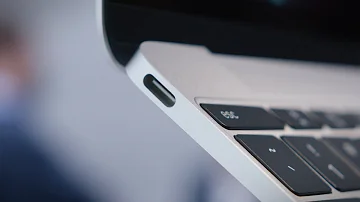
USB Type-C: Explained!
Catalog
Ⅳ Main advantages of Type-C connectors
1. USB Type-C and USB 3.1 2. USB Type-C and USB 3.2 3. USB Type-C and Thunderbolt 3/4 4. USB Type-C and USB4
Ⅵ Applications of USB Type-C connector
Ⅶ Frequently Asked Questions (FAQs)
Ⅰ What are Type-C connectors?
USB Type-C connector is an industry standard connector for transmitting data and power on a single cable. The USB-C connector was developed by the USB Implementers Forum (USB-IF). In 2014, USB Type-C was officially launched. It was first applied to the Nokia N1 tablet at the end of that year, followed by the Google Chromebook Pixel in early 2015. However, it gained widespread public recognition with Apple's adoption in the 2015 MacBook.
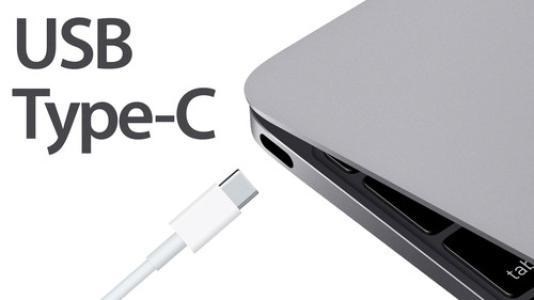
USB Type-C connector
In recent years, the Type-C connector has attracted significant attention due to its characteristics: fast data transfer, powerful capabilities, and compact size. As of 2025, Type-C has become the dominant interface standard, with the European Union mandating USB-C as the common charging port for electronic devices. The technology continues to evolve with USB4 Version 2.0 offering speeds up to 80 Gbps and enhanced power delivery capabilities up to 240W with the Extended Power Range (EPR) specification.
Ⅱ Pin definition
To understand the principle of USB Type-C, we must first understand its pin definition. The Type-C port has 4 pairs of TX/RX differential pairs, 2 pairs of USB D+/D- lines, one pair of SBU (Sideband Use) pins, 2 CC (Configuration Channel) pins, and 4 VBUS and 4 ground wires, totaling 24 pins.

USB Type-C plug outlet end

USB Type-C socket end
If the receiving end only needs DisplayPort (DP) signals and does not require USB 3.x signals, then DP can use all 4 pairs of TX/RX differential lines for output, achieving up to 4 lanes of DP output with a total bandwidth of up to 32.4 Gbps (each lane can output 8.1 Gbps). This easily supports 5K×3K at 60Hz video, and even up to 8K×4K at 60Hz (4:2:0 format). This mode is called DP Alt Mode.
To maintain compatibility with USB 2.0, Type-C retains USB D+/D- signals for USB 2.0 devices. USB 2.0 or even USB 1.1 devices can use the Type-C interface with reversible plug orientation support. The combination of USB D+/D- with DP Alt Mode enables DP+USB 2.0 mode, where DP occupies 4 pairs of TX/RX differential lines while USB uses only D+/D-.
USB 3.x typically uses only 2 pairs of TX/RX differential lines as data lanes—TX1/RX1 during standard orientation and TX2/RX2 during reversed orientation. The remaining 2 pairs of differential lines can carry DisplayPort signals in DP Alt Mode, enabling simultaneous USB 3.x + DP operation.
The Type-C connector provides 2 CC (Configuration Channel) lines and 2 SBU (Sideband Use) lines. The CC line is primarily used for USB Power Delivery (PD) protocol communication and determines the cable orientation. For standard insertion, the host uses CC1; for reversed insertion, CC2 is used. The CC channel uses a single-wire protocol. When DP Alt Mode is enabled, the SBU lines become the AUX_P/AUX_N differential pair in the DisplayPort protocol (with polarity adjusted according to insertion direction), responsible for transmitting DPCD, EDID, and other critical information.
Ⅲ Main features of USB Type-C
1. Power Supply
The USB Type-C interface provides a default 5V power supply, maintaining backward compatibility with previous USB interfaces. The interface includes 4 pins dedicated to power (VBUS) and 4 for ground (GND). The USB Power Delivery (PD) specification enables USB Type-C to support various voltage levels: 5V, 9V, 12V, 15V, and 20V, with currents up to 5A, providing up to 100W of power in standard PD 3.0.
Update 2025: The USB PD 3.1 specification introduced Extended Power Range (EPR), enabling power delivery up to 240W (48V at 5A), which is particularly beneficial for charging high-performance laptops and gaming devices.
2. Reversible Connection
The USB Type-C connector is symmetrical and reversible, allowing insertion in either orientation. This eliminates the frustration of incorrect insertion that plagued previous USB connectors. Unlike earlier USB standards where Type-A indicated host devices and Type-B indicated peripheral devices, USB Type-C ports can function as either host or device, with roles determined through the USB PD protocol negotiation. Both ends of a USB Type-C cable use identical connectors, simplifying cable management.
3. Bandwidth and Data Transfer Speeds
USB Type-C supports multiple data transfer protocols with varying speeds:
USB 2.0: 480 Mbps
USB 3.2 Gen 1 (formerly USB 3.0): 5 Gbps
USB 3.2 Gen 2 (formerly USB 3.1): 10 Gbps
USB 3.2 Gen 2×2: 20 Gbps
USB4 Gen 2×2: 20 Gbps
USB4 Gen 3×2: 40 Gbps
USB4 Version 2.0: Up to 80 Gbps (as of 2024)
Thunderbolt 3: 40 Gbps
Thunderbolt 4: 40 Gbps (with enhanced minimum requirements)
Thunderbolt 5: Up to 120 Gbps (announced in 2023)
The actual speed depends on the cable quality, device capabilities, and protocol support. SuperSpeed USB differential signal pairs are distributed on both sides of the interface, with one set actively used depending on insertion orientation.
4. Configuration Channel (CC)
The USB Type-C interface contains 2 Configuration Channel signal pins (CC1 & CC2) for protocol negotiation. These signals determine cable orientation, negotiate power delivery capabilities, establish alternate modes (such as DisplayPort, HDMI, or Thunderbolt), and configure device roles (host, device, or dual-role).
5. Alternate Modes
USB Type-C supports Alternate Modes, allowing non-USB signals to be transmitted over the interface. The diagram below shows the USB Type-C pin layout. Certain pins can be reassigned according to the alternate mode. Pins marked in yellow can be reconfigured in a full-featured USB Type-C cable, while pins marked in orange can be reconfigured for direct connect applications.

USB Type-C interface pin diagram
Common Alternate Modes include:
DisplayPort Alt Mode: Enables video output up to 8K resolution
HDMI Alt Mode: Supports HDMI 2.1 features
Thunderbolt 3/4 Alt Mode: Provides 40 Gbps bandwidth and daisy-chaining
Audio Adapter Accessory Mode: Supports analog audio output
Signal reassignment is negotiated through the CC channel. Devices communicate using Biphase Mark Code (BMC) encoding on the CC channel to establish the correct alternate mode configuration. Both devices must agree on signal reassignment before any changes occur. All USB Type-C interfaces must function as standard USB-compatible interfaces when not in an alternate mode.
Ⅳ Main advantages of Type-C connectors
1. Compact Design
The interface receptacle measures approximately 8.3mm × 2.5mm, which is roughly one-third the size of a standard USB Type-A connector, enabling slimmer device designs.
2. Reversible Plug Orientation
The Type-C connector is identical on both sides, supporting reversible insertion. This eliminates the common frustration of "USB never plugs in correctly on the first try." The connector is rated for at least 10,000 insertion-removal cycles.
3. High-Speed Data Transfer
Maximum data transfer speeds can reach up to 80 Gbps with USB4 Version 2.0 (as of 2024), significantly faster than previous USB standards. Even basic USB Type-C implementations support USB 3.2 Gen 2 at 10 Gbps.
4. Power Delivery and Fast Charging
USB Type-C supports the USB Power Delivery (PD) protocol, delivering up to 240W of power with USB PD 3.1 EPR. Power delivery is bidirectional, allowing devices to both supply and receive power. Users can charge laptops from power banks, or use laptops to charge other devices.
5. Multi-Protocol Support
Through Alternate Modes, Type-C integrates various transmission protocols including DisplayPort for high-resolution video (up to 8K), HDMI for multimedia, Thunderbolt for ultra-high-speed data transfer, and analog audio output. This enables a single cable to handle charging, data transfer, video output, and audio simultaneously.
6. Universal Compatibility
As of 2025, USB Type-C has become the universal standard mandated by the European Union for electronic devices, ensuring broad compatibility across smartphones, tablets, laptops, and accessories from different manufacturers.
Ⅴ Types of USB connectors and standards
Here is a comprehensive introduction to USB standards and their relationship with USB Type-C.
1. USB Type-C and USB 3.1/3.2
Many people confuse USB 3.1/3.2 with Type-C because they appeared around the same time, but they represent different concepts. USB 3.1 and 3.2 are data transfer standards, while Type-C is a physical connector type.
USB standards and their transfer speeds:
USB 1.0/1.1: 12 Mbps (Full Speed)
USB 2.0: 480 Mbps (High Speed)
USB 3.0 (now called USB 3.2 Gen 1): 5 Gbps (SuperSpeed)
USB 3.1 (now called USB 3.2 Gen 2): 10 Gbps (SuperSpeed+)
USB 3.2 Gen 2×2: 20 Gbps (SuperSpeed+ dual-lane)
Important Note: The USB-IF renamed USB 3.0 to USB 3.2 Gen 1 and USB 3.1 to USB 3.2 Gen 2, causing significant confusion. When manufacturers claim "USB 3.1 support," they often mean USB 3.2 Gen 1 (the original USB 3.0 with 5 Gbps speed), not true USB 3.2 Gen 2 (10 Gbps).
USB Type-C is merely the connector form factor. A USB Type-C port can support USB 2.0, USB 3.2 Gen 1, USB 3.2 Gen 2, USB 3.2 Gen 2×2, or even USB4. Conversely, USB 3.2 can use Type-A, Type-B (including Micro-USB), or Type-C connectors. The connector type does not determine the data transfer speed—the underlying protocol does.
2. USB Type-C and USB 3.2
USB 3.2, announced by USB-IF in September 2017, is an incremental update to USB 3.1. It maintains the SuperSpeed USB physical layer data rate and encoding technology while introducing multi-lane operation.
The key innovation in USB 3.2 is support for dual-lane operation (Gen 2×2), which doubles the bandwidth to 20 Gbps by utilizing both sets of SuperSpeed differential pairs simultaneously. This dual-lane mode requires a USB Type-C connector, as older USB-A and USB-B connectors lack the necessary pins. The USB-IF designated Type-C as the recommended connector for USB 3.2 to accelerate the transition to a unified interface standard.
3. USB Type-C and Thunderbolt 3/4
Thunderbolt is a high-performance interface technology developed through collaboration between Intel and Apple. It combines PCIe data transmission and DisplayPort video technology into a single interface.
Thunderbolt 3 (released 2015) was the first to adopt the USB Type-C physical connector, replacing the previous Mini DisplayPort connector. It provides:
40 Gbps bidirectional bandwidth
Support for two 4K displays or one 5K display
Up to 100W power delivery
PCIe Gen 3 ×4 connectivity for external GPUs
Daisy-chaining up to 6 devices
Thunderbolt 4 (released 2020) maintains the 40 Gbps speed but introduces stricter minimum requirements:
Mandatory support for two 4K displays or one 8K display
Minimum 32 Gbps PCIe bandwidth (doubled from TB3)
Wake from sleep with connected peripherals
DMA protection against physical attacks
Mandatory support for docks with up to four Thunderbolt ports
Thunderbolt 5 (announced 2023, available 2024-2025) delivers:
80 Gbps bidirectional bandwidth
Up to 120 Gbps in asymmetric mode for video-intensive applications
Support for multiple 8K displays or three 4K displays at 144Hz
Backward compatibility with Thunderbolt 3/4 and USB4
All Thunderbolt 3, 4, and 5 ports use the USB Type-C connector, but not all USB Type-C ports support Thunderbolt. Thunderbolt requires specific controller chips and certification.
4. USB Type-C and USB4
USB4 (released 2019) is based on the Thunderbolt 3 protocol that Intel contributed to USB-IF. USB4 specifications include:
USB4 Gen 2×2: 20 Gbps
USB4 Gen 3×2: 40 Gbps
Mandatory USB Type-C connector
Backward compatibility with USB 3.2, USB 2.0, and Thunderbolt 3
Dynamic bandwidth allocation between data and video
Support for DisplayPort 2.0 Alt Mode
USB4 Version 2.0 (announced 2022) doubles the performance:
Up to 80 Gbps bidirectional bandwidth
Up to 120 Gbps in asymmetric mode
Enhanced DisplayPort 2.1 support
Backward compatible with USB4 Gen 3 and earlier standards
USB4 exclusively uses USB Type-C connectors and represents the convergence of USB and Thunderbolt technologies, simplifying the ecosystem while delivering exceptional performance.
Ⅵ Applications of USB Type-C connector
As of 2025, USB Type-C has become ubiquitous across virtually all electronic device categories:
Consumer Electronics
Smartphones (iPhone 15 series and later, all major Android devices)
Tablets (iPad Pro, iPad Air, Android tablets)
Laptops (MacBooks, Windows ultrabooks, Chromebooks)
Desktop computers and monitors
Gaming consoles (Nintendo Switch, Steam Deck)
Audio and Accessories
Digital headphones and earbuds
Wireless charging cases
Portable speakers
Audio interfaces and DACs
Professional and Industrial
External storage devices (SSDs, NVMe enclosures)
Docking stations and hubs
External GPUs (eGPUs)
Professional cameras and video equipment
Medical devices
Industrial automation equipment
Emerging Applications
VR/AR headsets (Meta Quest, Apple Vision Pro)
Smart TVs and streaming devices
Automotive infotainment systems
IoT devices and smart home products
Electric vehicle charging communication
Robotics and drones
Real-World Benefits of USB Type-C
1. Cable Consolidation
One cable integrates charging, data transfer, and audio/video transmission, eliminating the clutter of multiple cables and adapters. A single USB Type-C cable can replace power adapters, USB data cables, HDMI cables, and DisplayPort cables.
2. Enhanced Productivity
With reversible insertion and high-speed data transfer (up to 80 Gbps with USB4 Version 2.0), USB Type-C significantly improves workflow efficiency. Large file transfers that once took minutes now complete in seconds. A single Type-C port on a laptop can connect to a docking station that provides power, multiple displays, network connectivity, and peripheral devices simultaneously.
3. Universal Fast Charging
USB Power Delivery enables fast charging across devices. With USB PD 3.1 EPR supporting up to 240W, even high-performance gaming laptops can be charged via USB Type-C. The bidirectional power capability means you can charge your laptop from a power bank or use your laptop to charge other devices. The EU's mandate for USB-C as the common charging standard (effective 2024) ensures universal charger compatibility.
4. Display Connectivity
Through DisplayPort Alt Mode, a single USB Type-C cable can drive multiple high-resolution displays. USB4 with DisplayPort 2.1 support can handle 8K displays at 60Hz or multiple 4K displays at high refresh rates, making USB Type-C ideal for professional content creation and gaming setups.
5. Environmental Impact
The standardization of USB Type-C reduces electronic waste by eliminating the need for device-specific cables and chargers. The EU estimates that the common charger mandate will save consumers approximately €250 million annually and reduce electronic waste by nearly 1,000 tons per year.
Ⅶ Frequently Asked Questions (FAQs)
Q1: Are all USB Type-C cables the same?
No. USB Type-C cables vary significantly in capabilities. Some support only USB 2.0 (480 Mbps), while others support USB4 (40-80 Gbps). Power delivery capabilities also differ—some cables support only 60W, while others support up to 240W. Thunderbolt cables offer additional features. Always check cable specifications to ensure they meet your needs.
Q2: Can I use any USB Type-C charger with my device?
Generally yes, but performance may vary. USB Power Delivery negotiates the optimal charging voltage and current. A lower-wattage charger will charge your device more slowly, while a higher-wattage charger won't damage your device (the device only draws what it needs). However, for optimal charging speed, use a charger that matches or exceeds your device's power requirements.
Q3: What's the difference between USB Type-C and Thunderbolt?
USB Type-C is a connector type, while Thunderbolt is a high-performance protocol that uses the USB Type-C connector. Thunderbolt offers higher bandwidth (40 Gbps for TB3/4, 80-120 Gbps for TB5), PCIe connectivity for external GPUs, and daisy-chaining capabilities. All Thunderbolt ports use USB Type-C connectors, but not all USB Type-C ports support Thunderbolt.
Q4: How can I identify a high-quality USB Type-C cable?
Look for cables with proper certification markings: USB-IF certification logo, power delivery rating (e.g., "60W" or "100W"), and data speed rating (e.g., "USB 3.2 Gen 2" or "40Gbps"). Certified cables undergo rigorous testing. For Thunderbolt cables, look for the Thunderbolt logo. Avoid unmarked or suspiciously cheap cables, as they may damage devices or pose safety risks.
Q5: Will USB Type-C replace all other connectors?
USB Type-C is rapidly becoming the universal standard for consumer electronics. The EU has mandated USB-C for mobile devices, tablets, and laptops. However, specialized connectors will remain in specific industries (e.g., aviation, military, industrial equipment) where ruggedized or proprietary connectors are required. For consumer devices, USB Type-C is effectively becoming the universal standard.
Q6: Can USB Type-C transmit video signals?
Yes, through DisplayPort Alt Mode or Thunderbolt. USB Type-C can transmit video signals up to 8K resolution at 60Hz (with DisplayPort 2.1). This allows a single cable to connect your laptop to an external monitor while simultaneously charging the laptop and transferring data. Some USB Type-C ports also support HDMI Alt Mode for direct HDMI output.
Q7: What is USB4 and how does it relate to USB Type-C?
USB4 is the latest USB specification (with USB4 Version 2.0 offering up to 80 Gbps). USB4 exclusively uses the USB Type-C connector and is based on the Thunderbolt 3 protocol. It provides dynamic bandwidth allocation, backward compatibility with USB 3.2 and Thunderbolt 3, and support for multiple data and display protocols over a single connection.
Q8: Is USB Type-C safe for fast charging?
Yes, when using certified cables and chargers. USB Power Delivery includes comprehensive safety protocols that negotiate power levels between devices, preventing overcharging, overheating, and electrical damage. The USB-IF certification ensures cables and chargers meet safety standards. Always use certified products from reputable manufacturers.
Q9: Can I connect older USB devices to USB Type-C ports?
Yes, using adapters or cables with different connectors on each end (e.g., USB-A to USB-C). USB Type-C maintains backward compatibility with USB 2.0 and USB 3.x standards. However, the connection will operate at the speed of the slowest component in the chain.
Q10: What should I look for when buying a USB Type-C hub or dock?
Consider: (1) Power delivery capability (ensure it can charge your laptop), (2) Data transfer speeds supported, (3) Video output options and maximum resolution, (4) Number and type of ports needed, (5) Build quality and certification, (6) Compatibility with your devices. For laptops, look for docks with at least 60W power delivery, USB 3.2 Gen 2 data ports, and support for your required display configuration.
Article Update Information:
Last Updated: October 2025
Major Updates:
Added information about USB4 Version 2.0 (80 Gbps)
Updated USB Power Delivery specifications to include PD 3.1 EPR (240W)
Added Thunderbolt 5 specifications (120 Gbps)
Included EU common charger mandate information
Updated application examples with current devices (iPhone 15, iPad Pro, etc.)
Added comprehensive FAQ section
Corrected USB 3.x naming conventions to reflect current USB-IF terminology
Enhanced mobile-responsive formatting
Added DisplayPort 2.1 support information
Updated market adoption statistics and regulatory information
Original Publication: 2020
This article has been updated to reflect the latest USB Type-C standards, technologies, and market developments as of October 2025.
 UTMEL
UTMEL
We are the professional distributor of electronic components, providing a large variety of products to save you a lot of time, effort, and cost with our efficient self-customized service. careful order preparation fast delivery service
What devices use USB Type C?
In addition, USB-C is narrow enough that it can fit on phones with no problem. This means that it can be a standard connector for both computers and phones, as well as other devices like game consoles. Some popular devices that use USB-C cables are the Nintendo Switch, MacBook Pro, and Samsung Galaxy line of phones.
What plugs into a USB-C port?
Really, anything that has a Micro USB or USB-A could ultimately get a USB-C port. Devices like wireless mice, keyboards, speakers, and smart home devices, all either currently do, or could in the future, offer USB-C ports, both for power delivery and data transfer.
What is the difference between USB and USB-C?
The USB-A has a much larger physical connector than the Type C, Type C is around the same size as a micro-USB connector. Unlike, Type A, you won't need to try and insert it, flip it over and then flip it over once more just to find the right orientation when trying to make a connection.
Are all USB-C connectors the same?
No, not all USB-C cables are equal. USB-C stands for the shape and type of connector, which is the same for all USB-C cables but not all cables support the same kind of protocols and transfer speeds.
What does USB-C look like?
The USB-C connector looks similar to a micro USB connector at first glance, though it's more oval in shape and slightly thicker to accommodate its best feature: flippability. Like Lightning and MagSafe, the USB-C connector has no up or down orientation.
 The Introduction to USB Type-C Pin Signal and PCB LayoutUTMEL03 December 202126206
Hello everyone. Welcome to the new post today. USB Type-C is a smaller-volume USB interface standard than Type-A and Type-B. It can be used on a PC (master device) as well as external devices (slave devices, such as mobile phones).
Read More Everything You Need to Know about ConnectorsUTMEL07 September 20218146
Electrical connectors, as key components for current or signal connections, are also an important part of the industrial system. Connectors can be as huge as airplanes and rockets or as small as mobile phones and televisions, forming bridges between circuits or other components and serving as electric current or signal links.
Read More Network Interface Card: Types, Functions and Buying GuideUTMEL17 August 202110459
Network Interface Card (NIC, also known as a network interface controller) is one of the most basic components in the local area network. It is the hardware device connecting the computer and the network. Whether it is a twisted pair connection, a coaxial cable connection, or an optical fiber connection, data communication must be realized with the help of a network interface card.
Read More What is Universal Serial Bus (USB)?UTMEL19 January 202612421
Universal Serial Bus (USB) is a serial bus standard and a technical specification for input and output interfaces. It is widely used in information communication devices. The latest generation is USB4, and its transmission speed is 40Gbit/s, the three-stage voltage is 5V/12V/20V, the maximum power supply is 100W.
Read More Classification and Selection of Industrial ConnectorsUTMEL11 February 20225804
This article mainly introduces a very important component-connector in the modern industrial system, including its definition, classification, and selection.
Read More
Subscribe to Utmel !
![K-REMO-001]() K-REMO-001
K-REMO-001Khadas
![KAHS-V-001]() KAHS-V-001
KAHS-V-001Khadas
![UTC-WALL-MOUNT1E]() UTC-WALL-MOUNT1E
UTC-WALL-MOUNT1EAdvantech Corp
![1700000237]() 1700000237
1700000237Advantech Corp
![AMK-V001E]() AMK-V001E
AMK-V001EAdvantech Corp
![1702002605]() 1702002605
1702002605Advantech Corp
![AIMB-B2275SG-00YE]() AIMB-B2275SG-00YE
AIMB-B2275SG-00YEAdvantech Corp
![POC-W152-BT0E]() POC-W152-BT0E
POC-W152-BT0EAdvantech Corp
![IPC-7120-25CE]() IPC-7120-25CE
IPC-7120-25CEAdvantech Corp
![PWS-870-ACC100E]() PWS-870-ACC100E
PWS-870-ACC100EAdvantech Corp