

 Product
 Brand
Brand Articles
 Tools
Tools
Surge Protector Best Practices for Everyday Use
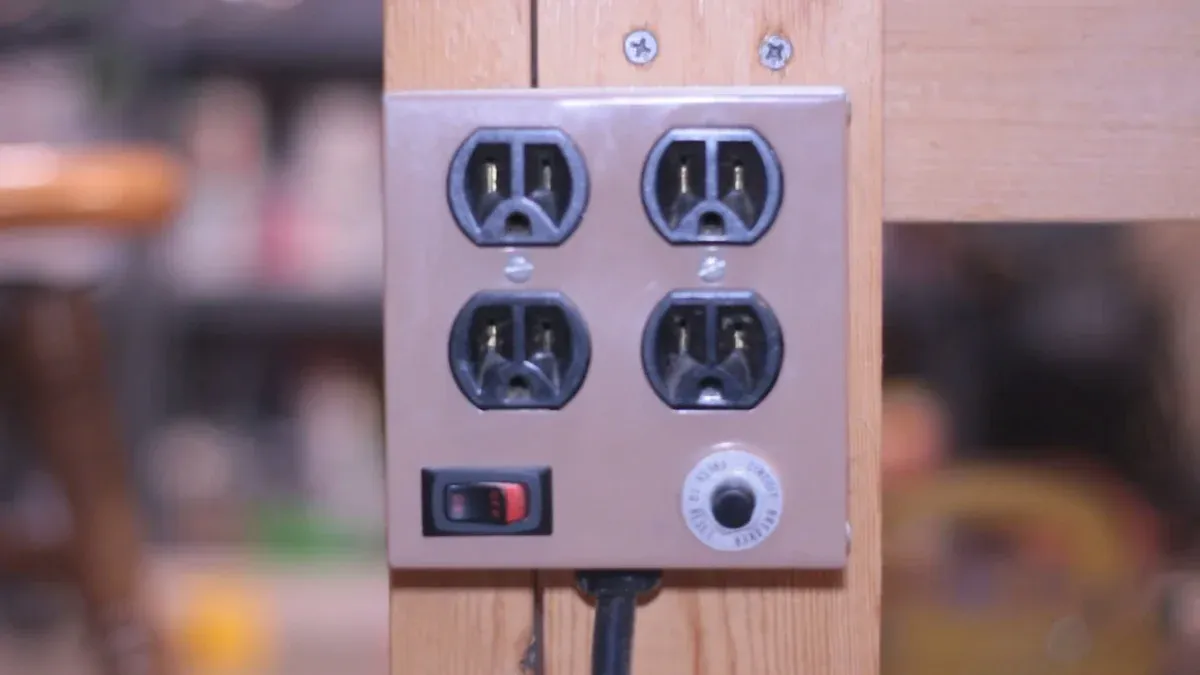
Imagine your favorite electronics—your computer, TV, or gaming console—suddenly failing due to a surge in power. That’s what surge protectors help you avoid. They shield your devices from sudden voltage spikes that can fry sensitive electrical components. Modern electronics are delicate, and even small surges can cause wear over time. Using a surge protector not only extends the life of your gadgets but also saves money by reducing replacement costs. Taking simple precautions, like unplugging devices during storms, and adopting surge protector safety practices can prevent expensive damage and protect your home from electrical mishaps.
Understanding Surge Protectors
What are surge protectors?
A surge protector is a device designed to shield your electronics from sudden spikes in electrical voltage. These spikes, often called surges, can occur for various reasons and may damage sensitive components in your devices. Surge protectors work by diverting excess voltage away from your gadgets, keeping them safe.
When choosing a surge protector, you’ll notice technical specifications like SPD ratings, joule ratings, and response times. For example:
SPD Ratings: These follow standards like NEMA LS-1 and IEEE C62.62, ensuring reliable performance.
Joule Rating: This tells you how much energy the surge protector can absorb before failing. A higher joule rating means better protection.
Response Time: While often instantaneous, the speed at which a surge protector reacts can vary.
These features help you pick the right surge protector for your needs, whether it’s for a home office or a gaming setup.
Why are surge protectors important for your home?
Surge protectors play a critical role in keeping your home and electronics safe. They prevent costly damage caused by power surges, which can fry your devices in seconds. Did you know that homes with whole-house surge protection may even qualify for lower insurance premiums? That’s because these systems reduce the risk of electrical damage significantly.
Using surge protectors also helps extend the lifespan of your electronics. From your TV to your HVAC system, these devices rely on stable power to function properly. By adding surge protection, you’re not just protecting your gadgets—you’re also protecting your home from potential electrical hazards.
Common causes of power surges
Power surges can happen for many reasons, and understanding them can help you stay prepared. Here are some common causes:
Lightning Strikes: A single strike can send a massive surge through your home’s wiring.
Faulty Wiring: Old or damaged electrical systems can cause unpredictable surges.
High-Powered Appliances: Devices like air conditioners or refrigerators can create small surges when they cycle on and off.
Utility Grid Issues: Problems like power outages or grid switching can lead to sudden voltage spikes.
According to studies, severe weather accounts for 58% of power outages, with over 1,000 events recorded annually. Unplugging devices during storms is a simple yet effective way to protect your home.
Tips for Using Surge Protectors Effectively
Dos for surge protector usage
Using surge protectors correctly can make a big difference in keeping your electronics safe. Here are some best practices to follow:
Choose certified surge protectors: Look for certifications like UL or IEC standards. These ensure the device meets safety and performance guidelines.
Match the surge protector to your needs: Assess the devices you want to protect. For example, high-powered appliances may need surge protectors with higher joule ratings.
Use point-of-use surge protectors: These are ideal for protecting individual devices like computers or TVs. They’re easy to install and provide localized protection.
Replace old surge protectors: Surge protectors wear out over time. If yours is more than three to five years old, it’s time for a replacement.
Unplug during storms: Lightning strikes can cause massive power surges. Unplugging devices during a storm adds an extra layer of safety.
Layer your protection: Combine whole-house surge protectors with point-of-use surge protectors for maximum safety.
Pro Tip: Always check the joule rating on your surge protector. A higher rating means better protection for your devices.
Don’ts to avoid with surge protectors
While surge protectors are helpful, improper use can lead to risks. Avoid these common mistakes:
Don’t overload your surge protector: Plugging in too many devices can cause overheating or even electrical fires. Always check the voltage and capacity limits.
Don’t daisy-chain power strips: Connecting multiple power strips or surge protectors together is dangerous. It increases the risk of overload and fire hazards.
Don’t use damaged surge protectors: If you notice melted plugs, frayed cords, or burn marks, stop using the device immediately.
Don’t ignore placement guidelines: Surge protectors should be plugged directly into wall outlets, not extension cords. This ensures they work as intended.
Don’t rely on surge protectors during storms: Even the best surge protector can’t handle the power of a direct lightning strike. Unplugging devices is the safest option.
A Houston news investigation once revealed a failed surge suppressor linked to a malfunctioning PCB. This highlights the importance of using high-quality surge protectors and replacing them when necessary.
Placement tips for optimal safety
Where you place your surge protector matters. Follow these tips to maximize safety and effectiveness:
Keep it close to the device: Position the surge protector near the electronics it’s protecting. This minimizes the distance electricity travels, reducing the risk of damage.
Avoid damp or humid areas: Moisture can damage electrical components and increase the risk of short circuits. Keep surge protectors away from water sources.
Use wall outlets: Plug surge protectors directly into wall outlets. Avoid using extension cords, as they can reduce the effectiveness of the surge protector.
Check for proper ventilation: Surge protectors can generate heat. Place them in well-ventilated areas to prevent overheating.
Secure the cords: Loose or tangled cords can be a tripping hazard. Use cable organizers to keep everything neat and safe.
Note: Investing in a high-quality surge protector from a reliable brand can save you from costly repairs or replacements.
By following these tips, you can protect your home and electronics from power surges while ensuring the safety of your family.
Surge Protector Safety Guidelines
Checking certifications for surge protector safety
When choosing a surge protector, certifications are your first line of defense against faulty devices. Certified surge protectors meet strict safety standards, ensuring reliable performance and protection for your electronics. Look for labels like ETL or UL, which indicate the device has undergone rigorous testing.
Here’s a quick guide to the key features you should check:
| Feature | Description |
|---|---|
| Joule Rating | Measures how much energy the surge protector can absorb before failing. Higher ratings mean better protection. |
| Clamping Voltage | Indicates the voltage threshold at which the device redirects excess energy. Lower values react faster. |
| Response Time | Shows how quickly the surge protector reacts to power surges. Faster times reduce exposure. |
| LED Indicating Lights | Help you monitor whether your devices are protected and if the outlet is grounded. |
| Complete 3-Line Protection | Shields appliances from surges across hot, neutral, and ground lines. |
| Warranty and Equipment Protection Policy | Offers coverage for repairs or reimbursements if your devices get damaged. |
Tip: Always prioritize surge protectors with complete 3-line protection. This ensures your devices are safe from surges across all electrical lines.
Avoiding overloads and understanding capacity limits
Overloading a surge protector can lead to overheating, electrical fires, or device failure. To avoid this, you need to understand its capacity limits. Here’s how:
Identify the Power Capacity: Check the surge protector or power strip for its maximum load capacity, usually listed in watts or amps.
Calculate the Total Load: Add up the wattage of all devices you plan to connect. You can find this information on the labels of your electronics.
Compare with Power Strip Capacity: Ensure the total wattage doesn’t exceed the surge protector’s limit. Most standard models handle up to 1,800 watts.
Alert: Never daisy-chain multiple power strips or surge protectors. This increases the risk of overload and can compromise surge protection.
By following these steps, you can protect your home and electronics from the dangers of overloading.
Identifying signs of wear or damage
Surge protectors don’t last forever. Over time, they can wear out or fail, leaving your devices vulnerable to power surges. Regular inspections help you spot issues before they become serious.
Here are three methods to test for potential failure:
Insulation Resistance Test: Disconnect the surge protector and measure the resistance between its terminals and the ground. This ensures there’s no leakage or fault.
Voltage Drop Test: Apply the rated voltage to the surge protector and measure the drop. If it’s outside the specified range, the device may need replacement.
Surge Test: Simulate power surges by applying impulses to the device. Compare the results to the manufacturer’s specifications to check its performance.
Note: If you notice melted plugs, frayed cords, or burn marks, stop using the surge protector immediately. These are clear signs of damage.
Regular testing and inspections keep your surge protectors in top shape, ensuring your electronics stay safe from electrical hazards.
Choosing the Right Surge Protector
Key features to consider
When buying a surge protector, you’ll want to focus on features that ensure safety and convenience. Not all surge protectors are created equal, so here’s what to look for:
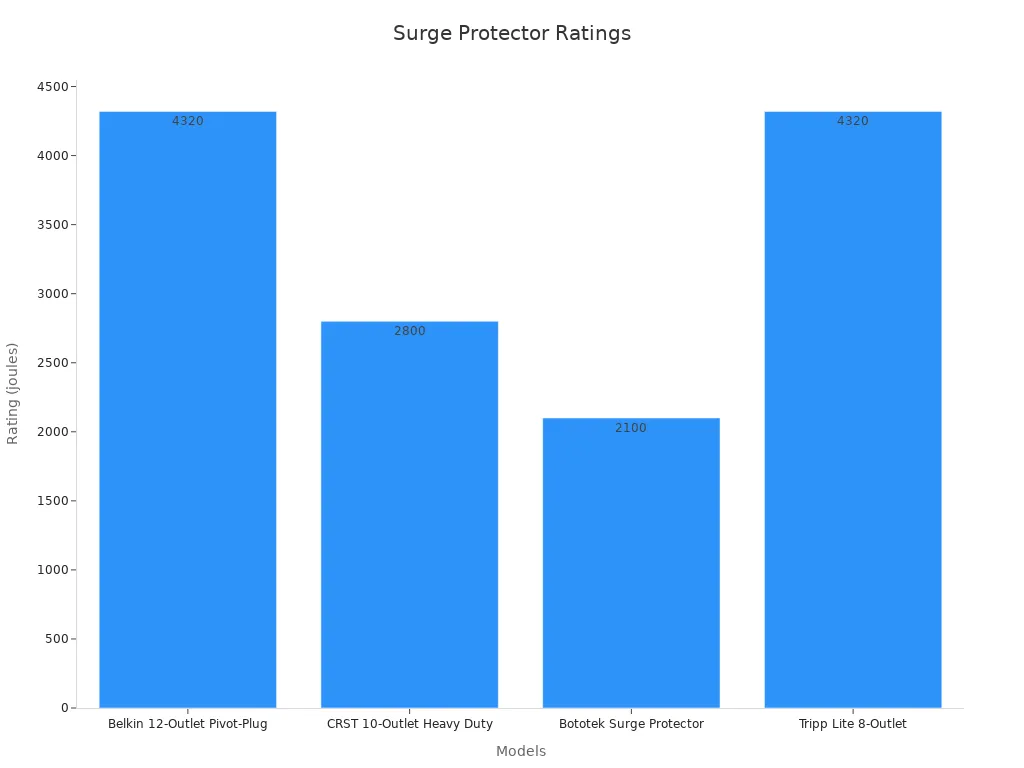
| Surge Protector Model | Surge Protection Rating | Cord Length | Safety Features | Usability Features |
|---|---|---|---|---|
| Belkin 12-Outlet Pivot-Plug | 4320 joules | 8 ft | Fire-retardant plastic rated over 1300F | ON-OFF switch, excellent for extended use |
| CRST 10-Outlet Heavy Duty | 2800 joules | 15 ft | Fire-retardant plastic rated over 1300F | Versatile for outdoor use |
| Bototek Surge Protector | 2100 joules | 8 ft | Fire-retardant plastic rated over 1300F | Slim design, 4 USB ports |
| Tripp Lite 8-Outlet | 4320 joules | 8 ft | Sliding safety covers | Good for child safety |
Look for a high joule rating, as it indicates better protection against surges. Features like fire-retardant materials and child safety covers add an extra layer of security. If you need flexibility, consider models with longer cords or USB ports for charging multiple devices.
Tip: Some surge protectors, like the Belkin 12-Outlet, even come with warranties for connected equipment, offering peace of mind if something goes wrong.
Whole-house surge protectors vs. standard options
Whole-house surge protectors offer a broader shield for your home’s electrical system. They protect everything, from your smoke alarms to your garage door opener. Standard surge protectors, on the other hand, only safeguard the devices plugged into them.
Here’s a quick comparison:
Whole-house surge protectors cover every outlet in your home, ensuring all your smart devices and appliances are safe.
Standard options are more affordable but don’t provide comprehensive protection.
Most homes benefit from whole house surge protection, especially when paired with point-of-use surge protectors for added safety.
Matching surge protectors to your needs
Choosing the right surge protector depends on your setup. For a home office, a model with USB ports and a high joule rating works best. If you’re protecting outdoor equipment, go for a heavy-duty option like the CRST 10-Outlet.
For maximum coverage, consider combining a whole house surge protector with individual surge protectors. This layered approach ensures your devices and electrical system stay safe from unexpected surges.
Note: Service entrance surge protectors installed at the main panel act as the first line of defense, while secondary panel protectors add extra coverage for homes with multiple zones.
By understanding your needs and the available options, you can protect your home and electronics effectively.
Maintaining and Replacing Surge Protectors
How to inspect surge protectors regularly
Regular inspections are one of the most effective ways to prevent damage to your sensitive devices. Surge protectors endure wear over time, especially after handling electrical spikes. To keep them in good shape, check for visible damage like frayed cords, melted plugs, or burn marks. These signs indicate that the device may no longer provide adequate protection.
You should also test the functionality of your surge protector. Many models come with indicator lights that show whether the device is working properly. If the light is off or flickering, it’s time to investigate further. For surge protection installation in high-risk areas, consider using models with built-in monitoring systems. These systems alert you when the device needs replacement, making maintenance easier.
When to replace your surge protector
Knowing when to replace a surge protector is crucial for maintaining surge protector safety. Here’s a quick guide to help you decide:
| Warning Indicators | Action Required |
|---|---|
| Status light changes | Replace surge protector |
| Monitoring system alerts | Replace surge protector |
| Visible damage | Replace surge protector |
| Complete failure | Replace surge protector (not recommended) |
If your surge protector has experienced a major power event, like a storm or lightning strike, it’s best to replace it. Even if it looks fine, its internal components may have degraded.
Tips to extend the lifespan of surge protectors
Proper maintenance can help you get the most out of your surge protectors. Here are some practical tips:
Monitor the joules of protection to understand how much energy your surge protector can absorb.
Use models with indicator lights to easily check their functionality.
Replace older surge protectors after significant power events, such as frequent power fluctuations or lightning strikes.
By following these steps, you can protect your home and ensure your surge protectors remain reliable for years to come.
Surge protectors are more than just convenient gadgets; they’re essential for protecting your electronics and preventing home electrical fires. By choosing the right model and following proper maintenance practices, you can avoid costly damage and extend the life of your devices.
According to a 2015 IDC survey, infrastructure failures can cost up to $500,000 per hour. Proactive surge protector maintenance ensures your home stays safe and your electronics remain functional.
Make surge protection a priority. Regular inspections, proper placement, and understanding your devices’ needs can save you from unexpected surges and financial losses.
FAQ
How do I know if my surge protector is working?
Check the indicator light. If it’s off or flickering, the surge protector may no longer provide protection. Replace it if needed.
Can I use a surge protector for outdoor appliances?
Yes, but choose a heavy-duty model designed for outdoor use. Look for weather-resistant features and fire-retardant materials for added safety.
Do surge protectors stop working after a power surge?
Yes, many surge protectors lose effectiveness after absorbing a large surge. Check the joule rating and replace the device if it’s been through a major event.
Tip: Always inspect your surge protector after storms or power outages to ensure it’s still functional.
 UTMEL
UTMEL
We are the professional distributor of electronic components, providing a large variety of products to save you a lot of time, effort, and cost with our efficient self-customized service. careful order preparation fast delivery service
 The Development Trends in the Field of Electronic Component ApplicationsUTMEL28 July 20234661
Electronic components form the backbone of all the technologies we see around today. Every innovative technology and flashy gadget we use has been fueled by these components. Moreover, electronic component applications expand to diverse fields and industries, including consumer electronics, healthcare, education, military, and similar others.
Read More Exploring the Strengths and Hurdles of Wide Bandgap Devices in Alternating Current Electric DrivesSaumitra Jagdale19 January 20243287
Wide-bandgap materials have emerged as pioneers in the era of power devices, altering the performance and efficiency of electronic systems. Silicon, the traditional semiconductor material, has limitations that become apparent as power requirements escalate. WBG materials, such as silicon carbide and gallium nitride, possess high switching frequency, low losses and high-temperature operating capability making them an ideal choice in power devices.
Read More Revolutionizing Automotive Traction: A Comprehensive Review of Multiphase Drives for Next-Generation VehiclesUTMEL04 May 20233800
In recent years, the revolutionary development of power electronics and converters paved the way for more scope for research in multiphase drives.
Read More Unveiling the Magic Behind TWS Earbuds: An Analysis of Their Market, Working, and Core ComponentsUTMEL24 July 20235246
TWS (True wireless stereo) is one of the most advanced sound technologies of recent days. It provides awesome sound quality through Bluetooth Connection. From this little device, you can enjoy anything (movies, videos, etc...) wirelessly.
Read More Automatic Voltage Regulator: Ultimate Guide to Stable Power and Equipment ProtectionUTMEL06 May 20258127
This in-depth manual will explore the realm of automatic voltage regulators. We'll go over what they are, how they work, their important advantages, and factors to take into account while selecting one. By the conclusion, you'll see why an AVR is essential to modern operations and living, not simply a nice-to-have.
Read More


