Product
 Brand
Brand Articles
 Tools
Tools
Trusted Vibration Sensors for Homeowners and Industry Professionals

Reliable vibration sensors protect your home and industrial equipment from unexpected failures. You often find accelerometers and wireless sensor systems monitoring motors, pumps, and compressors. These tools help you spot early signs of imbalance or loose parts. In industry, a well-designed sensor can achieve less than 6% error, while poor designs cause false alarms and missed problems. Accurate vibration sensors deliver safety, reduce downtime, and give you peace of mind.
Vibration Sensors Overview
Sensor Types
You can choose from several types of vibration sensors, each designed for specific tasks in home and industrial settings. Understanding these types helps you select the right tool for your needs.
Accelerometers
Accelerometers measure changes in motion or vibration. You often find three main types:Piezoelectric accelerometers use crystals to generate an electric charge when they vibrate. These work well for high-frequency vibration monitoring in industrial machines.
Piezoresistive accelerometers change their electrical resistance when they move. These handle both low and high-frequency vibrations, making them suitable for automotive and aerospace applications.
MEMS (Micro-Electro-Mechanical Systems) accelerometers use tiny mechanical parts on a chip. You see these in home security systems and portable devices because they are small and cost-effective.
Wireless Vibration Sensors
Wireless sensors send data without cables. You can install them quickly and move them easily. They fit well in both home security and industrial predictive maintenance.Other Types
Some systems use velocity or displacement sensors. Velocity sensors track how fast something moves, while displacement sensors measure how far it moves. These types help you monitor slow or subtle changes in equipment.
Tip: When you select a sensor, match the type to your application. For example, use MEMS accelerometers for smart home devices and piezoelectric types for heavy machinery.
Main Applications Table
| Sensor Type | Best Use Case | Typical Environment |
|---|---|---|
| Piezoelectric | High-frequency machinery | Industrial |
| Piezoresistive | Automotive, aerospace | Industrial, automotive |
| MEMS | Home security, IoT devices | Home, portable electronics |
| Wireless | Remote monitoring | Home, industry |
| Velocity/Displacement | Slow movement detection | Industrial |
Key Features
When you compare types of vibration sensors, focus on features that affect performance and reliability.
Sensitivity
Sensitivity tells you how well a sensor detects small vibrations. High sensitivity helps you catch early signs of trouble in machines or structures.Response Time
Response time measures how quickly a sensor reacts to changes. For example, a sensor’s response time is the period it takes to reach 90% of its final reading after a vibration starts. Fast response times help you spot sudden faults before they cause damage.Connectivity
Many modern sensors use Wi-Fi, Bluetooth, or Zigbee. Wi-Fi offers high speed and reliability. Bluetooth uses less power and is easy to set up. Zigbee supports large networks with low power use.Durability
Industrial sensors must survive harsh conditions like heat, dust, and vibration. Home sensors need to be compact and energy efficient.Market Growth and Adoption
The global market for vibration sensors reached $1.2 billion in 2023 and is expected to grow to $3.5 billion by 2032. This growth shows that more industries trust these sensors for machine monitoring, predictive maintenance, and condition monitoring. Manufacturing, oil and gas, and automotive companies lead the way, especially in North America and Asia Pacific.
Note: The right combination of sensitivity, response time, and connectivity ensures your vibration monitoring system works reliably and efficiently.
Wireless Vibration Sensors
Benefits
Wireless vibration sensors give you flexibility and speed when setting up monitoring systems. You can install these sensors on machines or structures without running cables. This makes them ideal for both new and old equipment. You can move them easily if your needs change.
Portability: You can place wireless vibration sensors wherever you need them. This helps you cover hard-to-reach areas or expand your monitoring as your facility grows.
Real-Time Monitoring: These sensors send data instantly to your phone or computer. You can see changes in vibration as they happen. This quick feedback helps you catch problems before they become serious.
Predictive Maintenance Compatibility: Wireless vibration sensors work well with predictive maintenance programs. They track vibration, temperature, and other key factors. This data helps you plan repairs before breakdowns occur.
Using wireless vibration sensors in predictive maintenance can reduce machine downtime by up to 50% and cut breakdowns by 70-75%. You also save on maintenance costs and extend equipment life.
Use Cases
You can use wireless vibration sensors in many settings. In industry, companies like WiSER 3X and Broadsens offer sensors that monitor motors, pumps, and conveyor belts. These sensors help you spot early signs of wear or failure. For example, a mining company used wireless vibration sensors to find faults in a ball mill, saving millions of dollars. In another case, a paper mill avoided losses over $140,000 by detecting a bearing problem early.
At home, you can use wireless vibration sensors for security. Place them on doors, windows, or appliances. If something shakes or moves, you get an alert right away. This keeps your property safe and gives you peace of mind.
| Application Area | Example Sensor | Typical Use |
|---|---|---|
| Industry | WiSER 3X | Motor and pump monitoring |
| Industry | Broadsens | Conveyor belt monitoring |
| Home | Aqara | Door and window security |
Predictive maintenance programs that use wireless vibration sensors track key metrics like equipment effectiveness and repair time. This helps you make better decisions and keep your systems running smoothly.
Trust and Accuracy
Why It Matters
You rely on vibration sensors to protect your equipment and property. When you choose the wrong sensor, you risk missing early warning signs of trouble. Missed faults can lead to equipment failure, costly repairs, or even safety hazards. In a home setting, a poor sensor may trigger false alarms or fail to detect real threats. This can cause frustration and reduce your trust in the system.
Sensor accuracy plays a key role in your monitoring strategy. Accurate sensors help you spot small changes in vibration before they become big problems. If your sensor gives false readings, you might ignore real issues or waste time on unnecessary checks. Reliable vibration sensors give you confidence that your machines and home are safe.
Note: Always check the specifications for accuracy and reliability before you install a sensor. This step helps you avoid problems later.
Real-World Impact
Accurate sensors make a real difference in both homes and industries. In factories, a trusted sensor can detect a failing motor bearing before it breaks down. This early warning lets you fix the problem and avoid expensive downtime. In your home, a reliable sensor can alert you to a window being forced open, giving you time to respond.
Poor sensor choice often leads to missed faults or false alarms. For example, if a sensor is not sensitive enough, it may not detect small but important vibrations. If it is too sensitive, it may trigger alarms for harmless events like passing trucks. You need to balance sensitivity and accuracy to get the best results.
A trusted vibration sensor protects your assets, saves money, and keeps people safe. When you invest in quality, you see fewer breakdowns and more peace of mind.
Evaluating Reliability
Design Features
When you choose a sensor, you need to look at several design features. Start with range. The range tells you how much vibration the sensor can measure. If you use it for heavy machinery, pick a sensor with a wide range. For home use, a smaller range often works well. Sensitivity is another key feature. High sensitivity helps you catch small changes early. Battery life matters, especially for wireless sensors. Long battery life means less maintenance and fewer interruptions. Always check the manufacturer’s reputation. Trusted brands test their products and follow industry standards like MIL-STD-810 or DO-160. These standards make sure the sensor works in real-world conditions.
Accuracy Metrics
You want your sensor to give you accurate data. Manufacturers use several methods to check accuracy. For example, they use calibration models that relate sensor readings to real vibration levels. Some systems use direct calibration for Time of Arrival in blade tip timing. This method links the sensor’s timing to the actual movement of machine parts. Companies also use uncertainty analysis, like the Monte Carlo method, to measure how much error might occur. In some cases, engineers compare new sensors with commercial accelerometers in both lab and field tests. They use vibration tests with single or multiple frequencies and analyze the results with tools like Power Spectral Density. These steps help you trust the numbers your sensor provides.
Common Pitfalls
Many people make mistakes when picking or installing vibration sensors. You might choose a sensor with the wrong range or low sensitivity. This can cause missed faults or false alarms. Some users forget to check battery life, leading to gaps in monitoring. Poor installation can also affect accuracy. Always follow the manufacturer’s instructions and use the right mounting hardware. Avoid placing sensors near strong magnetic fields or heat sources. If you skip calibration or ignore test standards, your sensor may not work as expected.
Tip: Take time to match the sensor’s features to your needs. Careful selection and proper setup help you avoid costly problems later.
Comparison Table
Pros and Cons
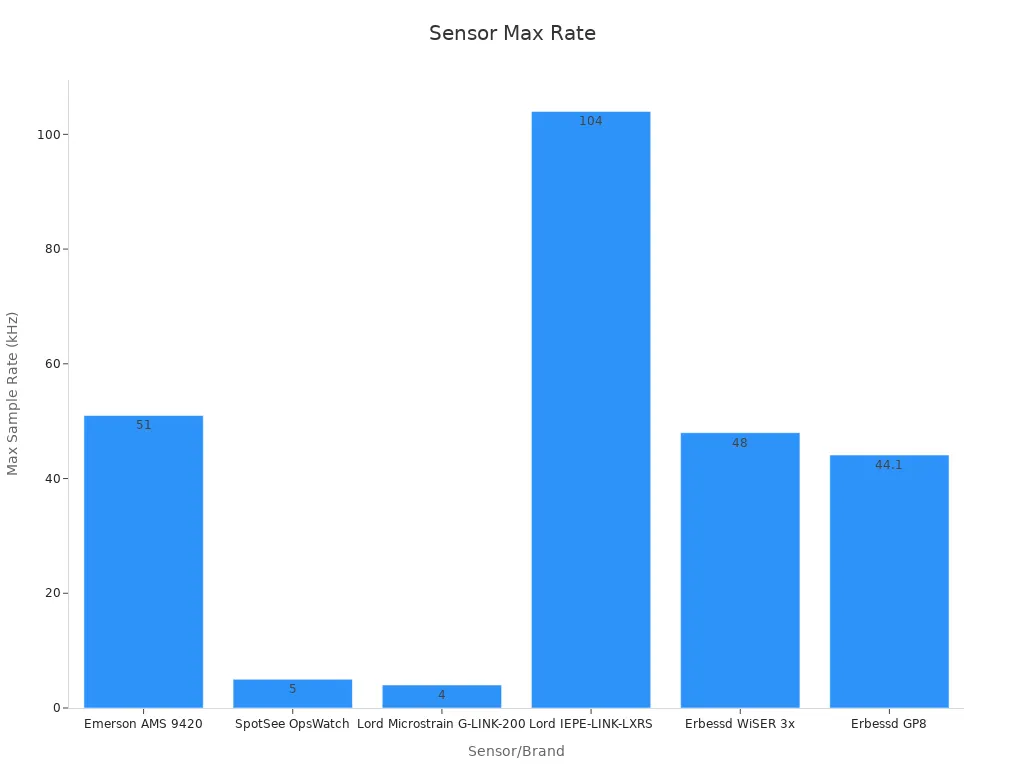
When you compare vibration transmitters, you need to look at their strengths and weaknesses. Each sensor fits different needs. Some work best for home security, while others handle tough industrial jobs. The table below shows how top vibration monitoring products stack up in real-world scenarios.
| Sensor / Brand | Sensor Type | Pros | Cons | Best Use Case |
|---|---|---|---|---|
| Aqara | MEMS | Easy setup, compact, affordable, wireless, good for smart homes | Limited range, not for harsh environments | Home security, window/door alerts |
| Aeotec | MEMS | Reliable, integrates with smart home systems, low power | Lower sensitivity for industrial use | Home automation, appliance alerts |
| Wilcoxon | Piezoelectric | High accuracy, durable, wide range, trusted in industry | Wired, higher cost, needs professional installation | Industrial machinery monitoring |
| WiSER 3X | MEMS (Triaxial) | Portable, wireless, high sample rate, 24-bit resolution | Expensive, battery maintenance needed | Portable industrial testing, field use |
| Emerson AMS 9420 | Piezoelectric | Rugged, wireless, large range, industry standard | Bulky, costly, complex setup | Large-scale manufacturing |
| SpotSee OpsWatch | MEMS (Triaxial) | WiFi enabled, convenient, good for smaller operations | Lower sensitivity, higher noise, moderate price | Small industrial sites, convenience |
Tip: Choose vibration transmitters that match your environment. MEMS types work well for homes and light industry. Piezoelectric types handle heavy-duty jobs.
Best Uses
You see vibration transmitters used in many places. On construction sites in Europe, they help keep vibrations safe for people and buildings. These sensors send real-time alerts if levels get too high. You can use them to protect your home, monitor machines, or meet safety rules at work. Rugged types like Wilcoxon and Emerson AMS 9420 work well outdoors or in factories. MEMS types such as Aqara and Aeotec fit best in homes or offices.
Use MEMS sensors for smart home security and appliance alerts.
Pick piezoelectric sensors for heavy machinery and long-term industrial monitoring.
Choose wireless vibration transmitters for flexible setups and remote sites.
You need to balance cost, reliability, and performance. Some sensors cost more but last longer and give better data. Others save money but may need more upkeep. When you select vibration monitoring products, think about your main goal—safety, comfort, or equipment health.
Home vs. Industrial Needs

Home Requirements
When you choose a vibration sensor for your home, you want a device that is sensitive enough to detect small movements but not so sensitive that it triggers false alarms. Home sensors often protect doors, windows, and valuables. You need a sensor that works well in a quiet environment and can pick up weak signals, like someone opening a window or tampering with a lock.
A good home sensor should have omnidirectional sensitivity. This means it can detect movement from any direction, making it harder for intruders to bypass. You also want a compact design so you can place it in tight spaces. Low power use is important because you do not want to change batteries often.
Here is a table comparing two popular magnetic sensors used in home security:
| Criteria / Sensor Feature | A1266 3D Micropower Hall Switch | ALS31300 3D Hall Linear Sensor |
|---|---|---|
| Sensitivity Range | ±40 Gauss (4 mT) | ±500 G, ±1000 G, ±2000 G |
| Operation Mode | Threshold Switch | Calibrated Linear |
| Sensing Mechanism | 3D Hall-effect | 3D Hall-effect |
| Output Protocol | Open Drain | I2C |
| Package Size | SOT23 (2.9 mm x 3 mm) | DFN (3 mm x 3 mm) |
| Features | X/Y/Z outputs, low power, OR output | EEPROM, adjustable settings, temperature sensor |
You want high sensitivity and a wide dynamic range. This helps the sensor detect weak signals and survive strong ones. Omnipolar and omnidirectional features make sure the sensor works no matter how you install it.
Tip: For home security, pick a sensor with easy installation, reliable alerts, and long battery life.
Industrial Requirements
In an industrial setting, you need sensors that can handle tough jobs. These sensors must survive heat, dust, and constant movement. You want a wide measurement range to track both small and large vibrations. High durability is a must because machines run for long hours.
Industrial sensors often connect to control systems using wired or wireless protocols. You need fast response times to catch sudden changes in machine vibration monitoring. High accuracy helps you spot problems before they cause damage. For example, a sensor on a factory motor can alert you to imbalance or wear before the machine fails.
You should look for sensors with strong enclosures and certifications for harsh environments. These sensors often cost more, but they last longer and give you better data.
Use sensors with high sensitivity for early fault detection.
Choose models with long battery life or wired power for continuous operation.
Make sure the sensor supports your facility’s data system.
Note: In industrial environments, reliable vibration monitoring protects equipment, reduces downtime, and keeps workers safe.
Predictive Maintenance
Role of Sensors
You can use vibration sensors as the backbone of predictive maintenance in your facility. These sensors measure vibration patterns, such as amplitude and frequency, to detect early signs of mechanical faults. When you monitor these signals, you can spot issues like imbalance, misalignment, or bearing defects before they cause major failures. This approach helps you move from reactive repairs to proactive care.
Many industries have seen real results from using vibration sensors for predictive maintenance:
Barbieri and colleagues used on-board vibration sensors in smart manufacturing to predict equipment health and schedule repairs.
Kiangala and Wang applied intelligent sensors in a bottling plant, catching conveyor motor faults early and reducing downtime.
Zhang’s team collected vibration data from rotating machines and used deep learning to predict the remaining useful life of equipment.
Yan’s research on CNC machines showed that vibration signals help with fault detection and health assessment.
Vlasov’s group used wireless vibration sensor networks for real-time condition monitoring, cutting maintenance costs and improving scheduling.
These examples show how vibration sensors support predictive maintenance by enabling early fault detection, accurate life prediction, and better planning.
By using vibration analysis and condition monitoring, you can extend equipment life, improve safety, and boost operational efficiency.
Implementation Tips
To get the most from predictive maintenance, you need a solid plan for integrating vibration sensors into your routine. Start by choosing the right sensors for your environment. Tri-axial accelerometers work well for machine health monitoring, especially when you consider factors like temperature and electromagnetic interference.
Follow these steps to build an effective predictive maintenance program:
Install sensors in key locations on your monitoring equipment, focusing on critical machines.
Use edge computing devices to process data near the source, which reduces delays and filters out noise.
Connect sensor data to your maintenance management system. This allows automatic work orders when sensors detect abnormal conditions.
Set up adaptive baselines using machine learning. This helps your system adjust to normal changes and reduces false alarms.
Train your team to read sensor data and respond to alerts quickly.
A well-designed predictive maintenance program can reduce maintenance costs by up to 40% compared to reactive approaches. You also increase asset uptime, improve equipment performance, and create a safer workplace.
| Benefit | Description | Quantitative Impact |
|---|---|---|
| Reduced Maintenance Costs | Better planning and fewer unexpected repairs. | Savings of 8–12%, up to 40% vs reactive maintenance |
| Increased Asset Uptime | Fewer unplanned downtimes and higher reliability. | More uptime, less lost production |
| Enhanced Equipment Performance | Early detection prevents severe damage. | Longer equipment life, better efficiency |
| Operational Efficiency | Real-time monitoring reduces downtime. | Continuous operation, lower costs |
| Safety and Environmental Benefits | Prevents failures and reduces waste. | Improved safety and sustainability |
Tip: Integrate vibration sensors with your existing systems and train your staff. This ensures you get the full value from predictive maintenance.
Recommendations
Selection Steps
Choosing the right sensor for your application does not need to feel overwhelming. You can follow a clear, step-by-step process to make the best decision for your home or industrial needs. This approach helps you match the sensor to your environment and ensures reliable performance.
Identify What You Need to Monitor
Start by deciding what material or equipment you want to sense. For example, if you need to monitor metal parts, inductive sensors work well. For liquids, you might use capacitive or ultrasonic sensors.Determine the Working Distance
Measure the distance between the sensor and the object or area you want to monitor. Some sensors work best at close range, while others can sense from farther away.Evaluate Key Performance Factors
Look at switching frequency, accuracy, repeatability, resolution, cost, and reliability. These factors help you narrow down your options.Optimize Sensor Placement
Use proven methods like finite element analysis or optimization algorithms to find the best locations for your sensors. Research shows that placing sensors in the right spots improves damage detection and system performance.Consider Integration with Predictive Maintenance
Make sure your sensor choice supports predictive maintenance. This step helps you catch problems early and plan repairs before failures happen.
Here is a table that summarizes important sensor characteristics:
| Sensor Type | Working Distance | Switching Frequency | Cost | Reliability | Accuracy | Repeatability | Resolution |
|---|---|---|---|---|---|---|---|
| Limit switch | Zero | Slowest | Medium | Medium | High | Low to High | Medium |
| Inductive | 0-50 mm | Fast (~2 kHz) | Low | High | High | High | Medium-High |
| Magnetic | 60 mm | Very fast (~5 kHz) | Medium | High | Medium | High | Medium |
| Capacitive | 0-45 mm | Slow (<100 Hz) | High | Medium | Low | Medium | Low |
| Ultrasonic | 0-10 m | Very slow | Very High | Medium | Low | Medium | Low |
| Photoelectric | 0-50 m | Fast | Medium | Medium | Medium | Medium | Medium |
| Laser | 0-100 m | Very fast | Very High | Medium | High | High | High |
Tip: Always match the sensor type and placement to your specific application. This step ensures you get accurate data and reliable alerts.
Long-Term Tips
Once you have selected and installed your sensors, you want to keep them working at their best. Long-term reliability and performance depend on regular care and smart practices.
Schedule Regular Maintenance
Check your sensors often. Clean them and test their accuracy. This habit helps you spot issues before they affect your system.Calibrate Sensors Periodically
Calibration keeps your sensors accurate. Set a schedule for calibration based on the manufacturer’s advice and your environment.Monitor Sensor Data Trends
Use your predictive maintenance system to track changes in vibration or other signals. Look for patterns that might show early signs of wear or failure.Update Software and Firmware
Keep your sensor systems up to date. Manufacturers often release updates that improve performance or fix bugs.Train Your Team
Make sure everyone who works with the sensors knows how to read data and respond to alerts. Good training leads to faster problem-solving and better results.Review and Optimize Placement
Over time, your needs may change. Review sensor placement and add or move sensors as needed to keep your predictive maintenance program effective.
Note: A strong predictive maintenance plan uses reliable sensors, regular checks, and smart data analysis. This approach helps you avoid costly breakdowns and keeps your equipment running smoothly.
Choosing the right vibration sensor means looking at accuracy, calibration needs, and how well the sensor fits your environment. You should compare calibration frequency and performance metrics for home and industrial sensors. The table below shows key differences:
| Aspect | Industrial Sensors | Residential Sensors |
|---|---|---|
| Calibration Frequency | Frequent | Periodic |
| Key Metrics | MAE, Pearson Coefficient | MAE, Pearson Coefficient |
Match sensor features to your needs. Check calibration schedules. Review performance data. Informed choices keep your equipment safe and your property secure.
FAQ
What is the main purpose of a vibration sensor?
You use a vibration sensor to detect movement or shaking in machines, buildings, or objects. This helps you find problems early, protect equipment, and improve safety. Many people use these sensors for security or maintenance.
How do you install a vibration sensor at home?
You can mount most home sensors with screws or adhesive pads. Place the sensor on doors, windows, or valuable items. Follow the manufacturer’s instructions for the best results. Test the sensor after installation to make sure it works.
How often should you calibrate vibration sensors?
You should check and calibrate industrial sensors every 6 to 12 months. Home sensors need calibration less often. Always follow the manufacturer’s guidelines for your specific model.
Can vibration sensors connect to smart home systems?
Yes, many modern vibration sensors work with smart home platforms like Zigbee, Z-Wave, or Wi-Fi. You can receive alerts on your phone or automate actions, such as turning on lights when the sensor detects movement.
What should you do if your sensor gives false alarms?
First, check the sensor’s placement. Make sure it is not near sources of vibration like fans or heavy traffic. Adjust the sensitivity settings if possible. If problems continue, contact the manufacturer for support.
 UTMEL
UTMEL
We are the professional distributor of electronic components, providing a large variety of products to save you a lot of time, effort, and cost with our efficient self-customized service. careful order preparation fast delivery service
 The Key Role of Electronic Components in IoT DevicesUTMEL01 September 20235187
The article discusses the pivotal role of electronic components in Internet of Things (IoT) devices. IoT devices work by capturing real-world data using sensors, processing it through a microcontroller, and then sending it to the cloud for further analysis.
Read More How to Identify the Perfect Proximity Sensor for Your ApplicationUTMEL19 July 20251098
Find the best proximity sensors for your project by evaluating material, sensing range, environment, and system needs to ensure optimal performance and reliability.
Read More Trusted Vibration Sensors for Homeowners and Industry ProfessionalsUTMEL17 July 2025807
Compare top vibration sensors for home and industrial use. Find trusted options for security, predictive maintenance, and equipment protection.
Read More Wiring and Mounting Photoelectric Sensors in 2025UTMEL15 July 2025996
Wire and mount photoelectric sensors in 2025 with step-by-step safety, wiring, and alignment tips for reliable installation and optimal sensor performance.
Read More Essential Tips for Picking the Best Gas SensorUTMEL15 July 20252223
Find out how to select gas sensors by matching target gases, environment, and compliance needs for reliable and accurate gas detection in any setting.
Read More
Subscribe to Utmel !