

 Product
 Brand
Brand Articles
 Tools
Tools
The Ultimate Guide to AI Noise Reduction Translation Earbuds
Quick Answer
AI translation earbuds are best understood as an audio interface for a speech-translation system. The earbuds capture speech and play translated audio, while a phone, an app, a cloud service, or a combination of these components may perform speech recognition, machine translation, and speech synthesis. Translation therefore does not necessarily happen inside the earbuds.
The most important buying question is not a headline accuracy percentage. Check whether the product supports your exact language pair, conversation mode, phone and operating system; whether the required mode works offline; where the audio is processed; and how the system behaves with accents, specialist terms, overlapping speakers, and background noise. For legal, medical, safety, or contractual communication, confirm important information with a qualified human interpreter.
What Are AI Translation Earbuds?
AI translation earbuds are wireless earbuds used to hear, capture, display, or play back translated speech. Some products are designed specifically for multilingual conversations. Others are ordinary consumer earbuds that expose a translation feature supplied by a connected phone and its software ecosystem.
Both types can feel similar to the wearer, but their architectures and operating requirements are different. A dedicated translator may provide structured modes for two-way conversations, lectures, calls, or media. An ecosystem-based product may rely on a phone's Translate or Interpreter app and use the earbuds mainly as microphones and audio output.
This distinction matters. A product can contain powerful audio processing for active noise cancellation and calls while still sending speech to a phone for translation. Marketing phrases such as “AI earbuds” or “real-time translation” do not, by themselves, tell you where the model runs, whether an internet connection is required, or which languages work offline.
Three Different Meanings of Noise Reduction
Translation-earbud descriptions often use “noise cancellation” as if it were one feature. In practice, three separate functions can be involved:
Active noise cancellation (ANC) reduces ambient sound heard by the wearer. It uses microphones and anti-noise processing to improve listening comfort, but it does not automatically make the remote translation engine understand speech correctly.
Microphone noise suppression or environmental noise cancellation tries to make the wearer's voice clearer for calls or translation input. Multi-microphone processing may suppress steady noise, echo, or sound arriving from directions other than the speaker.
Translation input cleanup may include voice-activity detection, beamforming, source separation, automatic gain control, and speech enhancement before speech recognition. Its goal is to provide a cleaner speech signal to the recognition model.
A product can be strong in one area and ordinary in another. ANC performance should not be treated as proof of translation accuracy, and a call-noise demo does not establish performance for two people speaking over one another in a crowded room.
How Real-Time Translation Through Earbuds Works
A common translation path contains the following stages:
Capture: one or more microphones record speech. The phone microphone may also be used, especially when it is placed near the other speaker.
Audio preprocessing: the system detects speech, controls gain, reduces echo and noise, and may focus on a target direction.
Automatic speech recognition: a speech model converts audio into interim and final text. Streaming recognition can return partial text before an utterance is complete.[7]
Machine translation: the recognized text is translated. Some systems can use glossaries or customized models for domain-specific terminology.[8]
Speech synthesis and display: translated text can appear on the phone and can be converted into synthetic speech for playback through an earbud or phone speaker.[9]
Total delay is the sum of speech endpoint detection, recognition, translation, synthesis, network transport, buffering, and playback. For that reason, a processor's sub-millisecond operation does not mean an entire conversation can be translated in under one millisecond. Turn-taking and sentence length also affect when a useful translation becomes available.
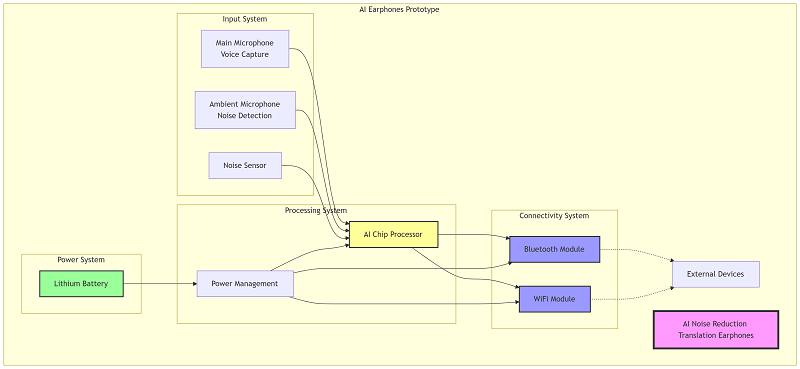
This original illustration is a conceptual architecture, not a teardown. In many commercial products, speech recognition and translation run on the connected phone or a cloud service rather than on a dedicated AI processor or Wi-Fi module inside each earbud.
Two Product Routes: Dedicated Translators and Ecosystem Earbuds
Dedicated translator earbuds
Products such as Timekettle's W4 Pro and M3 are sold around multilingual communication. Their companion apps organize translation modes and language packs, and the product pages describe workflows for face-to-face conversations, listening, calls, or media. They still require a smartphone app, so “dedicated” does not mean fully independent.[5][6]
Phone-ecosystem earbuds
Apple, Google, and Samsung provide translation through combinations of compatible earbuds, phones, operating systems, and apps. The phone remains central:
Apple's Live Translation uses compatible AirPods with an Apple Intelligence-enabled iPhone and the Translate app. After the required language models are downloaded, Apple states that processing occurs on the iPhone.[1]
Google Pixel Buds use Google Translate on a compatible Android phone. Google's current help page lists an internet connection among the requirements and notes that translation is not instantaneous.[2]
Samsung's Interpreter workflow plays translated audio through compatible Galaxy Buds while showing text on the Galaxy phone. Samsung also clarifies that Interpreter is supplied by the compatible Galaxy device, not by the Buds alone.[3][4]
Current Product Examples and What to Verify
The table below is a workflow comparison, not a ranking. Specifications are a snapshot of first-party pages checked on September 24, 2026. Timekettle language and battery figures are manufacturer-stated claims rather than independent test results. Language counts, subscriptions, regional availability, and supported devices can change.
| Product route | Processing dependency | Current first-party description | Verify before purchase |
|---|---|---|---|
| Timekettle W4 Pro | Timekettle app on a smartphone; internet requirements vary by mode | The current 2026 product page lists 52 languages, 106 accents, 13 offline pairs, six hours of translation per charge, and 12 hours of music.[5] | Exact language pair, offline entitlement, account or subscription terms, and regional product-page version |
| Timekettle M3 | Timekettle app on a smartphone | The current page lists 42 languages, 95 accents, selected offline language pairs, and 25 hours with the charging case.[6] | Whether the required mode and both translation directions are available offline |
| Compatible AirPods | Compatible iPhone, Apple Intelligence, iOS, firmware, and Translate app | Live Translation can play the other person's translated speech through AirPods and show or play the wearer's response on the iPhone.[1] | Device eligibility, beta status, supported languages, account region, and local availability |
| Google Pixel Buds | Compatible Android phone, Google apps, Translate app, account, and internet connection | Live Translate supports two-way conversation workflows; Transcribe mode has a narrower language and environment scope.[2] | Phone compatibility, language list, network access, and which mode supports the source and target languages |
| Galaxy Buds with Interpreter | Compatible Galaxy phone or tablet, Samsung account, software, and language packs | The phone's Interpreter can send translated audio to the Buds and display a transcript on screen.[3] | Galaxy device and One UI compatibility, language-pack availability, region, and online/offline behavior |
Do not compare these rows by language count alone. One vendor may count accents separately, another may report language pairs, and another may support different sets for conversation, transcription, calls, and offline use. Test the exact direction you need, such as Japanese-to-English and English-to-Japanese, rather than assuming that one listed language guarantees every mode.
Hardware Building Blocks in a Translation-Earbud System
A complete system may distribute functions across the earbuds, charging case, phone, and cloud. The following blocks are common design categories; they are not a confirmed bill of materials for any product named above.
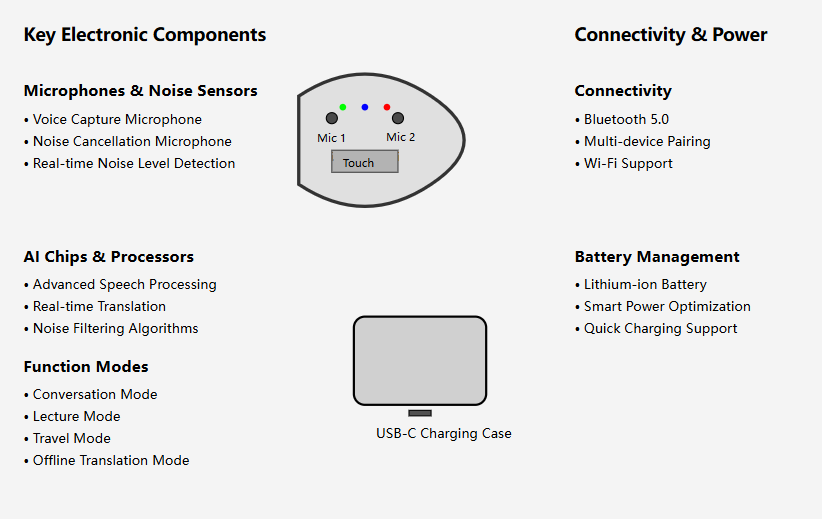
This original Utmel illustration is a high-level design concept. Actual products may omit Wi-Fi in the earbuds and use the phone's network connection instead.
| Design block | Role | Engineering checks |
|---|---|---|
| Microphone array | Captures the wearer's voice and ambient sound for beamforming, voice pickup, and noise suppression | Acoustic port, spacing, sensitivity matching, SNR, wind noise, echo paths, and fit variation |
| Bluetooth audio SoC and DSP | Runs wireless audio, codecs, ANC, microphone processing, controls, and possibly local voice functions | Audio interfaces, microphone channels, DSP capacity, codec support, firmware, package, power, and qualification. The Qualcomm QCC5141 is one documented earbud-oriented example, not proof of use in a named translator.[10] |
| Wireless link | Carries control and audio between the phone and earbuds and coordinates left/right devices | Bluetooth profile and codec compatibility, coexistence, antenna efficiency, range, multipoint behavior, and latency. LE Audio introduces LC3 and multi-stream capabilities, but both ends must support the required features.[11] |
| Phone and translation software | Performs app control, language selection, transcription, translation, synthesis, display, storage, or cloud access | Supported OS and devices, permissions, model downloads, network behavior, data handling, update policy, and account requirements |
| Battery and power management | Supplies the earbuds and charging case while protecting the cells and reporting state of charge | Cell capacity, peak radio/DSP load, charge current, thermal protection, shipping mode, case losses, and battery aging |
Accuracy, Latency, Offline Use, and Privacy
Why a single accuracy percentage is not enough
Recognition and translation quality changes with the language pair, accent, microphone position, distance, noise type, speaking rate, code-switching, names, and specialist terminology. Google also notes that recognition confidence may be absent and is not a complete measure of correctness.[7] Apple explicitly warns that Live Translation output may be inaccurate, unexpected, or offensive and advises checking important information.[1]
A meaningful comparison needs the same recordings, rooms, speakers, language directions, terminology, network conditions, and scoring method. Manufacturer accuracy claims made under different conditions should not be placed in one ranking table as if they were equivalent laboratory results.
Translation is real-time, but not instantaneous
Streaming systems can show interim text while a person is speaking, but final wording may change when more context arrives. Conversation products often wait for a pause before translating a complete phrase. This can improve meaning while adding delay. Google's Pixel Buds documentation directly notes that translation is not instantaneous.[2]
Offline does not mean every feature works without a network
Offline support may apply only to selected language pairs or modes. The language model may run on the phone rather than in the earbuds. Media translation, calls, cloud synchronization, or less common languages may still require internet access. Download the required packs and test them in airplane mode before travel.
Check where conversation data goes
Review the current privacy policy and product settings before using translation in confidential meetings. Apple states that after language models are downloaded, its AirPods Live Translation processing occurs on the iPhone and conversation data remains private.[1] Other products may use cloud services, retain transcripts, offer AI summaries, or require accounts. These are product-specific choices, not properties shared by all translation earbuds.
How to Choose AI Translation Earbuds
| Decision factor | What to check | Practical test |
|---|---|---|
| Language direction | Exact source and target languages, accents, and two-way support | Run a five-minute conversation in both directions, including names and numbers |
| Conversation workflow | Whether one or both people wear earbuds; touch-to-talk versus automatic turn detection | Simulate check-in, directions, and a longer discussion before the return window closes |
| Offline mode | Language pair, mode, download size, license, and renewal terms | Enable airplane mode with Bluetooth on and repeat the required workflow |
| Noise handling | Voice pickup and translation input, not only music ANC | Compare quiet-room, café-noise, wind, and overlapping-speaker recordings |
| Phone compatibility | Minimum phone model, OS, app, firmware, account, and regional requirements | Install and activate the complete workflow on the phone that will actually be used |
| Battery | Translation time rather than music time; case capacity; charging during travel | Run the required mode continuously and record the real operating time |
| Data and privacy | On-device versus cloud processing, saved transcripts, deletion controls, and account policy | Review settings and privacy terms before recording a real meeting |
| Total cost | Offline packs, subscriptions, replacement earbuds, app services, and warranty | Calculate the two-year cost, not only the purchase price |
Best fit by use case
Occasional travel: an existing compatible phone-and-earbud ecosystem may be sufficient if it supports the required languages.
Frequent multilingual meetings: prioritize structured listening, call, media, transcript, and export workflows, then review privacy controls.
Remote or international travel: verify offline language pairs and battery endurance before departure.
Language learning: choose a system that displays source and translated text, allows replay, and makes errors easy to inspect rather than hiding them behind audio.
How to Improve Translation Results
Move the active microphone closer to the speaker. Apple and Google both recommend improving microphone placement or proximity when conditions are difficult.[1][2]
Use one speaker at a time. Overlapping speech makes voice separation, recognition, and turn detection harder.
Speak in complete, moderate-length phrases. Very short fragments provide little context, while long uninterrupted speech increases delay.
State names, model numbers, dates, and prices twice. These details are both important and easy to misrecognize.
Confirm the selected language and direction. Automatic detection can choose the wrong language when a phrase is short or languages are mixed.
Download updates and offline packs before travel. Then test with the intended network disabled.
Read the transcript when available. Visible text makes it easier to catch a recognition error before it becomes a translation error.
Frequently Asked Questions
Do AI translation earbuds translate by themselves?
Often they do not. Many products use the earbuds for audio capture and playback while a connected phone and app perform recognition and translation. Check the architecture and phone requirement for the exact product.
Is noise cancellation the same as better translation?
No. ANC improves what the wearer hears. Translation input depends on microphone placement, voice pickup, preprocessing, speech recognition, and the translation model. Good ANC can improve comfort without guaranteeing better recognition.
Can translation earbuds work without internet?
Some products support selected offline language pairs or modes. Offline availability is usually narrower than online support and may require advance downloads. Test the exact mode in airplane mode before relying on it.
Are translation earbuds accurate enough for business meetings?
They can help with routine discussion, but performance varies with language, terminology, speakers, and noise. Use transcripts and confirmation for names, figures, commitments, or technical terms. Use a qualified interpreter for high-stakes communication.
What is the difference between translation earbuds and a translator device?
Earbuds provide private audio and hands-free listening. A handheld translator may offer a larger screen, outward-facing speaker, camera, or more independent operation. The better choice depends on who must hear the output, whether both people will share equipment, and whether phone dependence is acceptable.
References
Apple Support, “Use Live Translation with your AirPods.” Accessed September 24, 2026.
Google Pixel Buds Help, “Translate with Google Pixel Buds.” Accessed September 24, 2026.
Samsung Support, “Using Galaxy AI features with your Galaxy Buds3 series.” Accessed September 24, 2026.
Samsung Australia, “How to use the Interpreter Setting on my Galaxy device.” Accessed September 24, 2026.
Timekettle, “W4 Pro AI Interpreter Earbuds.” Accessed September 24, 2026.
Timekettle, “M3 Language Translator Earbuds.” Accessed September 24, 2026.
Google Cloud, “Cloud Speech-to-Text overview.” Accessed September 24, 2026.
Google Cloud, “Google translation offerings.” Accessed September 24, 2026.
Google Cloud, “Cloud Text-to-Speech basics.” Accessed September 24, 2026.
Qualcomm, “QCC5141 Bluetooth Audio SoC.” Accessed September 24, 2026.
Bluetooth SIG, “LE Audio.” Accessed September 24, 2026.
 UTMEL
UTMEL
We are the professional distributor of electronic components, providing a large variety of products to save you a lot of time, effort, and cost with our efficient self-customized service. careful order preparation fast delivery service
Why are AI earbuds better than regular translation gadgets?
AI earbuds translate instantly and block background noise. Unlike older devices, they’re hands-free and adjust to your voice. You can use them in loud places or during chats without issues. They’re also lightweight, making them great for work or travel.
Can AI earbuds work offline?
Yes, many models can translate without internet. You just need to download language packs first. This is helpful in areas with no internet or weak signals. Always check if the earphones have offline features before buying.
How accurate are AI earbuds at translating?
Most AI earbuds are 90–98% accurate for common languages. But slang, idioms, or rare accents might lower accuracy. Speaking clearly and using simple words helps improve results. Models like the S80 AL Translator handle tough translations well.
Can multiple people use AI earphones at the same time?
Yes, some advanced models, like the S80 AL Translator, allow group translations. This means several people can talk in different languages at once. It’s great for group trips or business meetings.
How long does the battery last on AI earphones?
Battery life depends on the model. Most last 6–30 hours per charge. Quick-charge options give hours of use in minutes. Check battery details to find what fits your needs. Tip: For long trips, pick earphones with at least 8 hours of battery life.
 Improving the Energy Conversion Efficiency of Triboelectric NanogeneratorsSaumitra Jagdale19 November 20243271
There is a huge growth in demand for self-sustaining electronic devices, as the traditional power-generating devices fail in remote and harsh environments due to the periodic requirement of battery changes. Also, these devices are frequency specific; some work only in high frequency and some in low frequency. Triboelectric nanogenerators (TENGs) provide a promising solution by efficiently converting mechanical energy into electricity as they are versatile, compact, and cheap, making them a popular choice.
Read More Methodologies for Increasing Efficiency of Fuel Stack Technology for Energy GenerationSaumitra Jagdale19 November 20243116
Presently, power companies are moving towards renewable energy systems. Conventional energy sources are more expensive because they require a vast network to be maintained and huge human resources. Also, they harm the environment by releasing several harmful gases. As the industry’s focus shifts toward renewable energy sources, energy systems powered by Proton Exchange Membrane Fuel Stacks (PEMFS) are gaining traction.
Read More VSC Light Meaning, Causes, and Step-by-Step DiagnosticsUTMEL19 May 20263723
A VSC (Vehicle Stability Control) light indicates the system is disabled, often as a fail-safe triggered by unrelated engine faults like a loose gas cap. While the stability system prevents lateral skidding, it shuts down when sensor data is unreliable. Proper diagnosis requires an ABS-capable OBD2 scanner. Resolving the root engine code, checking wheel speed sensors, or performing a zero-point calibration usually restores system function.
Read More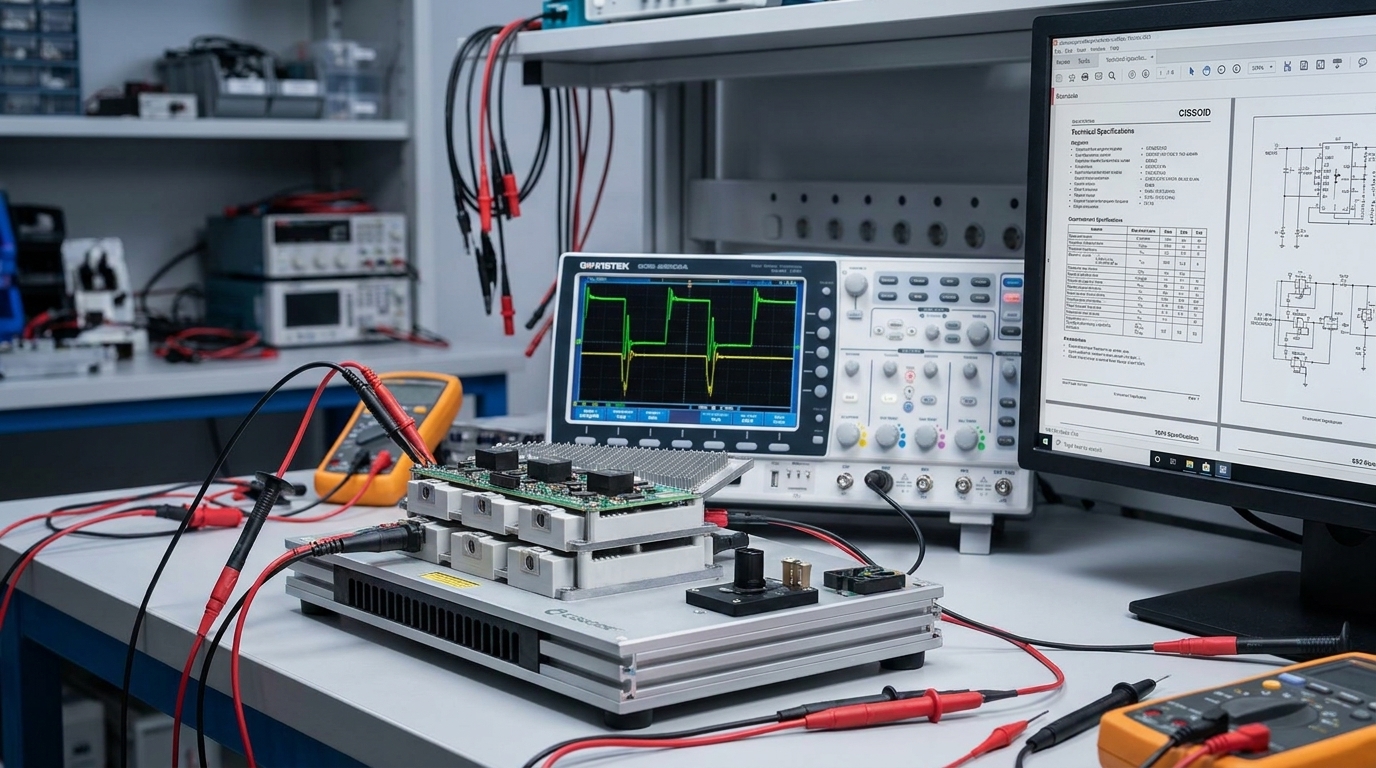 What JEDEC JEP203 and JEP204 Actually Change for SiC Qualification Engineers and Component BuyersUTMEL29 July 2026508
Summary: When JEDEC published JEP203 and JEP204 on June 3, 2026[1], most coverage treated them as an announcement. They are better understood as the first shared language the silicon carbide industry has had for two problems that have quietly consumed engineering hours since the first commercial SiC MOSFETs shipped: short-circuit evaluation that produces numbers you can compare across suppliers, and a consolidated reference of stress procedures so qualification engineers stop reinventing test plans from scratch. This article explains what changes on Monday morning and what to ask suppliers for now.
Read More 2nm vs 3nm Chips: What the Latest Process Nodes Mean for PerformanceUTMEL19 August 20261694
The shift from 3nm to 2nm process nodes marks a fundamental change in transistor architecture, moving from FinFET to Gate-All-Around (GAA) nanosheets. This transition delivers meaningful improvements in performance, power, and density, but also introduces new challenges like SRAM scaling limits, thermal density, and backside power delivery. The article compares TSMC, Samsung, and Intel approaches, offering a practical decision framework for engineering teams.
Read More
Subscribe to Utmel !
![CD-2001-6-SET]() CD-2001-6-SET
CD-2001-6-SETPanduit Corp
![20820009901]() 20820009901
20820009901HARTING
![2002182100]() 2002182100
2002182100Molex
![HR30-6R-6S-T01]() HR30-6R-6S-T01
HR30-6R-6S-T01Hirose Electric Co Ltd
![0190270136]() 0190270136
0190270136Molex
![1212046]() 1212046
1212046Phoenix Contact
![DCE.91.092.BVC]() DCE.91.092.BVC
DCE.91.092.BVCLEMO
![227-1221-63]() 227-1221-63
227-1221-63Amphenol RF
![WC-930]() WC-930
WC-930JST Sales America Inc.
![1772793]() 1772793
1772793Phoenix Contact


