

 Product
 Brand
Brand Articles
 Tools
Tools
Guide to the STMicroelectronics STM32F100VCT6B Microcontroller

256KB 256K x 8 FLASH ARM® Cortex®-M3 32-Bit Microcontroller STM32F1 Series STM32F100 100 Pin 24MHz 100-LQFP


256KB 256K x 8 FLASH ARM® Cortex®-M3 32-Bit Microcontroller STM32F1 Series STM32F100 100 Pin 24MHz 100-LQFP
Learn how the STM32F100VCT6B microcontroller balances performance, cost, and power efficiency, making it ideal for IoT, industrial, and beginner projects.
Product Introduction
Are you looking for the perfect microcontroller to kickstart your electronics journey? The STM32F100VCT6B might just be what you need. It offers a sweet spot between performance, cost, and usability, making it beginner-friendly. With clock speeds reaching up to 72 MHz, it handles tasks efficiently without overwhelming you. Plus, its built-in peripherals like UART, SPI, and I2C simplify your system design.
This STM32 microcontroller is versatile too. Whether you're working on a home automation system or a portable device, its low-power modes and compact design make it a reliable choice. And with the STM32 family starting at budget-friendly prices, you can explore development without breaking the bank.
Overview of STM32 Microcontrollers
What is the STM32 family?
The STM32 family is a popular lineup of microcontrollers designed by STMicroelectronics. These microcontrollers are based on ARM Cortex cores, offering a wide range of performance levels and features. Whether you're building a simple sensor project or a complex industrial system, STM32 microcontrollers provide the tools you need. They are known for their flexibility, extensive ecosystem, and ease of development.
The STM32 family has been evolving since its launch in 2007. Here's a quick look at its milestones:
| Date | Announcement |
|---|---|
| October 2006 | Licensing of the ARM Cortex-M3 core |
| June 2007 | Launch of STM32 F1-series based on ARM Cortex-M3 |
| September 2011 | Launch of STM32 F4-series based on ARM Cortex-M4F |
| October 2018 | Launch of STM32L5 series based on ARM Cortex-M33 |
| March 2024 | Launch of STM32U0 series based on ARM Cortex-M0+ |
Categories within STM32 microcontrollers (F0, F1, F2, etc.)
STM32 microcontrollers are divided into several series, each tailored for specific applications. Here's a breakdown:
| Series | Description | Performance Characteristics |
|---|---|---|
| F | General-purpose applications | Balances performance and cost |
| L | Low-power applications | Ideal for battery-operated devices |
| U | Energy-efficient yet demanding tasks | Combines low power with high performance |
| H | High-performance applications | Requires significant processing power |
| G | Budget-friendly | Mix of performance and cost efficiency |
| C | Ultra-low-cost | Perfect for cost-sensitive projects |
| W | Wireless capabilities | Ideal for IoT applications |
| MP | Robust processing capabilities | Microprocessor series for demanding tasks |
Some examples include:
STM32C0 series: ARM Cortex-M0+
STM32F0 series: ARM Cortex-M0
STM32F4 series: ARM Cortex-M4F
Each series offers unique features, so you can pick one that matches your project's needs.
Where the STM32F100VCT6B fits in the STM32 lineup
The STM32F100VCT6B belongs to the F1 series, which is known for its balance of performance and cost. It uses the ARM Cortex-M3 core, making it a great choice for general-purpose applications. With a clock speed of up to 72 MHz, it provides enough power for most beginner and intermediate projects.
This microcontroller is ideal for tasks like motor control, industrial automation, and even simple IoT devices. Its affordability and versatility make it a favorite among hobbyists and professionals alike. If you're just starting with STM32 microcontrollers, the STM32F100VCT6B is a solid entry point into the STM32 ecosystem.
Key Features of the STM32F100VCT6B Microcontroller
Performance and Processing Power
When it comes to performance, the STM32F100VCT6B microcontroller strikes a great balance between speed and efficiency. It’s powered by a 32-bit ARM Cortex-M3 core, which operates at a clock frequency of up to 24 MHz. While this might not sound like much compared to high-performance processors, it’s more than enough for most embedded applications. Whether you’re controlling motors, processing sensor data, or managing communication protocols, this microcontroller delivers reliable performance without overloading your system.
Here’s a quick look at its processing benchmarks:
| Specification | Value |
|---|---|
| Maximum Clock Frequency | 24 MHz |
| Speed | 24 MHz |
This level of performance makes the STM32F100VCT6B a solid choice for general-purpose projects. It’s fast enough to handle real-time tasks while keeping power consumption in check. Plus, the Cortex-M3 architecture ensures efficient instruction execution, which is perfect for beginners exploring the STM32 family.
Memory and Storage Capabilities
The STM32F100VCT6B doesn’t just excel in performance—it also offers impressive memory and storage options. It comes with up to 512 Kbytes of Flash memory and 32 Kbytes of SRAM. This combination gives you plenty of room to store your program code and handle data processing.
Here’s why this matters:
Flash memory is where your program code lives. With 512 Kbytes, you can write complex applications without worrying about running out of space.
SRAM is used for temporary data storage during program execution. The 32 Kbytes available here ensure smooth operation, even for tasks that require a lot of variables or buffers.
Additionally, the microcontroller supports a flexible static memory control interface. This feature allows you to connect external memory if your project demands even more storage. Whether you’re building a data logger or a control system, the STM32F100VCT6B has you covered.
Power Consumption and Efficiency
Power efficiency is a critical factor in embedded systems, especially for battery-powered devices. The STM32F100VCT6B shines in this area with its low-power modes and efficient design. It operates within a temperature range of –40 to +85 °C, making it suitable for a variety of environments.
Here’s what makes it energy-efficient:
Low-power modes: The microcontroller includes several power-saving features, such as sleep and standby modes. These modes reduce power consumption when the system is idle, extending battery life.
Optimized architecture: The Cortex-M3 core is designed for efficiency, ensuring that every clock cycle is used effectively.
This combination of features makes the STM32F100VCT6B ideal for applications like portable devices, IoT sensors, and other projects where power consumption is a concern. You can focus on your development without worrying about draining your power source too quickly.
Tip: If you’re designing a low-power application, take advantage of the microcontroller’s power-saving modes. They can make a big difference in your project’s overall efficiency.
Available peripherals and interfaces.
The STM32F100VCT6B microcontroller comes packed with a variety of peripherals and interfaces, making it a versatile choice for many applications. These peripherals allow you to connect sensors, control motors, manage communication protocols, and much more. Let’s break down what’s available:
Analog-to-Digital Converters (ADCs): The microcontroller includes up to three 12-bit ADCs. These are perfect for reading analog signals from sensors like temperature or light sensors.
Digital-to-Analog Converters (DACs): With two DACs, you can generate analog signals, which are useful for audio applications or controlling analog devices.
Timers: It features twelve 16-bit general-purpose timers, including two PWM timers for precise motor control, and two 32-bit timers for advanced timing tasks.
Communication Interfaces:
I2C: Up to three interfaces for connecting devices like EEPROMs or real-time clocks.
SPI: Three interfaces for high-speed communication with peripherals like displays or memory chips.
USART/UART: Four USARTs and two UARTs for serial communication, ideal for debugging or connecting to other microcontrollers.
USB OTG: Full-speed USB support for connecting to PCs or USB devices.
CAN: Two CAN interfaces for automotive or industrial communication.
SDIO/MMC: A dedicated interface for SD cards, making it easy to add storage to your project.
Here’s a quick summary of the STM32F100VCT6B’s peripherals:
| Specification | STM32F100VCT6B |
|---|---|
| ADCs | Up to three 12-bit |
| DACs | Two |
| Timers | Twelve general-purpose 16-bit, including two PWM timers, plus two 32-bit timers |
| I2C Interfaces | Up to three |
| SPI Interfaces | Three |
| USARTs | Four plus two UARTs |
| USB OTG | Full-speed |
| CANs | Two |
| SDIO/MMC Interface | Yes |
These peripherals make the STM32F100VCT6B a great choice for projects that require multiple communication protocols or precise control over hardware.
Tip: If you’re working on a project with multiple sensors or communication modules, take advantage of the microcontroller’s diverse interfaces. They’ll simplify your design and reduce the need for additional components.
Package and pinout details.
The physical design of the STM32F100VCT6B is just as important as its internal features. This microcontroller comes in an LQFP (Low-Profile Quad Flat Package) with 100 pins. The compact design makes it suitable for space-constrained applications, while the pinout provides flexibility for connecting peripherals.
Here are the key package details:
| Package Type | Dimensions (mm) |
|---|---|
| LQFP 100 | 14 x 14 x 1.4 |
The 100-pin layout ensures you have enough connections for all your peripherals and interfaces. Each pin serves a specific purpose, such as power supply, communication, or GPIO (General Purpose Input/Output). The pinout is well-documented in the STM32F100VCT6B datasheet, so you can easily identify which pins to use for your project.
Note: When designing your PCB, double-check the pinout to avoid miswiring. A small mistake here can lead to big headaches later!
The combination of a compact package and a versatile pinout makes this microcontroller a practical choice for both beginners and experienced developers. Whether you’re building a small IoT device or a more complex system, the STM32F100VCT6B’s design has you covered.
Evaluating the STM32F100VCT6B for Your Project
Defining your project requirements
Before diving into development, you need to define your project’s requirements clearly. This step ensures you choose the right microcontroller and avoid unnecessary complications later. But how do you figure out what your project needs? Here are some methods and tools to help you get started:
| Method/Tool | Description |
|---|---|
| Stakeholder Analysis | Identify everyone involved in the project to understand their needs and expectations. |
| Re-use of Existing Requirements | Use requirements from similar projects as a starting point, adapting them as needed. |
| Prototyping | Build prototypes to explore ideas and validate functionality before committing to a final design. |
| Surveys | Gather input from a large audience using well-structured questions to uncover useful insights. |
| Workshops | Collaborate with stakeholders in workshops to detail system specifications and gather feedback. |
| Interface Analysis | Study how your system will interact with other devices to ensure compatibility. |
| Patent Search | Research existing patents to avoid infringement and discover innovative solutions. |
For example, if you’re building a home automation system, you might start with stakeholder analysis to understand user needs. Then, use prototyping to test features like sensor integration or wireless communication. By combining these methods, you’ll have a solid foundation for your project.
Tip: Always document your requirements. A well-documented plan saves time and helps you stay on track during development.
Matching requirements to the microcontroller's features
Once you’ve outlined your project’s requirements, the next step is to match them with the features of the STM32F100VCT6B. This microcontroller offers a balanced mix of performance, peripherals, and power efficiency, making it suitable for a wide range of applications.
Here’s a quick comparison to help you evaluate whether the STM32F100VCT6B fits your needs:
| Feature / Factor | STM32F100VCT6B |
|---|---|
| Processing Model | Sequential instruction execution on a 32-bit ARM Cortex-M3 core. |
| Performance | Up to 24 MHz clock speed, ideal for control tasks and low-speed processing. |
| Power Efficiency | Low-power modes like sleep and standby for battery-operated devices. |
| Analog Integration | Includes ADCs, DACs, and comparators for handling analog signals. |
| Communication Interfaces | Supports I2C, SPI, UART, USB OTG, and CAN for versatile connectivity. |
| Cost | Affordable, making it a great choice for budget-conscious projects. |
For instance, if your project involves reading sensor data and sending it to a server, the STM32F100VCT6B’s ADCs and UART interfaces will handle these tasks efficiently. Its low-power modes also make it perfect for battery-powered IoT devices.
Note: If your project requires advanced features like AI capabilities or high-speed processing, you might need to explore other STM32 microcontrollers, such as the STM32F4 or STM32H7 series.
Considering power, cost, and performance trade-offs
Every project involves trade-offs between power, cost, and performance. Understanding these trade-offs will help you make informed decisions and optimize your design.
| Aspect | Description |
|---|---|
| Manufacturing Costs | Includes PCB assembly, testing, and packaging expenses. |
| Non-Recurring Engineering (NRE) | Covers design, prototyping, and certification costs. |
| Impact of Cost | Lower costs might compromise component quality or performance. |
| Performance Metrics | Includes processing speed, power consumption, and communication bandwidth. |
| Impact of Performance | Higher performance often requires advanced components, increasing costs. |
| Power Efficiency | Essential for battery-operated devices; optimizing reduces heat generation. |
For example, if you’re designing a portable device, power efficiency should be your top priority. The STM32F100VCT6B’s low-power modes can extend battery life significantly. However, if your application demands high-speed processing, you might need to sacrifice some power efficiency for better performance.
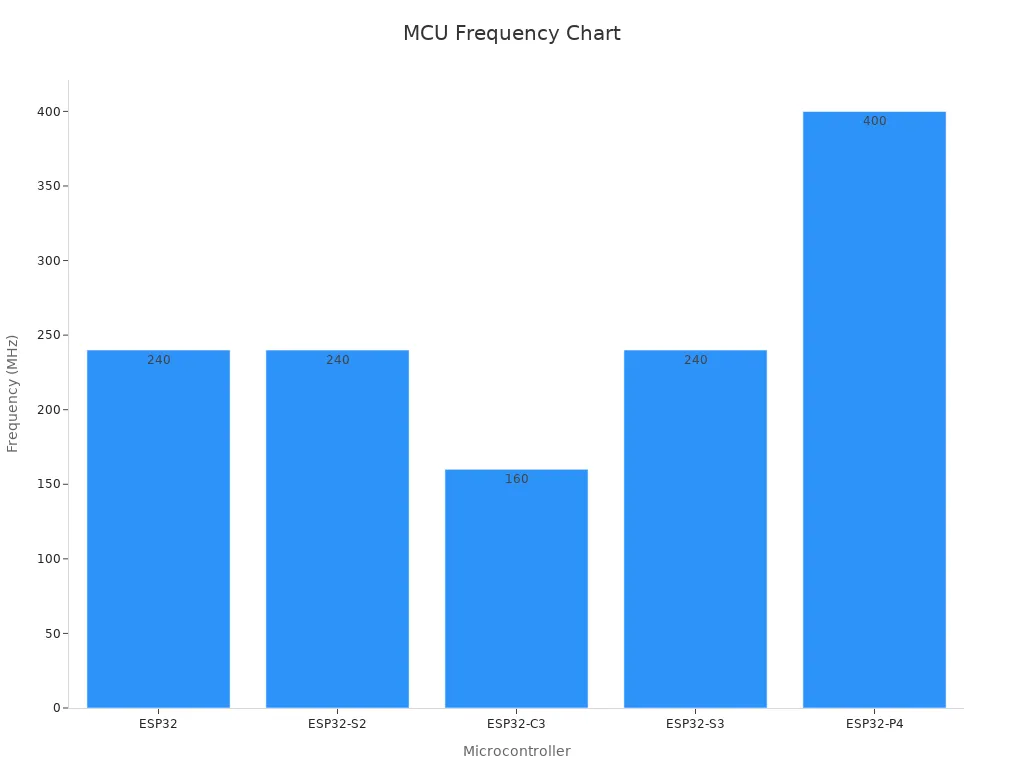
Here’s a visual comparison of CPU frequencies across different microcontrollers to give you an idea of performance trade-offs:
Tip: Always balance your project’s needs with your budget. Sometimes, a slightly more expensive microcontroller can save you time and effort in the long run.
By carefully evaluating your requirements and considering these trade-offs, you can determine whether the STM32F100VCT6B is the right choice for your project. Its combination of affordability, power efficiency, and versatile features makes it a strong contender for many applications.
Examples of projects suitable for the STM32F100VCT6B microcontroller.
The STM32F100VCT6B microcontroller is a versatile choice for a wide range of applications. Its balance of performance, power efficiency, and affordability makes it ideal for both hobbyists and professionals. Let’s explore some specific projects where this microcontroller truly shines.
1. Motor Drives
If you’re working on a motor control project, this microcontroller is a fantastic option. With its PWM timers and ADCs, you can precisely control motor speed and direction. Whether it’s for a robotic arm or an electric vehicle prototype, the STM32F100VCT6B handles the task efficiently.
2. Medical Equipment
This microcontroller is also a great fit for healthcare applications. It can be used in devices like heart rate monitors or diagnostic tools. Its low-power modes ensure that battery-operated medical equipment lasts longer, which is crucial in healthcare settings.
3. Handheld Equipment
For portable devices, power consumption is always a concern. The STM32F100VCT6B’s energy-efficient design makes it perfect for handheld gadgets like remote controls, portable scanners, or even small gaming devices.
4. Industrial Applications
In industrial settings, reliability is key. This microcontroller is well-suited for programmable logic controllers (PLCs), inverters, and other automation systems. Its robust design and wide operating temperature range make it dependable in harsh environments.
5. PC and Gaming Peripherals
If you’re into gaming or computer accessories, this microcontroller can power peripherals like keyboards, mice, or game controllers. Its USB and communication interfaces make it easy to integrate with PCs and gaming consoles.
6. GPS Platforms
Building a navigation system? The STM32F100VCT6B can handle GPS data processing with ease. Its low-power modes also make it a great choice for portable GPS devices.
7. Alarm Systems and Video Intercoms
For security applications, this microcontroller is a reliable choice. You can use it in alarm systems or video intercoms, where its communication interfaces and GPIO pins come in handy for connecting sensors and cameras.
8. HVAC Systems
Heating, ventilation, and air conditioning (HVAC) systems often require precise control and monitoring. The STM32F100VCT6B’s ADCs and timers make it a strong candidate for these applications.
Here’s a quick summary of the types of applications where this microcontroller excels:
| Application Type | Description |
|---|---|
| Motor Drives | Suitable for controlling motors in various applications. |
| Medical Equipment | Can be used in devices for healthcare monitoring and diagnostics. |
| Handheld Equipment | Ideal for portable devices requiring low power consumption. |
| PC and Gaming Peripherals | Supports peripherals for computers and gaming consoles. |
| GPS Platforms | Can be integrated into GPS devices for navigation. |
| Industrial Applications | Applicable in various industrial control systems. |
| PLCs | Suitable for programmable logic controllers in automation. |
| Inverters | Can be used in power inverters for energy conversion. |
| Printers | Suitable for control in printing devices. |
| Scanners | Can be integrated into scanning devices for data capture. |
| Alarm Systems | Ideal for security and alarm systems. |
| Video Intercoms | Can be used in intercom systems for video communication. |
| HVACs | Suitable for heating, ventilation, and air conditioning systems. |
Tip: When starting a new project, think about the specific requirements of your application. The STM32F100VCT6B offers a variety of features that can simplify your design and reduce development time.
By choosing the STM32F100VCT6B, you’re not just picking a microcontroller—you’re selecting a reliable partner for your next project. Whether it’s a simple handheld device or a complex industrial system, this microcontroller has the tools you need to succeed.
Getting Started with the STM32F100VCT6B Microcontroller
Setting up the development environment
Getting started with STM32 development is an exciting journey. First, you'll need to set up your development environment. This involves a few key steps:
Install the Development Software: Download and install the IDE of your choice for STM32 development. Follow the manufacturer's instructions to get it up and running.
Connect Your Development Board: Use a USB cable to connect your development board to your computer.
Configure Your IDE: Open your IDE and configure it to work with your development board. Most IDEs come with STM32CubeMX, a handy tool for configuring your board and generating code.
Create Your First Project: Once your IDE is set up, create your first project. Use the template project provided by the IDE as a starting point.
Build and Flash Your Project: After creating your project, build it and flash it to your development board.
These steps will help you establish a robust software development environment, crucial for working with the STM32F100VCT6B microcontroller.
Required tools and software (e.g., STM32CubeIDE, ST-Link)
To dive into STM32 development, you'll need some essential tools and software. Here's what you should have:
ST-LINK/V2: This in-circuit debugger/programmer is vital for STM32 development. It helps you program and debug your microcontroller efficiently.
STM32CubeIDE: This is the flagship software tool for STM32 development. It offers a comprehensive environment for coding, debugging, and testing your projects.
These development tools are well-regarded in the community for their effectiveness and ease of use. They simplify the process of getting started with STM32 and ensure a smooth development experience.
Writing and uploading your first program
Now, let's get to the fun part—creating your first project. Follow these steps to write and upload your first program on the STM32F100VCT6B:
Create a New Project: Open STM32CubeIDE and start a new project.
Select Your Microcontroller: Use the Target Selection Tool to choose the STM32F100VCT6B or your specific development board.
Name Your Project: Give your project a name that reflects its purpose.
Initialize Peripherals: Use the Device Configuration Tool to set up all necessary peripherals.
Generate and Write Code: Generate the project and start writing your code.
Once your code is ready, build the project and upload it to your development board. This process marks the beginning of your journey into STM32 development, opening up a world of possibilities.
Debugging and testing basics.
Debugging and testing are essential steps when working with the STM32F100VCT6B microcontroller. They help you identify and fix issues in your code, ensuring your project runs smoothly. Let’s break down the basics so you can get started confidently.
Tools You’ll Need
To debug and test effectively, you’ll need a few tools:
ST-LINK Debugger: This tool allows you to flash your code and debug it directly on the microcontroller.
STM32CubeIDE: It provides a built-in debugger that works seamlessly with ST-LINK.
Development Board: Most STM32 boards, including those for the STM32F100VCT6B, come with on-board debugging interfaces.
Tip: Use a development board with features like user LEDs and push-buttons. These make it easier to test your code and interact with the hardware.
Debugging Best Practices
When debugging, follow these steps to make the process easier:
Use Breakpoints: Set breakpoints in your code to pause execution and inspect variables.
Check Debug Logs: Use the IDE’s debug console to view logs and error messages.
Test in Small Steps: Write and test your code in small chunks. This makes it easier to pinpoint issues.
Verify Connections: Double-check your hardware connections. A loose wire can cause unexpected errors.
Here’s a quick look at a typical debugging setup:
| Feature | Description |
|---|---|
| Microcontroller | STM32F100VCT6B with 512 KB Flash memory and 32 KB RAM |
| Debugging Tool | On-board ST-LINK for seamless debugging and flashing |
| Power Supply | Powered by USB or external supply (5 V or 3.3 V) |
| User Interface | Two user LEDs and one push-button |
| Prototyping | Extension header for quick connections to prototyping boards |
| Software | Comprehensive free software with examples (STSW-STM32078) |
Testing Your Code
Testing ensures your program behaves as expected. Start by running simple tests to verify basic functionality. For example, blink an LED to confirm your microcontroller is working. Then, move on to more complex tests, like reading sensor data or communicating with peripherals.
STM32 microcontrollers, including the STM32F100VCT6B, offer robust debugging options. Tools like ST-LINK make it easy to flash and debug your code through SWD (Serial Wire Debug). Most development boards include built-in debug interfaces, so you can quickly identify and fix issues.
Note: Always test your code under real-world conditions. If your project will run on battery power, test it with the same power source to ensure everything works as expected.
By mastering these debugging and testing basics, you’ll save time and avoid frustration. Plus, you’ll gain confidence in your ability to troubleshoot and optimize your projects.
Tips for Working with STM32 Microcontrollers
Common mistakes to avoid
When working with STM32 microcontrollers, you might encounter a few common pitfalls. Avoiding these can save you time and frustration during your development journey.
| Issue Type | Description |
|---|---|
| CAN Reception Issues | Incorrect configurations, power supply problems, and environmental factors can lead to communication failures. |
| Power Issues | Incorrect power supplies and fluctuations can affect the operation of the CAN transceiver and the STM32. |
| User Errors | Mistakes in setting up connections or configurations can lead to issues. |
| Environmental Factors | Power supply issues or excessive temperature may affect device performance. |
| Driver Version | Using an outdated driver version might have unresolved bugs that affect CAN communication. |
| Device Specific Issues | Some issues might be specific to a particular microcontroller or platform being used. |
To avoid these issues:
Verify hardware connections and ensure proper termination of the CAN bus.
Simplify your setup to isolate problems.
Check filter configurations and CAN settings for accuracy.
Use tools like oscilloscopes and CAN analyzers to monitor signals and detect errors.
Tip: Always update your firmware and drivers to the latest versions. Outdated software can cause unexpected bugs.
Best practices for working with STM32 microcontrollers
To get the most out of STM32 microcontrollers, follow these best practices:
Understand the Clock System: The STM32 clock system is vital for proper configuration. Take time to learn how it works to avoid timing issues.
Use Debugging Tools: Tools like ST-LINK and STM32CubeIDE simplify debugging. Set breakpoints and use logs to identify errors quickly.
Optimize Memory Usage: Efficient memory management ensures smooth performance. Use techniques like buffer optimization and memory mapping.
Leverage the Rich Ecosystem: STM32 microcontrollers come with a robust development and support ecosystem. Explore libraries, tools, and community forums to enhance your projects.
Document Everything: Keep detailed notes on your configurations and code. Good documentation helps you troubleshoot faster and share your work with others.
Note: Resources like the book STM32 Mastery and the wolfBoot video series offer advanced insights into STM32 programming. They’re great for expanding your knowledge.
Resources for learning and troubleshooting
The STM32 ecosystem offers plenty of resources to help you learn and troubleshoot effectively. Here’s a quick overview:
| Resource Type | Description |
|---|---|
| Online Training | Specific modules focused on teaching skills for optimal MCU performance. |
| MOOCs | Online courses in MOOC format to assist in designing with ST products, software, and tools. |
| STM32 Community | A platform for collaboration and support among developers, makers, and enthusiasts. |
| Videos | A media library with a selection of videos on the STM32 platform. |
| Textbooks | Recommended textbooks for microcontrollers, with an option to submit publications. |
| Partner Training Courses | Courses provided by partners to complement ST’s training offerings. |
| Embedded Security Learning Journey | A free online course focused on implementing security in general-purpose microcontrollers. |
These resources cover everything from beginner tutorials to advanced techniques. Whether you’re troubleshooting a bug or exploring new features, you’ll find plenty of support.
Tip: Join the STM32 community forums. They’re a great place to ask questions, share ideas, and learn from experienced developers.
The STM32F100VCT6B is a fantastic microcontroller for beginners. Its balance of performance, affordability, and versatility makes it a reliable choice for countless projects. With features like low-power modes, multiple communication interfaces, and robust memory, it’s ready to tackle anything from IoT devices to industrial automation.
Why not dive in and start experimenting? Grab a development board, set up your tools, and create something amazing. If you need help, check out the STM32 community forums or the official documentation. You’ll find plenty of resources to guide you along the way.
Tip: Don’t hesitate to start small. Even a simple LED blinking project can teach you a lot about working with this microcontroller.
FAQ
What makes the STM32F100VCT6B beginner-friendly?
The STM32F100VCT6B offers a balance of performance and simplicity. Its built-in peripherals, low-power modes, and affordable price make it easy to learn and experiment with. Plus, the STM32 ecosystem provides plenty of tools and resources to help you get started.
Can I use the STM32F100VCT6B for IoT projects?
Absolutely! The STM32F100VCT6B supports communication interfaces like I2C, SPI, and UART, which are perfect for connecting sensors and modules. Its low-power modes also make it ideal for battery-powered IoT devices.
What tools do I need to program the STM32F100VCT6B?
You’ll need an ST-LINK debugger/programmer and STM32CubeIDE software. These tools let you write, upload, and debug your code. Most STM32 development boards come with built-in ST-LINK, so you’re ready to go right out of the box.
How do I power the STM32F100VCT6B?
You can power it using a USB connection or an external power supply (3.3V or 5V). Check your development board’s specifications to ensure proper voltage levels. Always double-check your connections to avoid damaging the microcontroller.
Where can I find resources to learn STM32 programming?
The STM32 ecosystem offers free resources like STM32CubeIDE tutorials, datasheets, and community forums. You can also explore online courses, YouTube videos, and books dedicated to STM32 microcontrollers.
Tip: Start with the official STM32CubeIDE documentation for a solid foundation.
Specifications
- TypeParameter
- Factory Lead Time10 Weeks
- Mounting Type
The "Mounting Type" in electronic components refers to the method used to attach or connect a component to a circuit board or other substrate, such as through-hole, surface-mount, or panel mount.
Surface Mount - Package / Case
refers to the protective housing that encases an electronic component, providing mechanical support, electrical connections, and thermal management.
100-LQFP - Surface Mount
having leads that are designed to be soldered on the side of a circuit board that the body of the component is mounted on.
YES - Number of Pins100
- Data ConvertersA/D 16x12b; D/A 2x12b
- Power Dissipation (Max)434mW
- Number of I/Os80
- Watchdog TimersYes
- Operating Temperature
The operating temperature is the range of ambient temperature within which a power supply, or any other electrical equipment, operate in. This ranges from a minimum operating temperature, to a peak or maximum operating temperature, outside which, the power supply may fail.
-40°C~85°C TA - Packaging
Semiconductor package is a carrier / shell used to contain and cover one or more semiconductor components or integrated circuits. The material of the shell can be metal, plastic, glass or ceramic.
Tray - Series
In electronic components, the "Series" refers to a group of products that share similar characteristics, designs, or functionalities, often produced by the same manufacturer. These components within a series typically have common specifications but may vary in terms of voltage, power, or packaging to meet different application needs. The series name helps identify and differentiate between various product lines within a manufacturer's catalog.
STM32F1 - Part Status
Parts can have many statuses as they progress through the configuration, analysis, review, and approval stages.
ACTIVE (Last Updated: 7 months ago) - Moisture Sensitivity Level (MSL)
Moisture Sensitivity Level (MSL) is a standardized rating that indicates the susceptibility of electronic components, particularly semiconductors, to moisture-induced damage during storage and the soldering process, defining the allowable exposure time to ambient conditions before they require special handling or baking to prevent failures
3 (168 Hours) - Number of Terminations100
- ECCN Code
An ECCN (Export Control Classification Number) is an alphanumeric code used by the U.S. Bureau of Industry and Security to identify and categorize electronic components and other dual-use items that may require an export license based on their technical characteristics and potential for military use.
EAR99 - Voltage - Supply
Voltage - Supply refers to the range of voltage levels that an electronic component or circuit is designed to operate with. It indicates the minimum and maximum supply voltage that can be applied for the device to function properly. Providing supply voltages outside this range can lead to malfunction, damage, or reduced performance. This parameter is critical for ensuring compatibility between different components in a circuit.
2V~3.6V - Terminal Position
In electronic components, the term "Terminal Position" refers to the physical location of the connection points on the component where external electrical connections can be made. These connection points, known as terminals, are typically used to attach wires, leads, or other components to the main body of the electronic component. The terminal position is important for ensuring proper connectivity and functionality of the component within a circuit. It is often specified in technical datasheets or component specifications to help designers and engineers understand how to properly integrate the component into their circuit designs.
QUAD - Terminal Form
Occurring at or forming the end of a series, succession, or the like; closing; concluding.
GULL WING - Terminal Pitch
The center distance from one pole to the next.
0.5mm - Frequency
In electronic components, the parameter "Frequency" refers to the rate at which a signal oscillates or cycles within a given period of time. It is typically measured in Hertz (Hz) and represents how many times a signal completes a full cycle in one second. Frequency is a crucial aspect in electronic components as it determines the behavior and performance of various devices such as oscillators, filters, and communication systems. Understanding the frequency characteristics of components is essential for designing and analyzing electronic circuits to ensure proper functionality and compatibility with other components in a system.
24MHz - Base Part Number
The "Base Part Number" (BPN) in electronic components serves a similar purpose to the "Base Product Number." It refers to the primary identifier for a component that captures the essential characteristics shared by a group of similar components. The BPN provides a fundamental way to reference a family or series of components without specifying all the variations and specific details.
STM32F100 - Interface
In electronic components, the term "Interface" refers to the point at which two different systems, devices, or components connect and interact with each other. It can involve physical connections such as ports, connectors, or cables, as well as communication protocols and standards that facilitate the exchange of data or signals between the connected entities. The interface serves as a bridge that enables seamless communication and interoperability between different parts of a system or between different systems altogether. Designing a reliable and efficient interface is crucial in ensuring proper functionality and performance of electronic components and systems.
I2C, IrDA, LIN, SPI, UART, USART - Memory Size
The memory capacity is the amount of data a device can store at any given time in its memory.
256kB - Oscillator Type
Wien Bridge Oscillator; RC Phase Shift Oscillator; Hartley Oscillator; Voltage Controlled Oscillator; Colpitts Oscillator; Clapp Oscillators; Crystal Oscillators; Armstrong Oscillator.
Internal - RAM Size
RAM size refers to the amount of random access memory (RAM) available in an electronic component, such as a computer or smartphone. RAM is a type of volatile memory that stores data and instructions that are actively being used by the device's processor. The RAM size is typically measured in gigabytes (GB) and determines how much data the device can store and access quickly for processing. A larger RAM size allows for smoother multitasking, faster loading times, and better overall performance of the electronic component. It is an important factor to consider when choosing a device, especially for tasks that require a lot of memory, such as gaming, video editing, or running multiple applications simultaneously.
24K x 8 - Core Processor
The term "Core Processor" typically refers to the central processing unit (CPU) of a computer or electronic device. It is the primary component responsible for executing instructions, performing calculations, and managing data within the system. The core processor is often considered the brain of the device, as it controls the overall operation and functionality. It is crucial for determining the speed and performance capabilities of the device, as well as its ability to handle various tasks and applications efficiently. In modern devices, core processors can have multiple cores, allowing for parallel processing and improved multitasking capabilities.
ARM® Cortex®-M3 - Peripherals
In the context of electronic components, "Peripherals" refer to devices or components that are connected to a main system or device to enhance its functionality or provide additional features. These peripherals can include input devices such as keyboards, mice, and touchscreens, as well as output devices like monitors, printers, and speakers. Other examples of peripherals include external storage devices, network adapters, and cameras. Essentially, peripherals are external devices that expand the capabilities of a main electronic system or device.
DMA, PDR, POR, PVD, PWM, Temp Sensor, WDT - Program Memory Type
Program memory typically refers to flash memory when it is used to hold the program (instructions). Program memory may also refer to a hard drive or solid state drive (SSD). Contrast with data memory.
FLASH - Core Size
Core size in electronic components refers to the physical dimensions of the core material used in devices such as inductors and transformers. The core size directly impacts the performance characteristics of the component, including its inductance, saturation current, and frequency response. A larger core size typically allows for higher power handling capabilities and lower core losses, while a smaller core size may result in a more compact design but with limitations on power handling and efficiency. Designers must carefully select the core size based on the specific requirements of the application to achieve optimal performance and efficiency.
32-Bit - Program Memory Size
Program Memory Size refers to the amount of memory available in an electronic component, such as a microcontroller or microprocessor, that is used to store program instructions. This memory is non-volatile, meaning that the data stored in it is retained even when the power is turned off. The program memory size determines the maximum amount of code that can be stored and executed by the electronic component. It is an important parameter to consider when selecting a component for a specific application, as insufficient program memory size may limit the functionality or performance of the device.
256KB 256K x 8 - Connectivity
In electronic components, "Connectivity" refers to the ability of a component to establish and maintain connections with other components or devices within a circuit. It is a crucial parameter that determines how easily signals can be transmitted between different parts of a circuit. Connectivity can be influenced by factors such as the number of input and output ports, the type of connectors used, and the overall design of the component. Components with good connectivity are essential for ensuring reliable and efficient operation of electronic systems.
I2C, IrDA, LINbus, SPI, UART/USART - Supply Current-Max
Supply Current-Max refers to the maximum amount of current that an electronic component or circuit can draw from its power supply under specified operating conditions. It is a critical parameter that determines the power consumption and thermal performance of the device. Exceeding this limit can lead to overheating, potential damage, or failure of the component. Knowing the Supply Current-Max helps in designing circuits that ensure proper operation and reliability.
19.7mA - Bit Size
In electronic components, "Bit Size" refers to the number of bits that can be processed or stored by a particular component. A bit is the smallest unit of data in computing and can have a value of either 0 or 1. The Bit Size parameter is commonly used to describe the capacity or performance of components such as microprocessors, memory modules, and data buses. A larger Bit Size generally indicates a higher processing capability or storage capacity, allowing for more complex operations and larger amounts of data to be handled efficiently. It is an important specification to consider when selecting electronic components for specific applications that require certain levels of performance and data processing capabilities.
32 - Data Bus Width
The data bus width in electronic components refers to the number of bits that can be transferred simultaneously between the processor and memory. It determines the amount of data that can be processed and transferred in a single operation. A wider data bus allows for faster data transfer speeds and improved overall performance of the electronic device. Common data bus widths include 8-bit, 16-bit, 32-bit, and 64-bit, with higher numbers indicating a larger capacity for data transfer. The data bus width is an important specification to consider when evaluating the speed and efficiency of a computer system or other electronic device.
32b - Number of Timers/Counters11
- Core Architecture
In electronic components, the term "Core Architecture" refers to the fundamental design and structure of the component's internal circuitry. It encompasses the arrangement of key components, such as processors, memory units, and input/output interfaces, within the device. The core architecture plays a crucial role in determining the component's performance, power efficiency, and overall capabilities. Different core architectures are optimized for specific applications and requirements, such as high-speed processing, low power consumption, or specialized functions. Understanding the core architecture of electronic components is essential for engineers and designers to select the most suitable components for their projects.
ARM - Number of ADC Channels16
- Number of PWM Channels6
- Number of I2C Channels2
- Number of SPI Channels3
- Height1.45mm
- Length14.2mm
- Width14.2mm
- REACH SVHC
The parameter "REACH SVHC" in electronic components refers to the compliance with the Registration, Evaluation, Authorization, and Restriction of Chemicals (REACH) regulation regarding Substances of Very High Concern (SVHC). SVHCs are substances that may have serious effects on human health or the environment, and their use is regulated under REACH to ensure their safe handling and minimize their impact.Manufacturers of electronic components need to declare if their products contain any SVHCs above a certain threshold concentration and provide information on the safe use of these substances. This information allows customers to make informed decisions about the potential risks associated with using the components and take appropriate measures to mitigate any hazards.Ensuring compliance with REACH SVHC requirements is essential for electronics manufacturers to meet regulatory standards, protect human health and the environment, and maintain transparency in their supply chain. It also demonstrates a commitment to sustainability and responsible manufacturing practices in the electronics industry.
No SVHC - Radiation Hardening
Radiation hardening is the process of making electronic components and circuits resistant to damage or malfunction caused by high levels of ionizing radiation, especially for environments in outer space (especially beyond the low Earth orbit), around nuclear reactors and particle accelerators, or during nuclear accidents or nuclear warfare.
No - RoHS Status
RoHS means “Restriction of Certain Hazardous Substances” in the “Hazardous Substances Directive” in electrical and electronic equipment.
ROHS3 Compliant - Lead Free
Lead Free is a term used to describe electronic components that do not contain lead as part of their composition. Lead is a toxic material that can have harmful effects on human health and the environment, so the electronics industry has been moving towards lead-free components to reduce these risks. Lead-free components are typically made using alternative materials such as silver, copper, and tin. Manufacturers must comply with regulations such as the Restriction of Hazardous Substances (RoHS) directive to ensure that their products are lead-free and environmentally friendly.
Lead Free
Datasheet PDF
- Datasheets :
 MIC2077 MOSFET Switch: Pinout, Equivalent and Datasheet
21 December 2021548
![2N3904 Silicon NPN Transistor[FAQ]:Datasheet, Pinout, Equivalent and Package](https://res.utmel.com/Images/Article/e1bcb6c2-6f0d-489f-a0e2-86d3984cd2d9.jpg) 2N3904 Silicon NPN Transistor[FAQ]:Datasheet, Pinout, Equivalent and Package
2N3904 Silicon NPN Transistor[FAQ]:Datasheet, Pinout, Equivalent and Package06 April 202213736
 PSSI2021SAY Transistor: PSSI2021SAY Datasheet PDF, Circuit, SOT-353
17 February 20221611
 LM337 Voltage Regulator: Pinout, Feature and Datasheet
23 October 202114178
 Exploring the Microchip PIC16C6X 8-Bit CMOS Microcontrollers
29 February 2024387
 STM32L476RGT6 Microcontroller: Pinout, Features and Datasheet
08 December 20235271
 A Comprehensive Guide to LTC693CN#PBF - Simple Reset/Power-On Reset Supervisor
22 May 2024348
 UCC28951-Q1 Controller: Pinout, Datasheet and Application Circuit
29 March 20222160
 Arduino vs. Raspberry Pi: A Detailed Comparison
24 April 20255787
 How New Battery Charger Technology is Shaping the Future
10 July 20251288
 The Introduction to USB Type-C Pin Signal and PCB Layout
03 December 202127417
 Chip Filters, Piezoelectric Materials and the Piezoelectric Effect
27 September 20227168
 Tough Times for Japanese Component Manufacturers
10 August 20223055
 What is DDR5 SDRAM? The Ultimate Guide to Specs, Architecture, and Market Trends
05 January 202612046
 Semiconductor Equipment Is in Short Supply
14 March 20223848
 The Introduction of Oscilloscope Probes
11 January 20228224
STMicroelectronics
In Stock: 4320
United States
China
Canada
Japan
Russia
Germany
United Kingdom
Singapore
Italy
Hong Kong(China)
Taiwan(China)
France
Korea
Mexico
Netherlands
Malaysia
Austria
Spain
Switzerland
Poland
Thailand
Vietnam
India
United Arab Emirates
Afghanistan
Åland Islands
Albania
Algeria
American Samoa
Andorra
Angola
Anguilla
Antigua & Barbuda
Argentina
Armenia
Aruba
Australia
Azerbaijan
Bahamas
Bahrain
Bangladesh
Barbados
Belarus
Belgium
Belize
Benin
Bermuda
Bhutan
Bolivia
Bonaire, Sint Eustatius and Saba
Bosnia & Herzegovina
Botswana
Brazil
British Indian Ocean Territory
British Virgin Islands
Brunei
Bulgaria
Burkina Faso
Burundi
Cabo Verde
Cambodia
Cameroon
Cayman Islands
Central African Republic
Chad
Chile
Christmas Island
Cocos (Keeling) Islands
Colombia
Comoros
Congo
Congo (DRC)
Cook Islands
Costa Rica
Côte d’Ivoire
Croatia
Cuba
Curaçao
Cyprus
Czechia
Denmark
Djibouti
Dominica
Dominican Republic
Ecuador
Egypt
El Salvador
Equatorial Guinea
Eritrea
Estonia
Eswatini
Ethiopia
Falkland Islands
Faroe Islands
Fiji
Finland
French Guiana
French Polynesia
Gabon
Gambia
Georgia
Ghana
Gibraltar
Greece
Greenland
Grenada
Guadeloupe
Guam
Guatemala
Guernsey
Guinea
Guinea-Bissau
Guyana
Haiti
Honduras
Hungary
Iceland
Indonesia
Iran
Iraq
Ireland
Isle of Man
Israel
Jamaica
Jersey
Jordan
Kazakhstan
Kenya
Kiribati
Kosovo
Kuwait
Kyrgyzstan
Laos
Latvia
Lebanon
Lesotho
Liberia
Libya
Liechtenstein
Lithuania
Luxembourg
Macao(China)
Madagascar
Malawi
Maldives
Mali
Malta
Marshall Islands
Martinique
Mauritania
Mauritius
Mayotte
Micronesia
Moldova
Monaco
Mongolia
Montenegro
Montserrat
Morocco
Mozambique
Myanmar
Namibia
Nauru
Nepal
New Caledonia
New Zealand
Nicaragua
Niger
Nigeria
Niue
Norfolk Island
North Korea
North Macedonia
Northern Mariana Islands
Norway
Oman
Pakistan
Palau
Palestinian Authority
Panama
Papua New Guinea
Paraguay
Peru
Philippines
Pitcairn Islands
Portugal
Puerto Rico
Qatar
Réunion
Romania
Rwanda
Samoa
San Marino
São Tomé & Príncipe
Saudi Arabia
Senegal
Serbia
Seychelles
Sierra Leone
Sint Maarten
Slovakia
Slovenia
Solomon Islands
Somalia
South Africa
South Sudan
Sri Lanka
St Helena, Ascension, Tristan da Cunha
St. Barthélemy
St. Kitts & Nevis
St. Lucia
St. Martin
St. Pierre & Miquelon
St. Vincent & Grenadines
Sudan
Suriname
Svalbard & Jan Mayen
Sweden
Syria
Tajikistan
Tanzania
Timor-Leste
Togo
Tokelau
Tonga
Trinidad & Tobago
Tunisia
Turkey
Turkmenistan
Turks & Caicos Islands
Tuvalu
U.S. Outlying Islands
U.S. Virgin Islands
Uganda
Ukraine
Uruguay
Uzbekistan
Vanuatu
Vatican City
Venezuela
Wallis & Futuna
Yemen
Zambia
Zimbabwe
![STM32F103RBT6]() STM32F103RBT6
STM32F103RBT6STMicroelectronics
![STM32F103ZET6]() STM32F103ZET6
STM32F103ZET6STMicroelectronics
![STM32H743IIT6]() STM32H743IIT6
STM32H743IIT6STMicroelectronics
![STM32F407VET6]() STM32F407VET6
STM32F407VET6STMicroelectronics
![STM32F405RGT6]() STM32F405RGT6
STM32F405RGT6STMicroelectronics
![STM32F030C8T6]() STM32F030C8T6
STM32F030C8T6STMicroelectronics
![STM32F100C8T6B]() STM32F100C8T6B
STM32F100C8T6BSTMicroelectronics
![STM32F103VBT6]() STM32F103VBT6
STM32F103VBT6STMicroelectronics
![STM8S003F3U6TR]() STM8S003F3U6TR
STM8S003F3U6TRSTMicroelectronics
![STM32F429ZIT6]() STM32F429ZIT6
STM32F429ZIT6STMicroelectronics


