 Product
 Brand
Brand Articles
 Tools
Tools
Development Board vs Single-Board Computer (SBC): Differences, History, and How to Choose
What is a development board and what is it used for?
Catalog
A Short History: From Evaluation Kits to Arduino and Raspberry Pi
Software and Programming Model: Bare-Metal/RTOS vs a Full OS
Real-World Examples by Vendor (Arduino, Raspberry Pi, STMicroelectronics, Espressif)
What Is a Development Board (Evaluation Board)?
A development board, often called an evaluation board, is hardware built around one specific microcontroller, system-on-chip, or FPGA. Its job is to let an engineer prototype with that exact device and exercise its peripherals before committing to a custom circuit board. Instead of designing your own PCB just to see whether a chip suits your project, you start from a board the silicon vendor (or a partner) already laid out correctly, with the power supply, clocking, and signal routing handled for you.
Two traits define the category. First, these boards expose the chip for hands-on work: pin headers break out the device's GPIO and communication buses, and an on-board or attachable debug interface lets you step through firmware on the real hardware. Second, they typically run bare-metal firmware or a real-time operating system rather than a desktop-class OS, because the underlying part is usually a microcontroller meant for embedded control rather than general computing.
The terminology overlaps in ways that confuse newcomers. An "evaluation kit" usually bundles a board with software and accessories so you can assess a part quickly. A "demonstration board" is tuned to showcase a particular feature or use case. A "reference design" is the documented, manufacturer-blessed schematic and layout you can adapt for your own product. In practice these labels blur, and each vendor applies them slightly differently, so it is worth checking how a given manufacturer uses the term on its product page.
What Is a Single-Board Computer (SBC)?
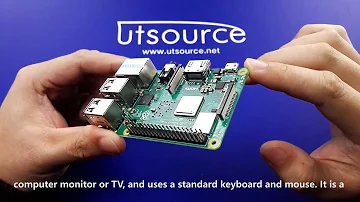
A single-board computer is a complete computer built on one circuit board. It carries a processor, memory, a storage interface, and a set of input and output ports, and it boots and runs a full operating system, most commonly a Linux distribution. Where a development board centers on one chip you intend to evaluate, an SBC is a self-contained machine you intend to use.
Plug in a display, a keyboard, and storage, and an SBC behaves like a small desktop PC. That makes the category attractive for general-purpose computing, edge workloads that need real processing power, multimedia playback, networking appliances, and any project where you want to run ordinary application software rather than write low-level firmware. Engineers reach for SBCs when the task benefits from a file system, a network stack, multitasking, and the enormous library of existing software that targets a mainstream operating system.
Because an SBC runs a familiar OS, the development experience resembles working on a laptop: you write and run programs in high-level languages, install packages, and lean on standard tooling. The board's general-purpose pins still let you talk to sensors and actuators, but the headline value is having a real computer in a compact, low-cost form factor.
A Short History: From Evaluation Kits to Arduino and Raspberry Pi
The lineage starts with the engineers' world. As microprocessors and later microcontrollers spread, silicon vendors shipped evaluation kits so customers could test a new part without first designing a board around it. These kits were aimed squarely at professionals and assumed familiarity with datasheets, toolchains, and debuggers.
Arduino widened the audience dramatically. By packaging an accessible microcontroller board with a simple programming environment and a friendly community, it brought hardware prototyping to students, artists, and hobbyists who had never touched a debugger. The exact timeline and product details are best read on Arduino's own site, but the cultural shift is the point: microcontroller development stopped being the exclusive territory of embedded specialists.
The single-board computer category reached a similar tipping point with Raspberry Pi class boards, which put an inexpensive, Linux-capable computer in millions of hands. Again, treat any specific dates or "first ever" claims with caution and rely on the manufacturer's documentation for particulars; what matters here is the trajectory, from professional evaluation kits, to accessible microcontroller boards, to mainstream single-board computers.
Development Board vs SBC: The Core Differences
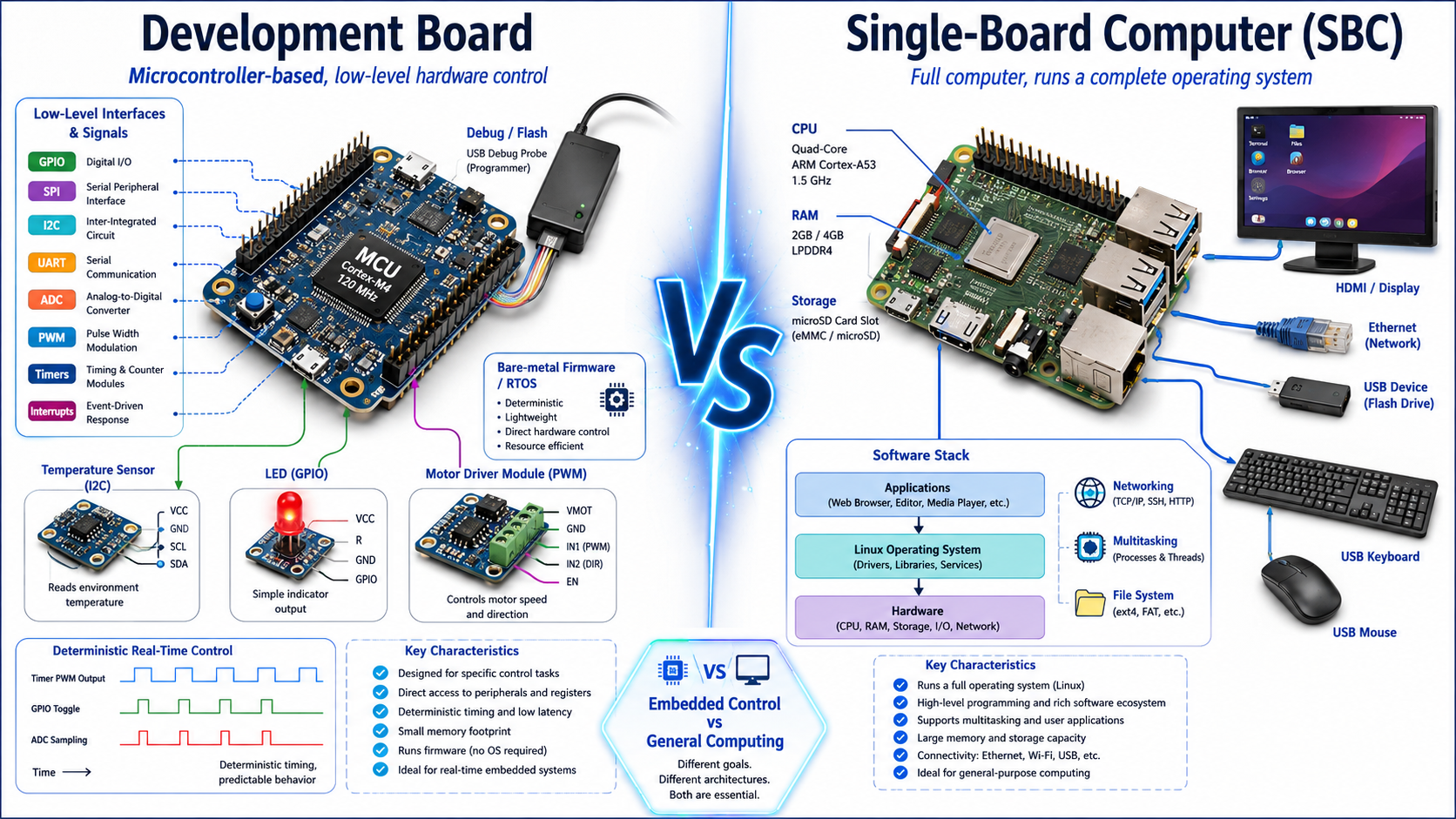
The heart of the distinction comes down to four dimensions: the processing model, the software model, the I/O focus, and the intended use. A development board is usually built on a microcontroller and is optimized for direct, deterministic hardware control. An SBC is built on an application processor and is optimized for running a full operating system and general software.
| Dimension | Development board (evaluation board) | Single-board computer (SBC) |
|---|---|---|
| Core silicon | Microcontroller, SoC, or FPGA being evaluated | Application processor with memory controller |
| Software | Bare-metal firmware or an RTOS | Full operating system, often Linux |
| Primary focus | Low-level peripherals and pin access | High-level ports and general computing |
| Typical workload | Embedded control, prototyping, sensor work | Computing, networking, multimedia, edge apps |
| How you program it | Vendor IDE/SDK, flashed over a debug probe | Install an OS image, then develop like on a PC |
| Determinism | Strong real-time, predictable timing | OS scheduling, less hard real-time by default |
Neither column is "better." A board that excels at toggling a pin in a precise number of microseconds is a poor choice for transcoding video, and a board that streams media effortlessly is overkill for a battery-powered sensor that wakes once a minute. The right answer follows the workload.
Software and Programming Model: Bare-Metal/RTOS vs a Full OS
How you actually build software differs sharply between the two, and this is where many projects succeed or stall. On a microcontroller development board, you generally write firmware in the vendor's IDE or SDK, compile it for the target, and flash it onto the chip over a hardware debug probe. Your code may run bare-metal, owning the processor directly, or on a real-time operating system that schedules tasks with tight timing guarantees. Debugging happens on the silicon itself, stepping through instructions and inspecting registers.
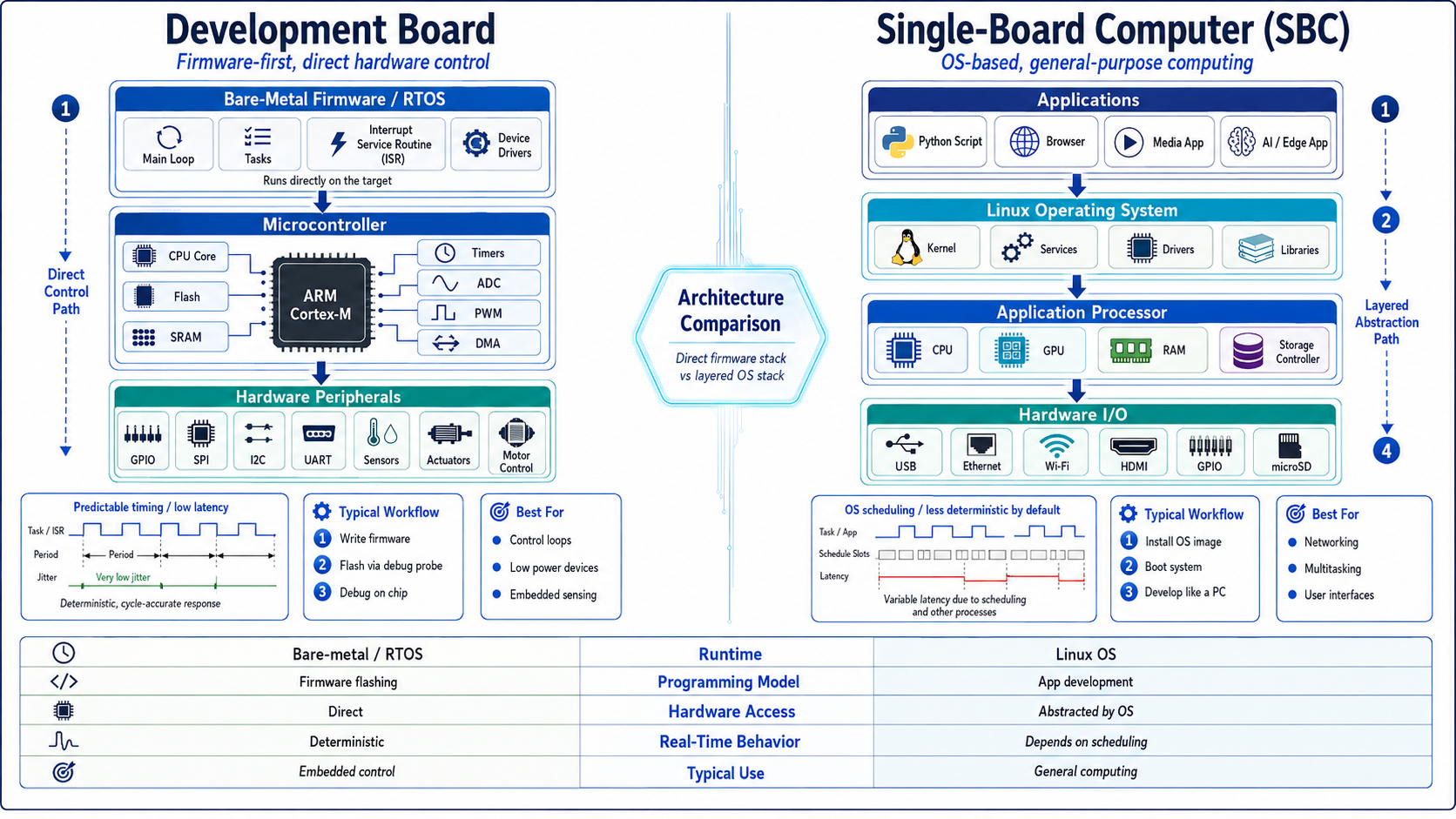
Development boards run firmware directly on hardware, while SBCs rely on layered operating systems and software abstraction.
On an SBC, you start by writing an operating system image to storage, boot the board, and then develop much as you would on any computer. You install packages, run interpreters or compilers locally, and use the same languages, frameworks, and libraries you already know from desktop or server work. The trade-off is that a general-purpose OS introduces scheduling latency, so hard real-time behavior takes extra effort compared with a dedicated microcontroller.
| Aspect | Microcontroller dev board | Single-board computer |
|---|---|---|
| Runtime | Bare-metal or RTOS | General-purpose OS (commonly Linux) |
| Toolchain | Vendor IDE/SDK, cross-compiler | Native package managers and standard dev tools |
| Deployment | Flash firmware via debug probe | Write an OS image to storage, then boot |
| Debugging | On-chip debug, registers and breakpoints | OS-level tools, logs, remote shells |
| Real-time behavior | Predictable, deterministic | Depends on OS scheduling and configuration |
| Best for | Tight control loops, low power, fixed tasks | Multitasking, networking, rich applications |
For precise toolchain steps, supported languages, and configuration details, follow the named vendor documentation, since each ecosystem evolves and the specifics vary by part and OS version.
I/O, Peripherals, and Expansion: What Each Board Exposes
The connectors along the edge of each board tell you what it was built to do. Development boards emphasize low-level access: general-purpose I/O pins, serial buses such as I2C, SPI, and UART, analog inputs, timers, and the headers a debugger needs. This is the toolkit for talking directly to sensors, motor drivers, and other components at the signal level, with the timing control embedded work demands.
Single-board computers lead with higher-level ports: USB for peripherals, wired and wireless networking, a display output, and a storage interface, alongside a header of general-purpose pins for hardware projects. That mix reflects their role as compact computers that also happen to interface with the physical world.
The line keeps blurring at the connectivity layer. Many modern microcontroller boards integrate Wi-Fi and Bluetooth so a small embedded device can join a network, and SBCs ship with rich wireless and wired options as standard. Both categories also support expansion, whether through add-on boards, hats, shields, or standardized connectors, so you can extend a base board without redesigning it. For exact pinouts, supported buses, and expansion compatibility, check the specific board's documentation rather than assuming parity across a family.
How to Choose Between a Development Board and an SBC
A short set of questions usually settles the decision. Does the project need hard real-time, deterministic control, very low power for battery operation, or a simple dedicated task that runs forever? Those constraints point toward a microcontroller development board. Does it instead need to run a full operating system, multitask, handle networking or multimedia, or reuse desktop-style software and libraries? Those needs point toward an SBC.
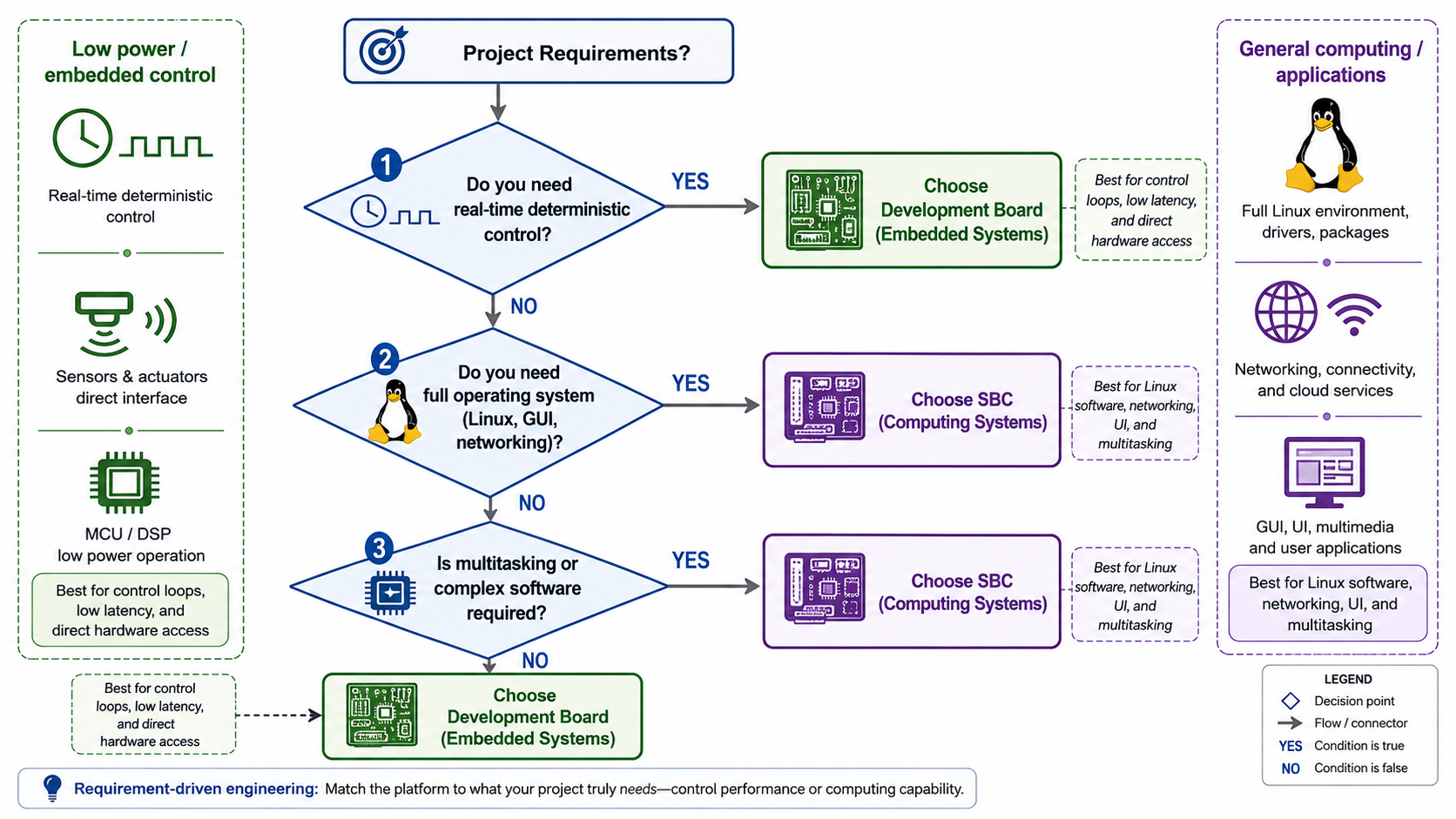
Choosing between a development board and an SBC depends on real-time control needs, operating system requirements, and application complexity.
| If your project needs... | Lean toward |
|---|---|
| Hard real-time, tight timing loops | Microcontroller development board |
| Long battery life and low standby power | Microcontroller development board |
| Direct sensor and actuator control | Microcontroller development board |
| A full OS and a file system | Single-board computer |
| Networking, multimedia, or a display UI | Single-board computer |
| Reusing existing desktop-style software | Single-board computer |
These are tendencies, not laws. Plenty of products pair both: an SBC handles the application layer, networking, and user interface, while a companion microcontroller manages precise, real-time control of the hardware. If your project has both a "thinking" job and a "twitch-reflex" job, splitting them across the two board types is often cleaner than forcing one device to do everything.
Real-World Examples by Vendor (Arduino, Raspberry Pi, STMicroelectronics, Espressif)
Naming real products makes the categories concrete. Arduino boards are the familiar entry point to accessible microcontroller development, pairing approachable hardware with a simple programming flow for prototyping and learning. STMicroelectronics offers Nucleo, Discovery, and broader evaluation boards built around its microcontrollers, giving engineers a vendor-supported way to evaluate a specific device with debug and expansion access. Espressif's ESP32 development boards illustrate the connected-microcontroller case, integrating wireless connectivity and programmed through the vendor's SDK, typically bare-metal or on an RTOS. On the SBC side, Raspberry Pi is the canonical example of a single-board computer that boots a full operating system and serves education, makers, and professional or edge deployments alike.
For any exact figure, whether clock speeds, memory, pin counts, supported interfaces, or software requirements, go straight to that vendor's official documentation. Specifications change across revisions, and the manufacturer's current pages are the only reliable source for the precise numbers.
Frequently Asked Questions
Is a Raspberry Pi a development board or a single-board computer?
It is a single-board computer. It carries a processor, memory, storage interface, and I/O on one board and boots a full operating system, so it behaves like a compact PC rather than a chip-evaluation platform.
What is the difference between a microcontroller board and an SBC?
A microcontroller board centers on a single embedded chip and usually runs bare-metal firmware or an RTOS for direct, deterministic hardware control. An SBC runs a full operating system on an application processor and is built for general computing, networking, and multitasking.
Can a development board run Linux?
Some can, particularly boards built on more capable application-class processors, but a typical microcontroller development board does not run a desktop-style Linux; it runs bare-metal code or an RTOS. Check the specific part's documentation to see what it supports.
Is an Arduino a single-board computer?
No. Arduino boards are microcontroller development boards intended for prototyping and embedded control, not single-board computers that boot a general-purpose operating system.
What is the difference between an evaluation board, a demonstration board, and a reference design?
An evaluation board (or kit) helps you assess a specific part, a demonstration board showcases a particular feature or use case, and a reference design is the documented schematic and layout you adapt for your own product. The terms overlap, and vendors apply them differently, so confirm the meaning on the manufacturer's page.
Do I need an operating system to use a development board?
Not necessarily. Many microcontroller development boards run bare-metal firmware with no operating system, while others use a lightweight RTOS when you need task scheduling and timing guarantees.
When should I use an SBC instead of a microcontroller development board?
Choose an SBC when you need to run a full operating system, multitask, handle networking or multimedia, or reuse desktop-style software. Choose a microcontroller development board when you need tight real-time control, low power, or a simple dedicated task.
Sources and References
Arduino official documentation shows how an accessible microcontroller development board family is programmed and used for prototyping; treat exact board specifications as subject to revision and confirm them on the current product pages.
Raspberry Pi documentation describes a single-board computer that runs a full operating system across education and professional use; specific model details change over time, so verify the precise figures there.
STMicroelectronics evaluation tools illustrate how a silicon vendor provides evaluation and development boards built around a specific microcontroller; the exact connectors and supported features depend on each board, so check its own page.
Espressif developer kits and documentation demonstrate connected microcontroller development with integrated wireless and a vendor SDK; the supported interfaces vary by board, so rely on the official docs for specifics.
Wikipedia: Single-board computer gives a general definition of an SBC as a complete computer on one board; as an encyclopedic overview it is useful for concepts rather than authoritative product specifications.
element14 community discussion on SBCs and dev boards reflects how practitioners frame the distinction; as a community thread it captures perspective and intent rather than verified technical figures.
 UTMEL
UTMEL
We are the professional distributor of electronic components, providing a large variety of products to save you a lot of time, effort, and cost with our efficient self-customized service. careful order preparation fast delivery service
 Getting Started with Arduino: What is Arduino and How to Use Arduino BoardsUTMEL28 September 20237253
Arduino is an open-source electronics platform that includes software and programmable circuit boards, allowing beginners to build electronic projects by writing simple code. The article provides an overview of Arduino, including different board types, basic components, how to use the boards, and project ideas like an automated plant watering system.
Read More IoT Chips Lead Time 2026: Navigating MCU, PMIC, and Sensor ShortagesUTMEL15 July 2026920
Navigating component supply and allocation challenges in the 2026 IoT market. This procurement trend brief provides electronics engineers and component sourcing teams with a data-driven analysis of the IoT chips lead time 2026 landscape, detailing supply bottlenecks and alternative design strategies.
Read More MCU with Built-in NPU: How to Pick an Edge AI Microcontroller in 2026UTMEL30 July 20261432
Evaluating Edge AI microcontrollers requires looking beyond vendor-quoted TOPS metrics. This guide explains how to segment candidate parts into sensor, control, or vision tiers, calculate binding SRAM constraints, verify NPU operator support to avoid CPU fallbacks, and navigate production lifecycle risks. Follow a practical five-step engineering sequence to benchmark real models on physical evaluation boards.
Read More Top 5 Microcontrollers Defining IoT, Edge AI, and Power Efficiency in 2026: Sourcing and Selection GuideUTMEL15 August 2026766
This guide reviews the top five microcontrollers defining 2026 embedded designs—ESP32-S3, STM32U5, MSPM0G5187, CH32V003, and nRF54. It evaluates how contiguous SRAM limits, power duty cycling, and hardware acceleration impact edge AI and IoT performance. It also details strategic procurement methods for navigating mature-node supply chain risks, dual-footprint layouts, and component authentication.
Read More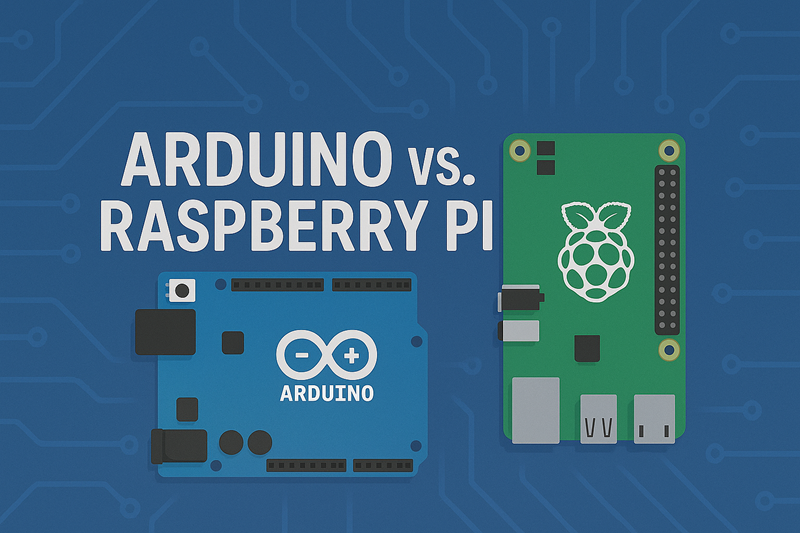 Arduino vs. Raspberry Pi: A Detailed ComparisonUTMEL24 April 20255869
Hello everyone, welcome to the new post today.This guide is going to talk in detail about Arduino vs. Raspberry Pi to clarify their differences and help you pick the right board based on your needs.
Read More
Subscribe to Utmel !
![4225]() 4225
4225HEYCO PRODUCTS
![4205]() 4205
4205HEYCO PRODUCTS
![MTFC64GASAQHD-IT]() MTFC64GASAQHD-IT
MTFC64GASAQHD-ITMicron Technology
![MTFC128GAOANAMF1-WT]() MTFC128GAOANAMF1-WT
MTFC128GAOANAMF1-WTMicron Technology
![EMMC04G-M627-E03U]() EMMC04G-M627-E03U
EMMC04G-M627-E03UKingston
![MTFC64GASAOEA-WT ES]() MTFC64GASAOEA-WT ES
MTFC64GASAOEA-WT ESMicron Technology
![MTFC128GAVATTC-IT TR]() MTFC128GAVATTC-IT TR
MTFC128GAVATTC-IT TRMicron Technology
![IS21ES04G-BCLI]() IS21ES04G-BCLI
IS21ES04G-BCLIISSI
![AAR]() AAR
AARCooper
![110060010]() 110060010
110060010Seeed