Product
 Brand
Brand Articles
 Tools
Tools
Pull-Down Circuit Guide: Working Principle, Resistor Value, Circuit Design, and Applications
A pull-down circuit is one of the simplest ways to make a digital input behave predictably. It uses a resistor connected between a signal node and ground, so the node reads as a defined logic LOW whenever no active device is driving it HIGH. In practical electronics, that small resistor prevents floating inputs, false button presses, random state changes, and unstable startup behavior.
Pull-down circuits are common in microcontroller buttons, logic inputs, MOSFET gates, transistor bases, sensor interfaces, and reset or enable pins. The idea is simple, but the design choice is not arbitrary. A pull-down resistor must be strong enough to overcome leakage, noise, and capacitance, but weak enough to avoid wasting current or loading the driving signal.
This guide explains how a pull-down circuit works, how to choose a resistor value, where pull-downs are used, and what mistakes to avoid in real circuit design.
What Is a Pull-Down Circuit?
A pull-down circuit is a circuit arrangement that connects a signal node to ground through a resistor. When no other device drives the node, the resistor gently pulls the voltage down to 0 V, creating a default LOW logic state.
In a typical microcontroller button circuit:
One side of the pushbutton connects to VCC.
The other side connects to the microcontroller input pin.
A resistor connects that same input node to ground.
When the button is open, the resistor pulls the input LOW.
When the button is pressed, the switch connects the input to VCC and the pin reads HIGH.
The resistor is important because it does not short VCC directly to ground when the button is pressed. Instead, it allows a small current to flow while the input node is held HIGH.
Why Floating Inputs Are a Problem
A digital input is designed to interpret voltage as logic 0 or logic 1. It is not designed to make sense of a disconnected wire. If a pin is left floating, its voltage can drift because of nearby electric fields, leakage current, capacitive coupling, human touch, PCB contamination, or electromagnetic noise.
A floating input can cause symptoms such as:
Random HIGH or LOW readings.
False switch triggers.
Higher current consumption from internal input stages.
Unstable startup states.
Intermittent failures that appear only when a cable, hand, motor, relay, or RF source is nearby.
The pull-down resistor fixes this by giving the input node a known reference path to ground.
Pull-Down Circuit Working Principle
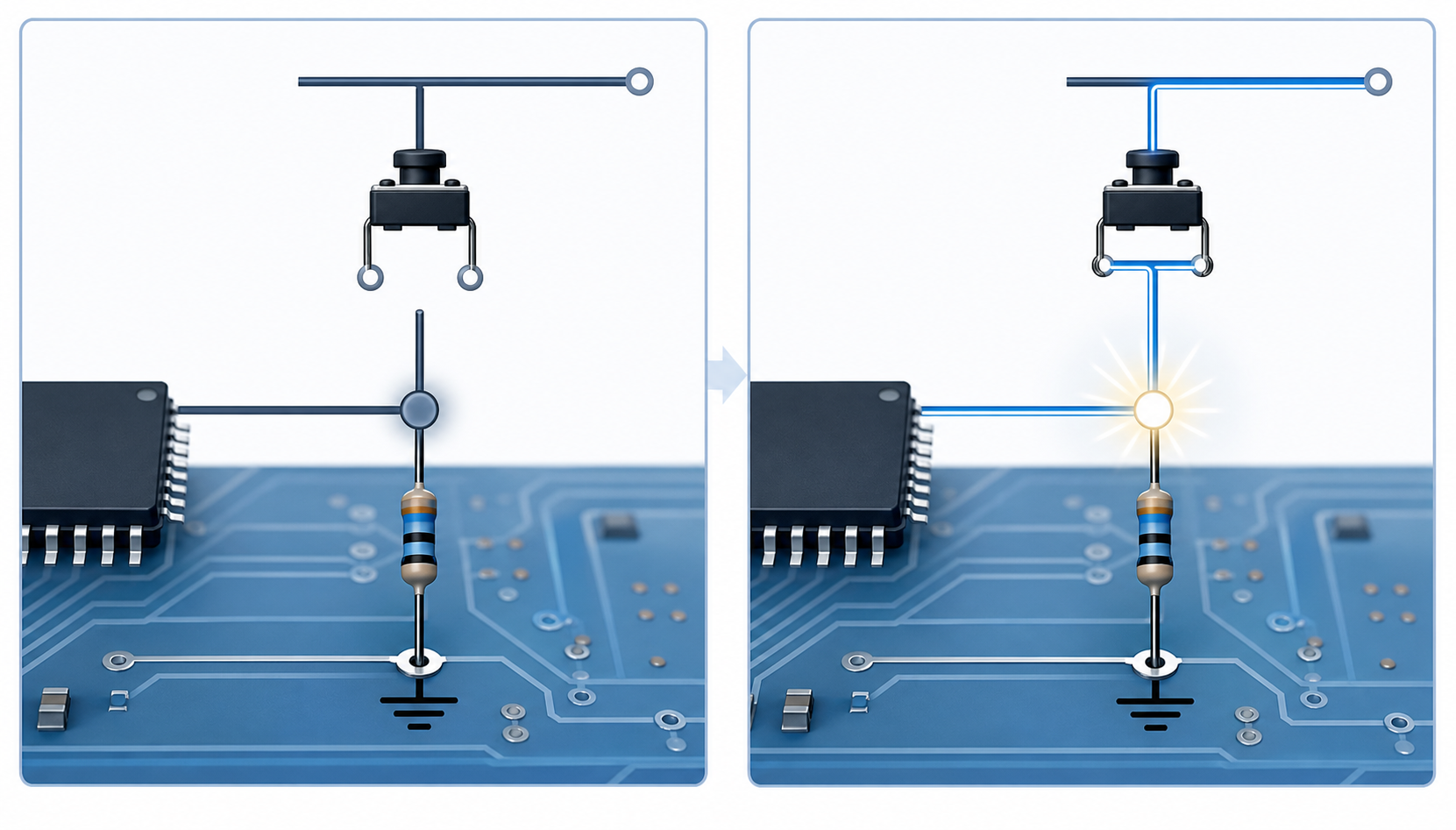
The working principle is based on Ohm's law and logic input thresholds.
When the switch is open, the input node is connected to ground through the pull-down resistor. Because the microcontroller input draws only a tiny leakage current, the voltage at the node stays close to 0 V. The input reads LOW.
When the switch is closed, the input node is connected directly to VCC through the switch. The input reads HIGH. At the same time, current flows from VCC through the pull-down resistor to ground:
I = VCC / R
For example, with a 5 V supply and a 10 kilohm pull-down resistor:
I = 5 V / 10,000 ohm = 0.5 mA
That current is usually acceptable for a pushbutton input. But if the resistor were 1 kilohm, the current would rise to 5 mA. If the resistor were 100 kilohm, the current would fall to 0.05 mA, but the node would become weaker against noise and slower when capacitance is present.
Pull-Down Resistor vs Pull-Up Resistor
Pull-down and pull-up resistors solve the same general problem: they define a default logic state for a signal node.
A pull-down resistor connects the signal node to ground and creates a default LOW state. An external switch, driver, or transistor then pulls the node HIGH when active.
A pull-up resistor connects the signal node to VCC and creates a default HIGH state. An external switch, driver, or transistor then pulls the node LOW when active.
The difference is the default state and the active state:
| Circuit type | Resistor connection | Default state | Active action |
|---|---|---|---|
| Pull-down | Signal to ground | LOW | Drive signal HIGH |
| Pull-up | Signal to VCC | HIGH | Drive signal LOW |
Pull-ups are especially common with open-drain and open-collector outputs, because those devices can pull the line LOW but cannot drive it HIGH by themselves. Pull-downs are common when a circuit needs a default OFF or LOW state, such as a button input that becomes HIGH only when pressed.
Common Pull-Down Circuit Design
The most common pull-down circuit is a pushbutton input for a microcontroller, FPGA, logic gate, or embedded controller.
Basic connection:
VCC -> pushbutton -> input node -> microcontroller input
input node -> pull-down resistor -> GND
When the button is not pressed, the resistor holds the input at ground. When the button is pressed, the switch connects the input to VCC.
For a practical design, also consider:
Software debounce or a hardware debounce network.
Input protection if the button is off-board or connected by a cable.
ESD protection for exposed buttons or connectors.
PCB trace length and nearby noisy signals.
Whether the microcontroller already enables an internal pull-up or pull-down.
Internal pull-down resistors are convenient, but they are usually weak and have broad tolerance. For production hardware, an external resistor is often preferred when noise margin, startup state, or timing matters.
How to Choose a Pull-Down Resistor Value
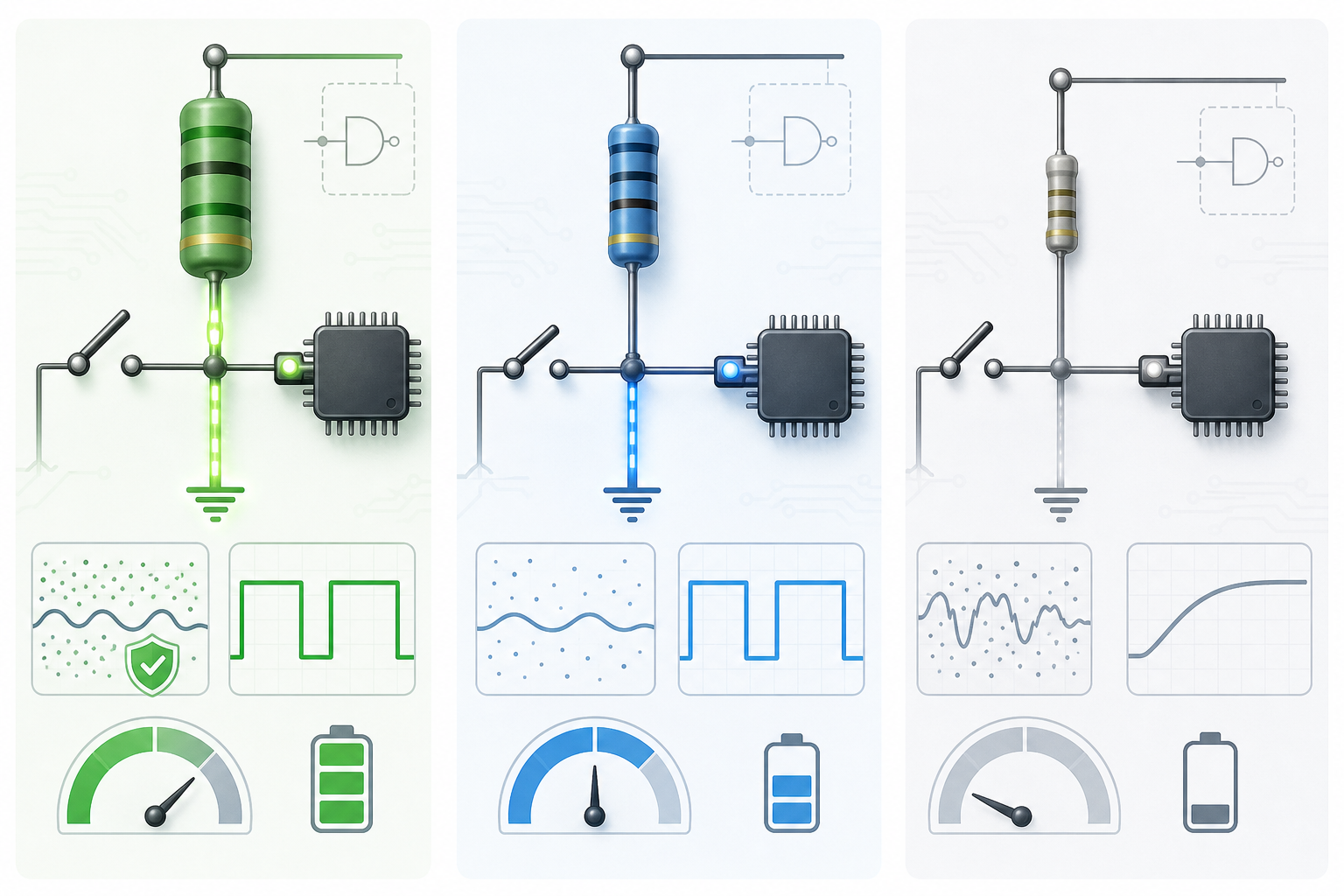
A common starting value for a pull-down resistor is 10 kilohm. It works well for many microcontroller button inputs because it keeps current moderate while giving the input a reasonably firm reference to ground.
However, there is no universal value. The correct resistor depends on the input leakage current, logic thresholds, supply voltage, noise environment, capacitance, speed requirement, and current budget.
Typical ranges:
| Pull-down value | Typical use | Tradeoff |
|---|---|---|
| 1 kilohm to 4.7 kilohm | Noisy wiring, faster discharge, stronger defined state | More current when the node is driven HIGH |
| 4.7 kilohm to 10 kilohm | General digital inputs and pushbuttons | Balanced default choice |
| 47 kilohm to 100 kilohm | Low-power circuits with short traces and low leakage | Lower current but weaker noise immunity and slower response |
| Above 100 kilohm | Ultra-low-power or special high-impedance circuits | Must be checked carefully against leakage and noise |
Check the HIGH-State Current
When the signal is driven HIGH, the pull-down resistor creates a path from VCC to ground. The current is:
I = VCC / R
At 3.3 V:
1 kilohm draws about 3.3 mA.
4.7 kilohm draws about 0.70 mA.
10 kilohm draws about 0.33 mA.
100 kilohm draws about 0.033 mA.
For a battery-powered product, that difference can matter if the signal spends much of its time HIGH.
Check Input Leakage and Logic Thresholds
The pull-down must keep the input below the maximum LOW input voltage, usually listed in the datasheet as VIL(max). Leakage current can raise or lower the node depending on the device and topology.
A useful design check is:
R must be low enough that leakage current cannot move the node above VIL(max).
In simplified form, if leakage current tends to pull the node upward:
R <= VIL(max) / leakage current
Always use the worst-case leakage current and threshold values from the datasheet, especially across temperature.
Check RC Timing
The resistor and the node capacitance form an RC network:
tau = R x C
A larger resistor gives a larger time constant, which means the node may change more slowly. This matters for fast inputs, long cables, high capacitance, MOSFET gates, or signals that must settle quickly after power-up.
Check Noise Environment
High-value pull-down resistors save current, but they create a weaker path to ground. Long wires, relays, motors, switching converters, RF modules, and high-impedance sensor nodes can all inject noise. In those situations, a lower resistor value, filtering, shielding, Schmitt-trigger input, or improved PCB layout may be needed.
Pull-Down Circuit Applications
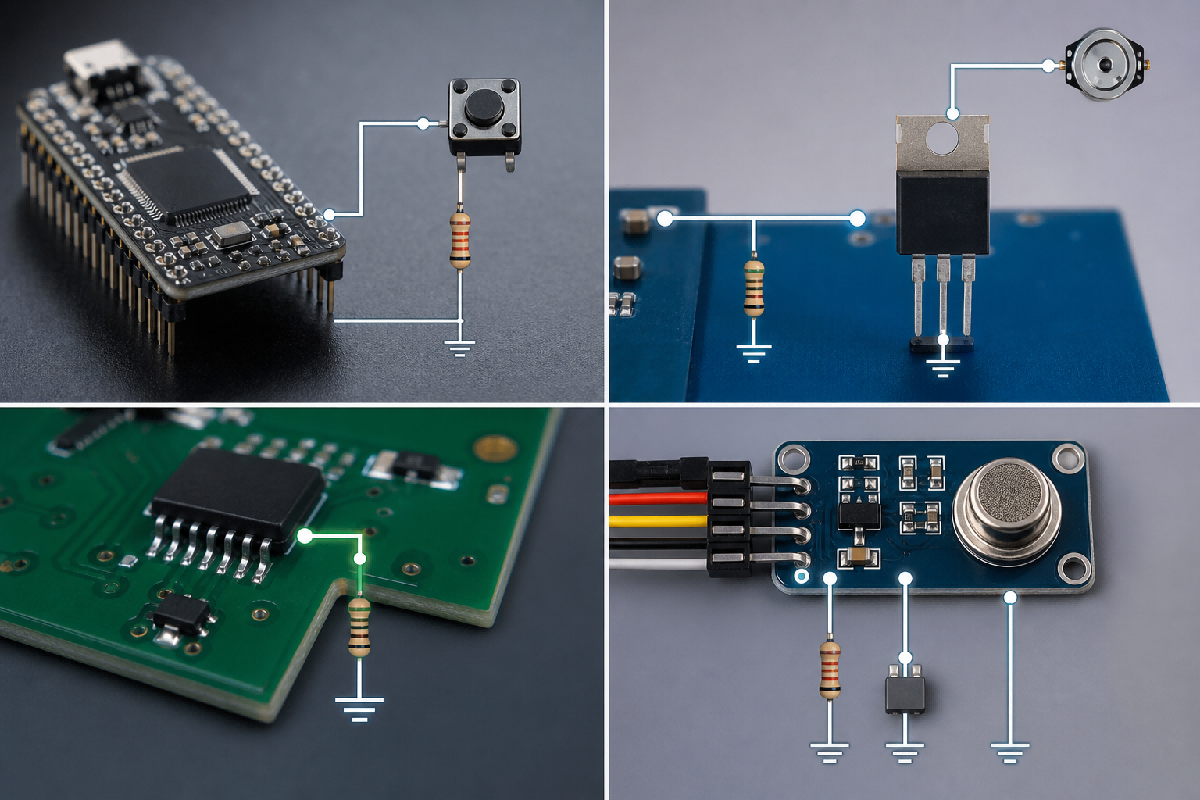
Pull-down circuits appear anywhere a default LOW state is needed.
Microcontroller Button Inputs
The classic use case is a pushbutton connected to an MCU input. The pull-down resistor holds the input LOW until the user presses the button. This creates active-HIGH button logic, which is easy to read in firmware:
button not pressed = LOW
button pressed = HIGH
Many microcontrollers include internal pull-up or pull-down resistors, but external resistors are still common when the product needs stronger noise immunity, known tolerance, or stable behavior during reset.
MOSFET Gate Pull-Downs
An N-channel MOSFET gate is insulated and can hold charge. If the gate is left floating, the MOSFET may partially turn on, heat up, or switch unpredictably. A pull-down resistor from gate to source or ground bleeds off charge and keeps the MOSFET OFF during startup, reset, or when the driver is disconnected.
Typical MOSFET gate pull-down values often range from 10 kilohm to 100 kilohm, but fast switching, high noise, and gate capacitance can justify a stronger value.
BJT Base Pull-Downs
A pull-down resistor on the base of an NPN transistor can help keep it off when the driving signal is high impedance. It also gives leakage current a safe path to ground.
Reset, Enable, and Mode Pins
Many ICs have reset, enable, boot-mode, configuration, or address pins that must not float during startup. A pull-down can set the default state until a controller actively drives the pin. Always check the datasheet because some pins require pull-ups, some require pull-downs, and some have internal biasing.
Unused Digital Inputs
Unused CMOS inputs should not be left floating unless the datasheet explicitly allows it. A pull-down resistor can set a defined LOW state. In many cases, tying the input directly to ground or configuring it properly in firmware may also be acceptable, but the right choice depends on the device.
Sensor and Interface Circuits
Some sensor outputs, comparator outputs, and interface nodes need a defined default state when the source is disconnected or inactive. Pull-downs can be useful in active-HIGH interface designs. For open-drain and open-collector outputs, pull-ups are more common, so do not assume a pull-down is correct unless the output topology and logic polarity require it.
Pull-Down Circuit Design Example
Suppose you need a 3.3 V pushbutton input for a microcontroller. The button connects the input to 3.3 V when pressed. You want the input LOW when the button is open.
Start with a 10 kilohm pull-down resistor.
HIGH-state current:
I = 3.3 V / 10,000 ohm = 0.33 mA
For many MCU inputs, 0.33 mA while pressed is acceptable. If the button is on a long cable or near noise sources, you might use 4.7 kilohm to strengthen the pull-down. If the product is battery-powered and the trace is short, 47 kilohm may be acceptable after checking leakage, thresholds, and noise.
Add firmware debounce because mechanical switches do not transition cleanly. If the input is exposed to a user-accessible connector or external wiring, add appropriate protection and filtering.
Common Pull-Down Circuit Mistakes
Leaving the Input Floating
The most basic mistake is omitting the pull-down entirely. The circuit may work on a bench and fail in the field because the input is actually undefined.
Using a Resistor Value That Is Too High
A very high resistor reduces current, but it also weakens the reference to ground. The input becomes more sensitive to leakage, contamination, capacitance, and noise.
Using a Resistor Value That Is Too Low
A very low resistor gives a strong LOW state but wastes current whenever the signal is HIGH. It may also load a weak output driver.
Fighting an Internal Pull-Up
If a microcontroller has an internal pull-up enabled while an external pull-down is installed, the two resistors form a divider. The input voltage may land in an undefined region, or the circuit may waste current. Always confirm firmware pin configuration.
Ignoring Logic Polarity
A pull-down button circuit is active HIGH. A pull-up button circuit is active LOW. Firmware, labels, and test procedures should match the hardware logic.
Forgetting Startup Behavior
During reset, boot, or programming, MCU pins may be high impedance. If a MOSFET gate, enable pin, or relay driver must stay off, use a pull-down that works before firmware starts running.
Treating 10 Kilohm as a Rule
10 kilohm is a good starting point, not a law. Production designs should still check datasheet limits, leakage current, timing, power, and noise margin.
Pull-Down Circuit Checklist
Before finalizing a pull-down circuit, verify:
The required default state is LOW.
The active driver can reliably drive the node HIGH.
The pull-down current at HIGH state is acceptable.
The resistor is low enough for leakage and logic thresholds.
The resistor is not so low that it overloads the driver.
RC timing meets the required response time.
Noise environment and trace length are considered.
Internal pull-ups or pull-downs do not conflict with the external resistor.
Firmware logic matches the hardware polarity.
Startup, reset, and sleep states are safe.
FAQ
What is the purpose of a pull-down resistor?
The purpose is to hold a signal node at a defined LOW voltage when no active device is driving it. This prevents floating inputs and random logic states.
What is the most common pull-down resistor value?
10 kilohm is a common starting value for microcontroller inputs and pushbutton circuits. Depending on the design, values from 1 kilohm to 100 kilohm are also common.
Can I use an internal pull-down resistor?
Yes, if the microcontroller provides one and its value, tolerance, and startup behavior are acceptable. External pull-downs are often better for stronger biasing, known resistance, and noise-sensitive designs.
Does a pull-down resistor waste power?
It only draws significant current when the node is driven HIGH. The current is approximately VCC divided by the resistor value.
Is a pull-down resistor required for every input?
No. Some inputs are actively driven by another device, some have internal biasing, and some may be tied directly to a fixed level. But any high-impedance input that can float needs a defined state.
Conclusion
A pull-down circuit is a small part of a design, but it has a large effect on reliability. By connecting a signal node to ground through a resistor, it gives digital logic a known default LOW state and prevents random behavior from floating inputs.
For many microcontroller circuits, 10 kilohm is a practical starting value. For real products, the final value should be checked against leakage current, input thresholds, current consumption, RC timing, noise, and startup behavior. The best pull-down resistor is not simply the one that works in a quick test. It is the one that keeps the circuit predictable under real operating conditions.
Sources and Usage Notes
| Source | Source type | Used for | Caution |
|---|---|---|---|
| Texas Instruments, Choosing an Appropriate Pull-up/Pull-down Resistor | Semiconductor manufacturer application report | Resistor selection tradeoffs, current limits, leakage, and logic-level considerations | Focuses heavily on open-drain and pull-up/pull-down selection; adapt equations to the exact topology and datasheet |
| EEPower, Pull-up and Pull-down Resistors | Electronics educational reference | Basic pull-up and pull-down concepts, switch and digital input context | Educational overview; detailed production designs require device datasheets |
| Power Electronics News, Understanding Pull-Down Resistors | Technical tutorial | Pull-down applications, value range, current, and power considerations | Tutorial-level source; verify limits in the component datasheet |
| Newark Pull-up / Pull-down Resistor Calculator | Distributor calculator and reference | Practical calculation context and resistor-value workflow | Calculator assumptions must match the actual circuit |
| Seeed Studio, Pull-up Resistor vs Pull-down Resistor Arduino Guide | Maker and embedded tutorial | Microcontroller button examples and Arduino-style explanation | Useful for examples, not a substitute for MCU datasheets |
| Utmel, Differences Between Pull-up and Pull-down Resistors | Existing site background article | Internal topic continuity and comparison framing | Should not be the sole authority for calculation claims |
 UTMEL
UTMEL
We are the professional distributor of electronic components, providing a large variety of products to save you a lot of time, effort, and cost with our efficient self-customized service. careful order preparation fast delivery service
 Pull-Down Circuit Guide: Working Principle, Resistor Value, Circuit Design, and ApplicationsUTMEL26 June 2026500
Learn how pull-down circuits work, how to choose a pull-down resistor value, and how to design reliable microcontroller inputs, MOSFET gates, reset pins, and sensor interfaces.
Read More Smd Components Outlook 2026: Supply, Lead Times, and Sourcing OptionsUTMEL21 July 2026908
The 2026 electronic component market faces a selective shortage driven by AI infrastructure and electric vehicles. While active ICs face lead times up to 55 weeks, commodity SMD passives remain stable at 12–20 weeks. This procurement guide details key trends in MLCCs and circuit protection, outlining actionable strategy solutions like dual-sourcing and flexible footprints to mitigate supply chain risks.
Read More Decoupling Capacitor Placement Guide: Maximizing Power Integrity in High-Speed Digital PCBsUTMEL12 August 2026487
This technical guide details how to optimize decoupling capacitor layout to maximize Power Integrity (PI) in high-speed digital PCBs. It explains how switching ICs induce power rail noise, the physics of parasitic loop inductance, and the impact of stackup plane separation. Layout engineers will find practical strategies for via placement, anti-resonance mitigation across multi-value capacitor networks, and sourcing reliable low-ESR MLCCs.
Read More sar-adc-reference-driver-selection-managing-dynamic-kickback-noise-loop-stabilityUTMEL17 September 2026161
Precision SAR ADCs present high-speed dynamic switched-capacitor loads that demand instantaneous transient currents during bit trials. This guide details how to size local decoupling capacitors accounting for MLCC DC bias derating, stabilize reference buffers using dual-loop in-loop compensation, and minimize multiplicative noise degradation. It also provides layout directives and dynamic bench verification protocols across sampling rate sweeps and burst modes.
Read More HF PCB Circuit Design 10 QuestionsUTMEL16 March 20225523
Hello everyone, I am Rose. Today I want to give you a full explanation about PCB design. I Hope the following ten questions will give you a satisfied answer.
Read More
Subscribe to Utmel !
![MP4-1W-1W-10]() MP4-1W-1W-10
MP4-1W-1W-10Emerson
![NSS040A0X-62Z]() NSS040A0X-62Z
NSS040A0X-62ZGeneral Electric
![MP6-1W-1W-1W-4NE-4NN-00]() MP6-1W-1W-1W-4NE-4NN-00
MP6-1W-1W-1W-4NE-4NN-00Emerson
![BM2P063MF-ZE2]() BM2P063MF-ZE2
BM2P063MF-ZE2ROHM Semiconductor
![PQAE50-D24-S5-D]() PQAE50-D24-S5-D
PQAE50-D24-S5-DCUI Inc
![L6R160D-190-C6]() L6R160D-190-C6
L6R160D-190-C6Curtis Industries
![XG7]() XG7
XG7OptiFuse
![RPMH3.3-1.5]() RPMH3.3-1.5
RPMH3.3-1.5RECOM Power
![20A24-N15-I5-5PPM-F-M-1]() 20A24-N15-I5-5PPM-F-M-1
20A24-N15-I5-5PPM-F-M-1Advanced Energy
![20A24-P15-I10-5PPM-F-M-H-1]() 20A24-P15-I10-5PPM-F-M-H-1
20A24-P15-I10-5PPM-F-M-H-1Advanced Energy