

 Product
 Brand
Brand Articles
 Tools
Tools
3 simple steps to get Yageo CC0603KRX7R9BB103 models

CC 10000pF Ceramic Capacitor ±10% X7R 0.063Lx0.031W 1.60mmx0.80mm -55°C~125°C 2 Terminations Surface Mount, MLCC 0603 (1608 Metric)
Unit Price: $0.029012
Ext Price: $0.03


CC 10000pF Ceramic Capacitor ±10% X7R 0.063Lx0.031W 1.60mmx0.80mm -55°C~125°C 2 Terminations Surface Mount, MLCC 0603 (1608 Metric)
Download and use Yageo CC0603KRX7R9BB103 PCB footprints and 3D models in three easy steps. Ensure compatibility with your EDA software for smooth design.
Product Introduction
You want to use Yageo CC0603KRX7R9BB103 in your PCB project. You can get the right footprints and 3D models quickly. Choose trusted sources and check for formats that work with your design software. Both new and experienced designers can follow these steps for a smooth experience.
Find Yageo CC0603KRX7R9BB103 Models
Search Trusted Libraries
You can start your search for Yageo CC0603KRX7R9BB103 models by visiting trusted online libraries. DigiKey stands out as a reliable and authorized source for this component. When you use DigiKey, you get access to detailed product information, EDA/CAD models, and even a Reference Design Library. DigiKey also offers tools like PCB Builder and Scheme-it, which help you plan and design your circuit boards with confidence.
Other popular platforms include SnapEDA, Octopart, and Mouser. You can type "Yageo CC0603KRX7R9BB103" into the search bar on these sites. Each platform provides schematic symbols, PCB footprints, 3D models, and datasheets. These resources help you make sure your design uses the correct part and follows the right specifications.
Using trusted sources like DigiKey helps you avoid counterfeit or low-quality parts. This keeps your PCB designs reliable and ensures your projects work as expected.
Use Manufacturer Resources
You can also go straight to the manufacturer for the most accurate models. Yageo provides official resources for the CC0603KRX7R9BB103 model. On the product page, you will find a free CAD model, a datasheet, and contact information if you need more help. Here is a quick overview:
| Information Type | Details |
|---|---|
| Product Model | CC0603KRX7R9BB103 |
| Manufacturer | Yageo |
| Product Description | 10000 pF ±10% 50V Ceramic Capacitor X7R 0603 (1608 Metric) |
| Datasheet | Available on the official product page |
| CAD Model | Download Free CAD Model available |
| Packaging | Tape & Reel (TR) |
| Contact Phone Numbers | +1-888-251-5467, +1-813-463-9988 (US), +49 030 30015566 (DE) |
| Contact Email | sales@microchipusa.com |
| Location | Tampa, FL 33614 |
| Additional Services | Premier Distributor, Supply Chain Optimization, Risk and Obsolescence Management, etc. |
When you use official manufacturer resources, you know you are getting the most up-to-date and accurate files for your Yageo CC0603KRX7R9BB103 component. This helps you avoid mistakes and keeps your PCB designs strong.
Download Files
Choose File Formats
When you download models for Yageo CC0603KRX7R9BB103, you will see different file types. Each file type works with certain design software. The most common formats include:
STEP (.step or .stp): This format gives you a 3D model. You can use it to see how the part fits on your board.
.bxl: This file works with tools like Ultra Librarian. You can convert it to other formats if needed.
.lib and .mod: These files give you schematic symbols and PCB footprints. You can use them in programs like KiCad or Altium.
Tip: Check which file types your PCB design software supports before you download. This helps you avoid extra work later.
Complete the Download
You can download files from trusted sites like DigiKey, SnapEDA, Octopart, and Mouser. Each site has a slightly different process:
DigiKey: Search for Yageo CC0603KRX7R9BB103. Click on the product page. Look for the "EDA/CAD Models" section. Click the download button. You may need to create a free account.
SnapEDA: Type the part number in the search bar. Choose the format you need. Click "Download". You might need to sign up.
Mouser: Search for the part. If you see a "Download Symbol & Footprint" button, click it. Mouser uses a tool called Library Loader. Download and install Library Loader if you do not have it. Open the file with Library Loader to add it to your design software.
Octopart: Find the part and scroll to the CAD models section. Download the files directly. Some files may need you to log in.
Note: Always scan downloaded files for viruses. Trusted sites keep files safe, but it is smart to check.
You can now use these files in your PCB project. This step saves you time and helps you avoid mistakes.
Import into PCB Software
Add Footprints
You need to bring the downloaded footprints into your design tool. Many designers use DigiKey’s PCB Builder, Reference Design Library, or Scheme-it for this step. These tools let you upload the files you downloaded for Yageo CC0603KRX7R9BB103. You can also use other EDA tools if you prefer. Some popular choices include Altium, Eagle, OrCAD, KiCad, and PADS.
Here is a simple process you can follow in most tools:
Open your EDA software.
Find the option to import or add a new footprint.
Select the downloaded footprint file.
Place the footprint in your library or directly on your PCB layout.
Tip: If you get stuck, search for a video tutorial or check the help section in your software. Many companies post step-by-step guides on YouTube.
Link 3D Models
You can make your PCB design more accurate by linking a 3D model to your footprint. This step helps you see how the part fits on your board. Most EDA tools let you attach a 3D STEP file to the footprint.
Follow these steps:
Open the footprint editor in your EDA tool.
Look for the option to add or link a 3D model.
Choose the STEP file you downloaded for Yageo CC0603KRX7R9BB103.
Adjust the position and rotation if needed.
Note: Linking a 3D model gives you a clear view of your finished board. This helps you spot problems before you build your PCB.
You can always find more help in user forums or by watching official tutorials. Each software has its own steps, but the main idea stays the same. You import the footprint, then link the 3D model for the best results.
Troubleshooting
Fix Import Issues
You might run into a few problems when you import Yageo CC0603KRX7R9BB103 models into your PCB software. Here are some common issues and how you can solve them:
File Not Importing: Sometimes, your software does not recognize the file format. Make sure you downloaded the correct type for your tool. For example, use
.libor.modfiles for KiCad, and STEP files for 3D models.Model Not Displaying: If the 3D model does not show up, check if you linked the STEP file to the footprint. You may need to adjust the model’s position or rotation in the editor.
Missing Pins or Pads: Some footprints may not match your software’s pin mapping. Double-check the pin numbers and pad sizes. You can edit the footprint in your EDA tool if needed.
Corrupted or Incomplete Files: Downloads can fail or files can get corrupted. Try downloading the file again from the trusted source.
Tip: Always keep a backup of your original files. This helps you recover quickly if something goes wrong.
Find More Help
If you still have trouble, you can find answers and support from several places:
User Forums: The DigiKey TechForum stands out as a reliable place to get help with Yageo CC0603KRX7R9BB103 model import problems. Technicians and experienced engineers answer questions quickly and accurately.
Official Tutorials: Many EDA software companies post step-by-step guides and video tutorials. You can search YouTube or the official website for your tool.
Support Teams: Most trusted platforms like SnapEDA, Mouser, and Octopart offer customer support. You can send them your questions by email or through their help centers.
| Resource Type | Where to Find Help |
|---|---|
| Online Forum | DigiKey TechForum |
| Video Tutorials | YouTube, Official EDA Websites |
| Customer Support | SnapEDA, Mouser, Octopart |
Remember: You do not have to solve every problem alone. Many designers share their solutions online, so you can learn from their experience.
You can get Yageo CC0603KRX7R9BB103 models in just three steps: find, download, and import. Most users finish this process in about 2-3 days, as shown below:
| Source | Product Model | Average Time to Complete Process |
|---|---|---|
| goodao.net | Yageo CC0603KRX7R9BB103 | 2-3 days |
| DigiKey | Yageo CC0603KRX7R9BB103 | 1-3 days (shipping time) |
Try these steps for your next PCB project. If you face issues, check user forums for quick answers. Start now to make your PCB design workflow easier and faster!
FAQ
How do you know if the downloaded model matches your PCB software?
You should check the file format before downloading. Most sites list supported formats like STEP, .lib, or .bxl. Your PCB software’s help section or website will show which formats work best.
Can you edit the footprint or 3D model after importing?
Yes, you can edit both footprints and 3D models in most EDA tools. Look for the “Edit” or “Properties” option in your software. This lets you adjust pin numbers, pad sizes, or model placement.
What should you do if the model does not fit your board?
Double-check the part’s size in the datasheet. Open your EDA tool and compare the footprint to your board layout. If needed, adjust the footprint or download a different model.
Do you need to pay for Yageo CC0603KRX7R9BB103 models?
Most trusted sources like DigiKey and SnapEDA offer these models for free. You may need to create a free account. Always check the download page for any fees.
Where can you find more help if you get stuck?
| Resource | How It Helps |
|---|---|
| User Forums | Ask questions, get answers |
| Video Guides | Watch step-by-step demos |
| Support Teams | Get expert help |
You can also search YouTube or your EDA tool’s website for tutorials.
Specifications
- TypeParameter
- Factory Lead Time33 Weeks
- Mount
In electronic components, the term "Mount" typically refers to the method or process of physically attaching or fixing a component onto a circuit board or other electronic device. This can involve soldering, adhesive bonding, or other techniques to secure the component in place. The mounting process is crucial for ensuring proper electrical connections and mechanical stability within the electronic system. Different components may have specific mounting requirements based on their size, shape, and function, and manufacturers provide guidelines for proper mounting procedures to ensure optimal performance and reliability of the electronic device.
Surface Mount - Mounting Type
The "Mounting Type" in electronic components refers to the method used to attach or connect a component to a circuit board or other substrate, such as through-hole, surface-mount, or panel mount.
Surface Mount, MLCC - Package / Case
refers to the protective housing that encases an electronic component, providing mechanical support, electrical connections, and thermal management.
0603 (1608 Metric) - Terminal Shape
Terminal Shape in electronic components refers to the physical design of the connection points on the component that allow for electrical connections to be made. These terminals can come in various shapes such as pins, leads, pads, or terminals with specific configurations like surface mount or through-hole. The terminal shape is important as it determines how the component can be mounted on a circuit board or connected to other components. Different terminal shapes are used based on the specific requirements of the electronic circuit design and manufacturing process.
WRAPAROUND - Number of Pins2
- Material
In electronic components, the parameter "Material" refers to the substance or material used in the construction of the component. The choice of material is crucial as it directly impacts the component's performance, durability, and other characteristics. Different materials have varying properties such as conductivity, resistance to heat, corrosion resistance, and mechanical strength, which determine how the component functions in a circuit. Common materials used in electronic components include metals like copper and aluminum, semiconductors like silicon, insulators like ceramics and plastics, and various alloys. Selecting the appropriate material is essential for designing reliable and efficient electronic components.
Ceramic - Operating Temperature
The operating temperature is the range of ambient temperature within which a power supply, or any other electrical equipment, operate in. This ranges from a minimum operating temperature, to a peak or maximum operating temperature, outside which, the power supply may fail.
-55°C~125°C - Packaging
Semiconductor package is a carrier / shell used to contain and cover one or more semiconductor components or integrated circuits. The material of the shell can be metal, plastic, glass or ceramic.
Tape & Reel (TR) - Series
In electronic components, the "Series" refers to a group of products that share similar characteristics, designs, or functionalities, often produced by the same manufacturer. These components within a series typically have common specifications but may vary in terms of voltage, power, or packaging to meet different application needs. The series name helps identify and differentiate between various product lines within a manufacturer's catalog.
CC - Published2005
- Size / Dimension
In electronic components, the parameter "Size / Dimension" refers to the physical dimensions of the component, such as its length, width, and height. These dimensions are crucial for determining how the component will fit into a circuit or system, as well as for ensuring compatibility with other components and the overall design requirements. The size of a component can also impact its performance characteristics, thermal properties, and overall functionality within a given application. Engineers and designers must carefully consider the size and dimensions of electronic components to ensure proper integration and functionality within their designs.
0.063Lx0.031W 1.60mmx0.80mm - Tolerance
In electronic components, "tolerance" refers to the acceptable deviation or variation from the specified or ideal value of a particular parameter, such as resistance, capacitance, or voltage. It indicates the range within which the actual value of the component can fluctuate while still being considered acceptable for use in a circuit. Tolerance is typically expressed as a percentage or a specific value and is important for ensuring the accuracy and reliability of electronic devices. Components with tighter tolerances are more precise but may also be more expensive. It is crucial to consider tolerance when selecting components to ensure proper functionality and performance of the circuit.
±10% - JESD-609 Code
The "JESD-609 Code" in electronic components refers to a standardized marking code that indicates the lead-free solder composition and finish of electronic components for compliance with environmental regulations.
e3 - Pbfree Code
The "Pbfree Code" parameter in electronic components refers to the code or marking used to indicate that the component is lead-free. Lead (Pb) is a toxic substance that has been widely used in electronic components for many years, but due to environmental concerns, there has been a shift towards lead-free alternatives. The Pbfree Code helps manufacturers and users easily identify components that do not contain lead, ensuring compliance with regulations and promoting environmentally friendly practices. It is important to pay attention to the Pbfree Code when selecting electronic components to ensure they meet the necessary requirements for lead-free applications.
yes - Part Status
Parts can have many statuses as they progress through the configuration, analysis, review, and approval stages.
Active - Moisture Sensitivity Level (MSL)
Moisture Sensitivity Level (MSL) is a standardized rating that indicates the susceptibility of electronic components, particularly semiconductors, to moisture-induced damage during storage and the soldering process, defining the allowable exposure time to ambient conditions before they require special handling or baking to prevent failures
1 (Unlimited) - Number of Terminations2
- Termination
Termination in electronic components refers to the practice of matching the impedance of a circuit to prevent signal reflections and ensure maximum power transfer. It involves the use of resistors or other components at the end of transmission lines or connections. Proper termination is crucial in high-frequency applications to maintain signal integrity and reduce noise.
SMD/SMT - ECCN Code
An ECCN (Export Control Classification Number) is an alphanumeric code used by the U.S. Bureau of Industry and Security to identify and categorize electronic components and other dual-use items that may require an export license based on their technical characteristics and potential for military use.
EAR99 - Temperature Coefficient
The resistance-change factor per degree Celsius of temperature change is called the temperature coefficient of resistance. This factor is represented by the Greek lower-case letter “alpha” (α). A positive coefficient for a material means that its resistance increases with an increase in temperature.
X7R - Terminal Finish
Terminal Finish refers to the surface treatment applied to the terminals or leads of electronic components to enhance their performance and longevity. It can improve solderability, corrosion resistance, and overall reliability of the connection in electronic assemblies. Common finishes include nickel, gold, and tin, each possessing distinct properties suitable for various applications. The choice of terminal finish can significantly impact the durability and effectiveness of electronic devices.
Matte Tin (Sn) - with Nickel (Ni) barrier - Applications
The parameter "Applications" in electronic components refers to the specific uses or functions for which a component is designed. It encompasses various fields such as consumer electronics, industrial automation, telecommunications, automotive, and medical devices. Understanding the applications helps in selecting the right components for a particular design based on performance, reliability, and compatibility requirements. This parameter also guides manufacturers in targeting their products to relevant markets and customer needs.
General Purpose - Capacitance
Capacitance is a fundamental electrical property of electronic components that describes their ability to store electrical energy in the form of an electric field. It is measured in farads (F) and represents the ratio of the amount of electric charge stored on a component to the voltage across it. Capacitors are passive components that exhibit capacitance and are commonly used in electronic circuits for various purposes such as filtering, energy storage, timing, and coupling. Capacitance plays a crucial role in determining the behavior and performance of electronic systems by influencing factors like signal propagation, frequency response, and power consumption.
10000pF - Voltage - Rated DC
Voltage - Rated DC is a parameter that specifies the maximum direct current (DC) voltage that an electronic component can safely handle without being damaged. This rating is crucial for ensuring the proper functioning and longevity of the component in a circuit. Exceeding the rated DC voltage can lead to overheating, breakdown, or even permanent damage to the component. It is important to carefully consider this parameter when designing or selecting components for a circuit to prevent any potential issues related to voltage overload.
50V - Packing Method
The packing method in electronic components refers to the technique used to package and protect the component during shipping and handling. It encompasses various forms including tape and reel, tray, tube, or bulk packaging, each suited for different types of components and manufacturing processes. The choice of packing method can affect the ease of handling, storage, and the efficiency of assembly in automated processes. Additionally, it plays a crucial role in ensuring the reliability and integrity of the components until they are used in electronic devices.
TR, Paper, 7 Inch - Depth
In electronic components, "Depth" typically refers to the measurement of the distance from the front to the back of the component. It is an important parameter to consider when designing or selecting components for a project, as it determines how much space the component will occupy within a circuit or device. The depth of a component can impact the overall size and layout of the circuit board or enclosure in which it will be installed. It is usually specified in millimeters or inches and is crucial for ensuring proper fit and functionality within the intended application.
800μm - Case Code (Metric)
Case Code (Metric) in electronic components refers to a standardized system that specifies the dimensions of surface-mount devices (SMD) in millimeters, consisting of a four-digit number where the first two digits represent the width and the last two digits represent the height of the component, measured in tenths of a millimeter. The metric case codes are standardized by organizations such as the EIA and IEC, and are often compared to the Imperial code which uses inches, allowing for easier identification and selection of components across different regions and industries. This coding system is widely used in the design and manufacturing of electronic devices, particularly in applications requiring compact and efficient component layouts, and is essential for engineers and designers to ensure proper component selection and facilitate the assembly process in electronic manufacturing.
1608 - Case Code (Imperial)
The term "Case Code (Imperial)" in electronic components refers to a standardized system used to specify the physical dimensions and package types of components, particularly capacitors and resistors. This code helps manufacturers and engineers identify the size and form factor of the component, ensuring compatibility with circuit designs and PCB layouts. In the context of electronic components, the Case Code (Imperial) typically follows a numerical format that indicates the length and width of the component in inches. For example, a Case Code of 1206 signifies a component that measures 0.12 inches by 0.06 inches. This coding system is essential for selecting the correct components for specific applications, as it provides a quick reference to the physical characteristics of the part, including its footprint and mounting style.
0603 - Temperature Characteristics Code
The "Temperature Characteristics Code" in electronic components refers to a code or designation that indicates how the component's electrical properties vary with changes in temperature. This code helps users understand how the component will perform under different temperature conditions. It typically consists of a series of letters or numbers that represent the component's temperature coefficient, which is a measure of how the component's electrical characteristics change with temperature. Understanding the temperature characteristics code is important for selecting components that will operate reliably in specific temperature environments and for ensuring the overall performance and stability of electronic circuits.
X7R - Multilayer
The parameter "Multilayer" in electronic components refers to the construction of the component using multiple layers of materials. This construction technique involves stacking several layers of conductive and insulating materials to create a compact and efficient component. Multilayer components are commonly used in various electronic devices to save space and improve performance. The layers are typically interconnected using vias or other methods to ensure proper functionality. Overall, the multilayer design allows for increased functionality and complexity in a smaller form factor, making it a popular choice in modern electronics.
Yes - Insulation Resistance
The measurement of insulation resistance is carried out by means of a megohmmeter – high resistance range ohmmeter. A general rule-of-thumb is 10 Megohm or more.
100GOhm - Voltage
Voltage is a measure of the electric potential difference between two points in an electrical circuit. It is typically represented by the symbol "V" and is measured in volts. Voltage is a crucial parameter in electronic components as it determines the flow of electric current through a circuit. It is responsible for driving the movement of electrons from one point to another, providing the energy needed for electronic devices to function properly. In summary, voltage is a fundamental concept in electronics that plays a key role in the operation and performance of electronic components.
50V - Halogen Free
The term "Halogen Free" in electronic components refers to a specific characteristic of the materials used in the manufacturing of the component. Halogens are a group of elements that include fluorine, chlorine, bromine, iodine, and astatine. These elements are commonly used in flame retardants and other materials in electronics. However, the presence of halogens can pose environmental and health risks when the components are disposed of or recycled.Therefore, electronic components labeled as "Halogen Free" are manufactured without the use of halogenated materials. This designation indicates that the components do not contain any halogens, making them safer for the environment and human health. Halogen-free components are becoming increasingly popular in the electronics industry due to the growing awareness of environmental concerns and regulations regarding hazardous substances in electronic products.
Halogen Free - Height900μm
- Length1.6mm
- Width0.8mm
- Thickness (Max)
Thickness (Max) is a parameter in electronic components that refers to the maximum allowable thickness of the component. This measurement is important for ensuring proper fit and compatibility within a circuit or device. It is typically specified in the component's datasheet and is crucial for mechanical design considerations, such as determining clearance requirements and ensuring that the component can be properly mounted or soldered onto a PCB. Exceeding the maximum thickness limit can lead to issues such as interference with neighboring components, improper assembly, or mechanical stress that may affect the component's performance or reliability.
0.035 0.90mm - Thickness
Thickness in electronic components refers to the measurement of how thick a particular material or layer is within the component structure. It can pertain to various aspects, such as the thickness of a substrate, a dielectric layer, or conductive traces. This parameter is crucial as it impacts the electrical, mechanical, and thermal properties of the component, influencing its performance and reliability in electronic circuits.
889μm - REACH SVHC
The parameter "REACH SVHC" in electronic components refers to the compliance with the Registration, Evaluation, Authorization, and Restriction of Chemicals (REACH) regulation regarding Substances of Very High Concern (SVHC). SVHCs are substances that may have serious effects on human health or the environment, and their use is regulated under REACH to ensure their safe handling and minimize their impact.Manufacturers of electronic components need to declare if their products contain any SVHCs above a certain threshold concentration and provide information on the safe use of these substances. This information allows customers to make informed decisions about the potential risks associated with using the components and take appropriate measures to mitigate any hazards.Ensuring compliance with REACH SVHC requirements is essential for electronics manufacturers to meet regulatory standards, protect human health and the environment, and maintain transparency in their supply chain. It also demonstrates a commitment to sustainability and responsible manufacturing practices in the electronics industry.
No SVHC - Radiation Hardening
Radiation hardening is the process of making electronic components and circuits resistant to damage or malfunction caused by high levels of ionizing radiation, especially for environments in outer space (especially beyond the low Earth orbit), around nuclear reactors and particle accelerators, or during nuclear accidents or nuclear warfare.
No - RoHS Status
RoHS means “Restriction of Certain Hazardous Substances” in the “Hazardous Substances Directive” in electrical and electronic equipment.
ROHS3 Compliant - Lead Free
Lead Free is a term used to describe electronic components that do not contain lead as part of their composition. Lead is a toxic material that can have harmful effects on human health and the environment, so the electronics industry has been moving towards lead-free components to reduce these risks. Lead-free components are typically made using alternative materials such as silver, copper, and tin. Manufacturers must comply with regulations such as the Restriction of Hazardous Substances (RoHS) directive to ensure that their products are lead-free and environmentally friendly.
Lead Free
Parts with Similar Specs
- ImagePart NumberManufacturerCapacitanceMountPackage / CaseToleranceHeightThickness (Max)ThicknessWidthView Compare
![CC0603KRX7R9BB103]()
CC0603KRX7R9BB103
10000pF
Surface Mount
0603 (1608 Metric)
±10%
900 μm
0.035 (0.90mm)
889 μm
0.8 mm
![CL10B103KB8NNNC]()
10000pF
Surface Mount
0603 (1608 Metric)
±10%
900 μm
0.035 (0.90mm)
889 μm
0.8 mm
![CL10B103KC8NNNC]()
10000pF
Surface Mount
0603 (1608 Metric)
±10%
800 μm
0.035 (0.90mm)
889 μm
0.8 mm
![CL10B103KB8NCNC]()
10000pF
Surface Mount
0603 (1608 Metric)
±10%
800 μm
0.035 (0.90mm)
889 μm
0.8 mm
![CC0603KPX7R9BB103]()
10000pF
Surface Mount
0603 (1608 Metric)
±10%
800 μm
0.035 (0.90mm)
889 μm
0.8 mm


Datasheet PDF
- Datasheets :
Product Selection, Ordering Guide
CC Series, Class 2 X7R Datasheet
CC0603KRX7R9BB103-Yageo-datasheet-10883670.pdf
CC0603KRX7R9BB103-Yageo-datasheet-62336348.pdf
CC0603KRX7R9BB103-Yageo-datasheet-82288757.pdf
CC0603KRX7R9BB103-Yageo-datasheet-120101875.pdf
CC0603KRX7R9BB103-Yageo-datasheet-499490.pdf
CC0603KRX7R9BB103-Yageo-datasheet-17600895.pdf
CC0603KRX7R9BB103-Yageo-datasheet-8701427.pdf
CC0603KRX7R9BB103-Yageo-datasheet-137700082.pdf
CC0603KRX7R9BB103-Yageo-datasheet-118396.pdf
- RohsStatement :
![The Overview of ULN2804A [FAQ]](https://res.utmel.com/Images/Article/3181ac35-5dea-4941-9ec1-92b35f724019.jpg) The Overview of ULN2804A [FAQ]
The Overview of ULN2804A [FAQ]18 December 20213365
 SN7406N Inverting Buffer IC: How to use the SN7406N?
16 May 20223603
 CL220 Regulator: Datasheet, Application, Circuit
06 September 2021527
 MIC4452YN IC GATE DRVR LOW-SIDE 8DIP: Datasheet, Pinout, and Equivalents
14 February 20221459
 LM317 vs IRFZ44N Mosfet: Who works better?
03 August 202212751
 1N4728A Zener Diode: Datasheet, Voltage and Specifications
30 September 20214384
 AD8221 Precision Instrumentation Amplifier: High CMRR Performance and Design Guide
25 February 202685
 ST3485EBDR Transceiver: Features, Applications and Datasheet
13 December 20231372
 What is a Delay Circuit? 6 Types of Delay Circuits Explained
28 March 202549028
 The U.S. Semiconductor Sector Faces Workforce Challenges Amidst Surging Demand
27 November 20233432
 STM32U5: The Most Complex Low-power MCU
19 January 202210460
 An Overview of Top Semiconductor Companies
17 October 202521968
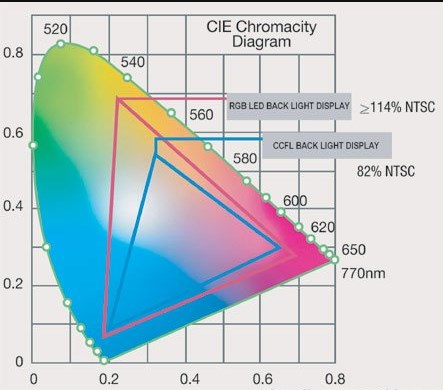 RGB LED: Circuit, Difference and Application
25 March 20215721
 Good News: UTMEL Electronic is now the Authorized Distributor for Isocom Components 2004 Ltd.
10 November 20237912
 Application of Wide Bandgap Devices in EV Converters
12 April 20231222
 Xilinx FPGAs: From Getting Started to Advanced Application Development
09 September 20253822
Yageo
In Stock: 71500
Minimum: 1 Multiples: 1
Qty
Unit Price
Ext Price
1
$0.029012
$0.03
500
$0.021332
$10.67
1000
$0.017777
$17.78
2000
$0.016309
$32.62
5000
$0.015242
$76.21
10000
$0.014179
$141.79
15000
$0.013712
$205.68
50000
$0.013483
$674.15
Not the price you want? Send RFQ Now and we'll contact you ASAP.
Inquire for More Quantity
![1206CG471J9B200]() 1206CG471J9B200
1206CG471J9B200Yageo
![CC0805KRX7R9BB104]() CC0805KRX7R9BB104
CC0805KRX7R9BB104Yageo
![CC0603JRNPO9BN101]() CC0603JRNPO9BN101
CC0603JRNPO9BN101Yageo
![CC0603KRX7R9BB102]() CC0603KRX7R9BB102
CC0603KRX7R9BB102Yageo
![CC0402KRX7R9BB102]() CC0402KRX7R9BB102
CC0402KRX7R9BB102Yageo
![CC0402KRX7R9BB103]() CC0402KRX7R9BB103
CC0402KRX7R9BB103Yageo
![CC0402KRX7R8BB104]() CC0402KRX7R8BB104
CC0402KRX7R8BB104Yageo
![CC0402KRX5R9BB104]() CC0402KRX5R9BB104
CC0402KRX5R9BB104Yageo
![CC0402ZRY5V7BB104]() CC0402ZRY5V7BB104
CC0402ZRY5V7BB104Yageo
![CC0402KRX5R6BB104]() CC0402KRX5R6BB104
CC0402KRX5R6BB104Yageo


