

 Product
 Brand
Brand Articles
 Tools
Tools
Arduino Nano ESP32: Overview, Features and Applications


Arduino® Nano ESP32
The Arduino Nano ESP32 represents a significant evolution of the classic Arduino Nano board, upgrading it with WiFi and Bluetooth capabilities based on the ESP32-S3 chip.

Arduino with ESP32 MCU - Arduino Nano ESP32
Arduino Nano ESP32 Overview

The Arduino Nano ESP32 represents a significant evolution of the classic Arduino Nano board, upgrading it with WiFi and Bluetooth capabilities based on the ESP32-S3 chip. At its core is a dual-core 240MHz Xtensa LX7 microprocessor providing both processing power and wireless connectivity.
This compact board measures only 18 x 43 mm but packs full-featured WiFi 4 (802.11 b/g/n) and Bluetooth 5.0 LE thanks to the embedded antenna in the ESP32-S3 module. The microcontroller includes 384KB ROM and 512KB SRAM along with plentiful peripherals for system control.
Specifications of the ESP32-S3 chip
ESP32-S3 Specification | Description |
|---|---|
| CPU | Xtensa® dual-core 32-bit LX7 microprocessor; up to 240 MHz |
| RAM | 512 KB on-chip SRAM |
| Flash | Supports SPI flash, and supports extra QSPI flash/SRAM |
| Wi-Fi | 802.11 b/g/n (802.11n up to 150 Mbps); supports 20/40 MHz bandwidth in 2.4 GHz band |
| Bluetooth | Bluetooth v5.0 BR/EDR and BLE |
| Clock Speed | Up to 240 MHz |
| I/O Pins | 44 |
| ADC Channels | 20 |
| DAC Channels | 2 |
| Peripheral Interfaces | SPI, I2C, I2S, UART, ADC, DAC, PWM, LCD, Camera interface, RMII, and other interfaces |
| Operating Temperature Range | -40°C ~ +125°C |
| Power Supply | 2.3V to 3.6V |
| Package | 7 mm x 7 mm x 0.9 mm QFN package |
ESP32-S3 Datasheet: |
|

For interfacing, 14 GPIO pins are provided as well as 8 analog inputs, hardware SPI, I2C, UART, and more communication options. The familiar Nano board layout enables easy connection to breadboards or embedding into small spaces. USB-C handles both power supply and programming over a USB CDC serial connection.

*As the official partner of Arduino, Utmel provides you with official original Arduino products. Welcome to shop at the page dedicated to Arduino products.
Arduino Nano ESP32 Pinout

Arduino Nano ESP32 Features
Microcontroller: ESP32-S3 dual-core Xtensa LX7 running at up to 240MHz
WiFi: 802.11 b/g/n supporting up to 150 Mbps
Bluetooth: Bluetooth 5.0 LE
14 digital I/O pins, 8 analog input pins
USB-C connector for power and programming
Breadboard-friendly design
Ultra-low power modes
Arduino Nano ESP32 Alternatives
Here are some alternatives to the Arduino Nano ESP32:
NodeMCU ESP32: This is an open-source IoT platform that is programmed using Lua scripting language for quick prototyping.
ESP32-CAM: This is a small ESP32 development board with a 2 MP camera for IoT projects.
Wemos D1 R32: This development board is compatible with the Arduino Uno R3 interface, but comes with an ESP32 module for more powerful performance.
SparkFun ESP32 Thing: Designed to make ESP32 easier to use, this development board integrates ESP32 with a rich set of peripherals.
Adafruit HUZZAH32 - ESP32 Feather Board: This is Adafruit's version of the ESP32 development board and is compatible with the Feather family of peripherals, making it ideal for battery-powered IoT devices.
Arduino Nano ESP32 vs. ESP32 DevKitC
| Feature | Nano ESP32 | ESP32 DevKitC |
|---|---|---|
| Size (mm) | Width: 18, Length: 45 | Width: 27.9, Length: 54.4 |
| Microcontroller | u-blox® NORA-W106 (ESP32-S3) | ESP32-WROOM-32D |
| USB Connector | USB-C® | Micro-USB |
| Digital I/O Pins | 14 | 39 |
| Analog Input Pins | 8 | 18 |
| PWM Pins | 5 | All GPIO |
| Connectivity | Wi-Fi® u-blox® NORA-W106 (ESP32-S3), Bluetooth® u-blox® NORA-W106 (ESP32-S3) | Wi-Fi: 802.11 b/g/n, Bluetooth: v4.2 BR/EDR and BLE |
| Clock Speed | Processor up to 240 MHz | Processor up to 240 MHz |
| Memory | ROM: 384 kB, SRAM: 512 kB, External Flash: 128 Mbit (16 MB) | ROM: 384 kB, SRAM: 520 kB |
| Price | €18.00, $23.00 | $10.00, $11.00 |
Arduino Nano ESP32 Applications
Compact IoT devices and wireless sensors
Wearable electronics and small robots
Wireless home automation and controls
Battery-powered gadgets and remote sensing
Educational microcontroller projects with WiFi
Prototyping basic WiFi-connected systems
Getting Started with Arduino Nano ESP32
- Making a Time Lapse Camera using Arduino Nano ESP32
Components Needed:
Arduino Nano ESP32
Camera module - Something like an OV2640 or other mini camera module
MicroSD card module/shield
MicroSD card
Power supply - LiPo battery and charger or USB power bank
Circuit:
Connect the camera module to the Arduino using SPI or parallel bus. Verify the pinout in the camera datasheet.
Attach the microSD card module using SPI pins (D11-D13)
Power the board either using the LiPo connected to the Vin pin or a USB power bank to the USB-C port.
Software:
Install ESP32 board support in Arduino IDE
Install the Arduino SD library to communicate with the SD card
Install the Arduino FS library to save files to the SD card
Install the camera library to control the camera module (e.g. ArduCAM)
In the setup() function initialize the SD card and camera
Calculate the interval time between captures based on the total timelapse duration needed.
In the loop(), capture an image from the camera and save it to an SD card with the incremental file name
Use deep sleep between captures to conserve battery life
Calculate the total elapsed time and stop capture after the required duration
Retrieve the images/video from the SD card to the computer and compile them into a timelapse video using video editing software.
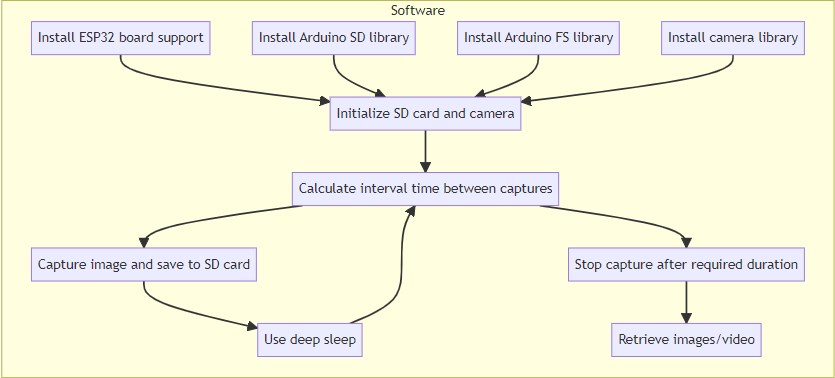
Software workflow
Additional functionality:
Add a real-time clock module to timestamp images
Use WiFi to upload images to cloud storage
Implement a web interface to configure timelapse parameters
Add a display to show system info/stats
Sample Code:
#include <WiFi.h>
#include <ESPAsyncWebServer.h>
#include <SPIFFS.h>
#include <Wire.h>
#include <Adafruit_Sensor.h>
#include <Adafruit_BME280.h>
#include <SD.h>
#include <ArduinoJson.h>
#define CAMERA_PIN 4
#define INTERVAL_MS 5000 // Capture frame every 5 seconds
#define FILE_NAME "/image%04d.jpg" // File name format for captured frames
const char* ssid = "YourWiFiSSID";
const char* password = "YourWiFiPassword";
AsyncWebServer server(80);
Adafruit_BME280 bme;
void setup() {
Serial.begin(115200);
// Connect to Wi-Fi
WiFi.begin(ssid, password);
while (WiFi.status() != WL_CONNECTED) {
delay(1000);
Serial.println("Connecting to WiFi...");
}
Serial.println("Connected to WiFi");
// Initialize SD card
if (!SD.begin()) {
Serial.println("Failed to initialize SD card");
return;
}
Serial.println("SD card initialized");
// Initialize camera module
pinMode(CAMERA_PIN, OUTPUT);
digitalWrite(CAMERA_PIN, LOW);
delay(1000);
// Initialize BME280 sensor
if (!bme.begin(0x76)) {
Serial.println("Failed to initialize BME280 sensor");
return;
}
Serial.println("BME280 sensor initialized");
// Start capturing frames periodically
setIntervalCapture();
// Start server
server.on("/", HTTP_GET, [](AsyncWebServerRequest *request){
String html = "<html><body><h1>Time-Lapse Camera</h1>";
html += "<p>Temperature: " + String(bme.readTemperature()) + " ℃</p>";
html += "<p>Humidity: " + String(bme.readHumidity()) + " %</p>";
html += "<p>Pressure: " + String(bme.readPressure() / 100.0F) + " hPa</p>";
html += "</body></html>";
request->send(200, "text/html", html);
});
server.begin();
}
void loop() {
// Handle server requests
server.handleClient();
}
void captureFrame() {
digitalWrite(CAMERA_PIN, HIGH); // Activate camera
delay(1000); // Allow time for camera to capture frame
digitalWrite(CAMERA_PIN, LOW); // Deactivate camera
}
void setIntervalCapture() {
unsigned long previousMillis = 0;
unsigned long currentMillis;
while (true) {
currentMillis = millis();
if (currentMillis - previousMillis >= INTERVAL_MS) {
previousMillis = currentMillis;
// Capture frame and save to SD card
captureFrame();
saveFrameToSDCard();
}
// Handle server requests
server.handleClient();
}
}
void saveFrameToSDCard() {
static int fileIndex = 1;
char fileName[20];
sprintf(fileName, FILE_NAME, fileIndex);
File file = SD.open(fileName, FILE_WRITE);
if (!file) {
Serial.println("Failed to open file");
return;
}
// Write captured frame to file
// Replace the following line with your camera module's code to capture the frame
file.print("Sample frame data");
file.close();
Serial.println("Frame saved to SD card: " + String(fileName));
fileIndex++;
}Resources for the Nano ESP32
| Type | Description | Link |
|---|---|---|
| Tutorial | Getting Started with Nano ESP32 | Arduino Documentation |
| Tutorial | Arduino Nano ESP32 Cheat Sheet | Arduino Documentation |
| Project | 160+ ESP32 Projects, Tutorials, and Guides with Arduino IDE | Random Nerd Tutorials |
| Project | How the New Arduino Nano ESP32 Makes IoT Projects a Breeze | MUO |
| Resource | Nano ESP32 Overview and Specifications | Arduino Documentation |
| Resource | MicroPython 101 with the Nano ESP32 | Arduino Documentation |
| Resource | Arduino Introduces the Nano ESP32, Bringing the Popular IoT Microcontroller into the Arduino Ecosystem | Benzinga |
| Resource | Nano ESP32 Official Store Page | Arduino Official Store |
Arduino Nano ESP32 Documentation
What microcontroller is used in the Nano ESP32?
It uses an ESP32-S3 dual-core Xtensa LX7 microcontroller running at 240MHz.
What is the wireless connectivity supported?
It has dual-mode WiFi 4 (802.11 b/g/n) and Bluetooth 5.0 LE.
How is the Nano ESP32 programmed?
It is programmed over USB-C using the Arduino IDE like other Arduino boards.
Does the board support Arduino IoT Cloud?
Yes, the Nano ESP32 works with Arduino IoT Cloud for easy IoT application development.
![BT151 Rectifier: Circuit, Pinout, and Datasheet [Video&FAQ]](https://res.utmel.com/Images/Article/72ba3500-06aa-4e9a-92ba-dbe18831aec2.png) BT151 Rectifier: Circuit, Pinout, and Datasheet [Video&FAQ]
BT151 Rectifier: Circuit, Pinout, and Datasheet [Video&FAQ]06 December 202123527
 TIP36C Transistor: Equivalent, Datasheet, Test Circuit
29 November 20219892
 OnSemi MBR0540T1G Schottky Diode: 40V 500mA Fast Switching Review
27 August 2025421
 Atmel SAM D20E / SAM D20G / SAM D20J Microcontroller: A Comprehensive Overview
28 February 2024201
![Where & How to use LM337? [FAQ]](https://res.utmel.com/Images/Article/510fd782-075a-4821-924a-c7ab7f12261d.png) Where & How to use LM337? [FAQ]
Where & How to use LM337? [FAQ]27 April 20224532
 STM32F429ZIT6 for Industrial Automation: Complete Guide 2025
24 July 2025304
![MTB30P06VT4G MOSFET: Pinout, Features and Datasheet [FAQ]](https://res.utmel.com/Images/Article/c7fe577b-e322-43f6-96c8-decba188a2fb.png) MTB30P06VT4G MOSFET: Pinout, Features and Datasheet [FAQ]
MTB30P06VT4G MOSFET: Pinout, Features and Datasheet [FAQ]23 April 20222312
 LSM6DSOTR Motion Sensor: Datasheet, Application Note, Pinout
23 February 20223923
 Huawei Responded How to Solve the Problem of Chip Supply
29 March 20224244
 Foreign Media Burst Samsung: DRAM, Foundry and Chip Defeat on All Fronts
20 April 20223354
 Aluminum Electrolytic Capacitor: Structure and Features
19 December 20205088
 LVDT - Linear Variable Differential Transformer Basics
16 January 20219514
 The Key Role of Electronic Components in IoT Devices
01 September 20235998
 New Crisis in Semiconductors: Neon Gas Prices Soar 9 Times
21 March 20229444
 Tantalum Capacitors Explained: How They Work, Where They Fit, and How to Use Them Safely
14 July 202613577
 What is Solenoid Valve? How to Choose a Solenoid Valve?
06 January 20224277
Arduino
In Stock
United States
China
Canada
Japan
Russia
Germany
United Kingdom
Singapore
Italy
Hong Kong(China)
Taiwan(China)
France
Korea
Mexico
Netherlands
Malaysia
Austria
Spain
Switzerland
Poland
Thailand
Vietnam
India
United Arab Emirates
Afghanistan
Åland Islands
Albania
Algeria
American Samoa
Andorra
Angola
Anguilla
Antigua & Barbuda
Argentina
Armenia
Aruba
Australia
Azerbaijan
Bahamas
Bahrain
Bangladesh
Barbados
Belarus
Belgium
Belize
Benin
Bermuda
Bhutan
Bolivia
Bonaire, Sint Eustatius and Saba
Bosnia & Herzegovina
Botswana
Brazil
British Indian Ocean Territory
British Virgin Islands
Brunei
Bulgaria
Burkina Faso
Burundi
Cabo Verde
Cambodia
Cameroon
Cayman Islands
Central African Republic
Chad
Chile
Christmas Island
Cocos (Keeling) Islands
Colombia
Comoros
Congo
Congo (DRC)
Cook Islands
Costa Rica
Côte d’Ivoire
Croatia
Cuba
Curaçao
Cyprus
Czechia
Denmark
Djibouti
Dominica
Dominican Republic
Ecuador
Egypt
El Salvador
Equatorial Guinea
Eritrea
Estonia
Eswatini
Ethiopia
Falkland Islands
Faroe Islands
Fiji
Finland
French Guiana
French Polynesia
Gabon
Gambia
Georgia
Ghana
Gibraltar
Greece
Greenland
Grenada
Guadeloupe
Guam
Guatemala
Guernsey
Guinea
Guinea-Bissau
Guyana
Haiti
Honduras
Hungary
Iceland
Indonesia
Iran
Iraq
Ireland
Isle of Man
Israel
Jamaica
Jersey
Jordan
Kazakhstan
Kenya
Kiribati
Kosovo
Kuwait
Kyrgyzstan
Laos
Latvia
Lebanon
Lesotho
Liberia
Libya
Liechtenstein
Lithuania
Luxembourg
Macao(China)
Madagascar
Malawi
Maldives
Mali
Malta
Marshall Islands
Martinique
Mauritania
Mauritius
Mayotte
Micronesia
Moldova
Monaco
Mongolia
Montenegro
Montserrat
Morocco
Mozambique
Myanmar
Namibia
Nauru
Nepal
New Caledonia
New Zealand
Nicaragua
Niger
Nigeria
Niue
Norfolk Island
North Korea
North Macedonia
Northern Mariana Islands
Norway
Oman
Pakistan
Palau
Palestinian Authority
Panama
Papua New Guinea
Paraguay
Peru
Philippines
Pitcairn Islands
Portugal
Puerto Rico
Qatar
Réunion
Romania
Rwanda
Samoa
San Marino
São Tomé & Príncipe
Saudi Arabia
Senegal
Serbia
Seychelles
Sierra Leone
Sint Maarten
Slovakia
Slovenia
Solomon Islands
Somalia
South Africa
South Sudan
Sri Lanka
St Helena, Ascension, Tristan da Cunha
St. Barthélemy
St. Kitts & Nevis
St. Lucia
St. Martin
St. Pierre & Miquelon
St. Vincent & Grenadines
Sudan
Suriname
Svalbard & Jan Mayen
Sweden
Syria
Tajikistan
Tanzania
Timor-Leste
Togo
Tokelau
Tonga
Trinidad & Tobago
Tunisia
Turkey
Turkmenistan
Turks & Caicos Islands
Tuvalu
U.S. Outlying Islands
U.S. Virgin Islands
Uganda
Ukraine
Uruguay
Uzbekistan
Vanuatu
Vatican City
Venezuela
Wallis & Futuna
Yemen
Zambia
Zimbabwe
![C000167]() C000167
C000167Arduino
![ARDUINO NANO 3.0]() ARDUINO NANO 3.0
ARDUINO NANO 3.0Arduino
![Arduino Zero | ABX00003]() Arduino Zero | ABX00003
Arduino Zero | ABX00003Arduino
![ARDUINO MEGA 2560 REV3]() ARDUINO MEGA 2560 REV3
ARDUINO MEGA 2560 REV3Arduino
![Arduino MKR GSM 1400 | ABX00018]()
![Starter Kit - Italiano | K010007]()
![Arduino Nano | A000005]() Arduino Nano | A000005
Arduino Nano | A000005Arduino
![ABX00012 | Arduino MKR ZERO]() ABX00012 | Arduino MKR ZERO
ABX00012 | Arduino MKR ZEROArduino
![Arduino CTC 101 Program - Full | AKX00002]()
![A000067 | Arduino Mega 2560 Rev3]()

