

 Product
 Brand
Brand Articles
 Tools
Tools
Essential Tips for Using STM32H743ZIT6 in Projects

2MB 2M x 8 FLASH ARM® Cortex®-M7 32-Bit Microcontroller STM32H7 Series STM32H743 400MHz 144-LQFP


2MB 2M x 8 FLASH ARM® Cortex®-M7 32-Bit Microcontroller STM32H7 Series STM32H743 400MHz 144-LQFP
Learn how to set up and use STM32H743ZIT6 in custom projects. Configure peripherals, debug issues, optimize performance, and explore advanced features.
Product Introduction
The STM32H743ZIT6 stands out as a powerful microcontroller designed to handle diverse applications in custom projects. Its robust processing capabilities and rich feature set make it an ideal choice for both beginners and experts. To unlock the full potential of this device, you need a proper setup and a clear understanding of its configuration. This tutorial provides a step by step guide to help you integrate the STM32 into your project seamlessly. By following this guide, you can ensure efficient performance and achieve reliable results with your device.
Setting Up the STM32H743ZIT6 Development Environment
Choosing the Right Development Board
Selecting the right development board is the first step in working with the STM32H743ZIT6. You should choose a board that matches your project requirements and provides the necessary peripherals. For beginners, the Nucleo-H743ZI2 is an excellent choice. It offers compatibility with STM32CubeIDE and includes built-in debugging tools, which simplify the development process. If your project demands advanced features like Ethernet or high-speed communication, consider the STM32H743I-EVAL board. This evaluation board provides additional connectivity options and a larger set of peripherals.
When choosing a board, evaluate the following factors:
Peripheral Support: Ensure the board supports the interfaces you need, such as I2C, SPI, or UART.
Power Supply Options: Check if the board can be powered via USB or an external source.
Form Factor: Consider the size of the board and its compatibility with your project enclosure.
Community Support: Boards with active user communities often have more tutorials and troubleshooting resources available.
Installing STM32CubeIDE and STM32CubeMX
To program and configure the STM32H743ZIT6, you need two essential tools: STM32CubeIDE and STM32CubeMX. These tools streamline the development process and help you create a new project with ease.
Download and Install STM32CubeIDE:
Visit the official STMicroelectronics website and download STM32CubeIDE. This integrated development environment (IDE) combines code editing, debugging, and project management in one platform. Follow the installation wizard to set it up on your computer.Install STM32CubeMX for Device Configuration:
STM32CubeMX is a graphical tool that simplifies device configuration. It allows you to set up peripherals, clocks, and pin assignments visually. You can install it as a standalone application or access it directly within STM32CubeIDE.Create a New Project:
Open STM32CubeIDE and use the device configuration wizard to create a new project. Select the STM32H743ZIT6 microcontroller from the list of available devices. The wizard will generate a basic project structure, including startup files and a main program template.How to Import Existing Cube Projects:
If you have an existing STM32CubeMX project, you can import it into STM32CubeIDE. Use the "Import" option in the File menu and follow the prompts to integrate your project seamlessly.
Connecting Hardware Components
Once your software environment is ready, connect the hardware components to your STM32H743ZIT6 development board. Proper connections ensure reliable communication and prevent damage to the device.
Key Steps for Hardware Connection:
Power Supply: Connect the board to your computer using a USB cable or an external power source. Ensure the voltage matches the board's requirements (typically 3V for STM32H743ZIT6).
Peripheral Connections: Attach sensors, LEDs, or other components to the appropriate GPIO pins. Refer to the board's pinout diagram for guidance.
Debugging Interface: Use the built-in ST-LINK debugger or an external debugging tool to program and debug your microcontroller.
Hardware Specifications Table:
The STM32H743ZIT6 offers robust hardware capabilities, making it suitable for complex projects. Here's a quick overview of its key specifications:
| Specification | Value |
|---|---|
| Data Bus Width | 32 bits |
| Number of Timers/Counters | 22 |
| Number of A/D Converters | 2 |
| Number of ADC Channels | 36 |
| Max Junction Temperature (Tj) | 125°C |
| Ambient Temperature Range High | 85°C |
| Number of SPI Channels | 6 |
| Supply Voltage | 3V |
| Memory Size | 2MB |
| Connectivity | CANbus, Ethernet, I2C, SPI... |
Visualizing Hardware Capabilities:
To better understand the STM32H743ZIT6's hardware capabilities, refer to the chart below:
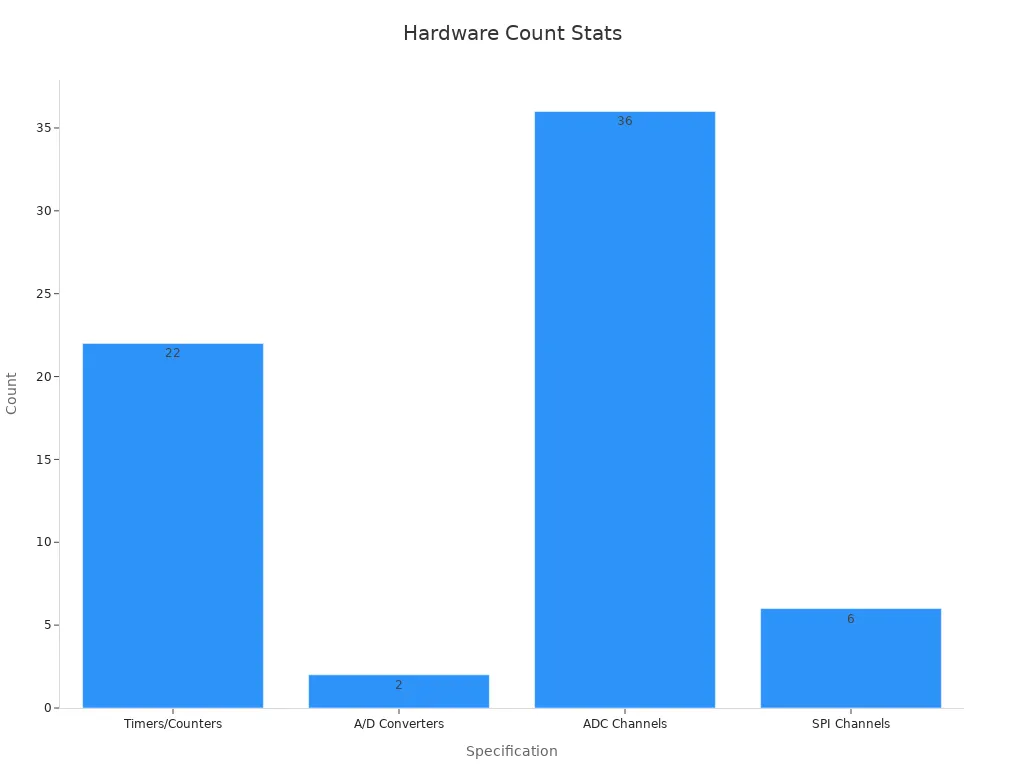
By following these steps and ensuring proper connections, you can set up a reliable development environment for your STM32H743ZIT6 project.
Testing the Setup with a Basic Program
After setting up your STM32H743ZIT6 development environment, the next step is to test it with a simple program. This ensures that your hardware and software configurations are working correctly before diving into more complex tasks. A basic LED blinking program is an excellent starting point for this purpose.
Writing the LED Blinking Program
To create the program, follow these steps:
Open STM32CubeIDE: Launch the IDE and open the project you created earlier. If you haven’t created one yet, use the device configuration wizard to set up a new project for the STM32H743ZIT6 microcontroller.
Configure GPIO Pins: Use STM32CubeMX (integrated within STM32CubeIDE) to configure a GPIO pin as an output. For example, you can select pin PA5, which is often connected to an onboard LED on many development boards.
Generate Initialization Code: After configuring the GPIO pin, click the "Generate Code" button. This action creates the necessary initialization code for your project.
Write the Blinking Logic: Open the
main.cfile in your project and add the following code inside the main loop:
/* Toggle the LED with a delay */
while (1)
{
    HAL_GPIO_TogglePin(GPIOA, GPIO_PIN_5); // Toggle the LED
    HAL_Delay(500); // Wait for 500 milliseconds
}
This code toggles the LED state every 500 milliseconds, creating a blinking effect.
Flashing the Program to the Microcontroller
Once your code is ready, you need to upload it to the STM32H743ZIT6 microcontroller. Follow these steps:
Connect the Board: Use a USB cable to connect your development board to your computer. Ensure the board is powered and recognized by your system.
Build the Project: In STM32CubeIDE, click on the "Build" button to compile your code. Fix any errors that appear during the build process.
Flash the Code: Click the "Debug" or "Run" button in the IDE. This action uploads the program to the microcontroller and starts execution.
Verifying the Output
After flashing the program, observe the LED on your development board. It should blink at regular intervals, indicating that your setup is functioning correctly. If the LED doesn’t blink, double-check your GPIO configuration and connections.
Tip: If you encounter issues, use the debugging tools in STM32CubeIDE to step through your code and identify problems.
Why This Step Matters
Testing your setup with a basic program helps you confirm that your development environment is correctly configured. It also familiarizes you with the process of writing, building, and flashing code. This foundational step ensures a smoother experience as you progress to more advanced features in your project.
Configuring the STM32H743ZIT6 System Clock
Understanding the Clock Tree Architecture
The STM32H743ZIT6 microcontroller uses a sophisticated clock tree architecture to manage its internal and external clocks. This architecture allows you to control the speed and timing of various peripherals and the core processor. Understanding this structure is essential for optimizing your project’s performance.
The clock tree consists of multiple sources, dividers, and multiplexers. These components work together to generate and distribute clock signals across the microcontroller. The primary clock sources include:
High-Speed Internal (HSI) Oscillator: A built-in oscillator that provides a stable clock signal without external components.
High-Speed External (HSE) Oscillator: An external crystal or resonator that offers higher precision.
Phase-Locked Loop (PLL): A circuit that multiplies the frequency of a base clock source to achieve higher speeds.
Each peripheral in the STM32H743ZIT6 can use a specific clock source, which you can configure based on your requirements. For example, the core processor may use the PLL for high-speed operations, while low-power peripherals might rely on the HSI.
Tip: Before you change the system clock, review the datasheet to understand the maximum frequencies supported by each peripheral. Exceeding these limits can cause instability.
Configuring the Clock in STM32CubeMX
STM32CubeMX simplifies the process of configuring the clock tree. You can use its graphical interface to select clock sources, set frequencies, and verify your configuration.
Follow these steps to configure the clock:
Open Your Project in STM32CubeMX: Launch STM32CubeIDE and open the project you created earlier. Navigate to the "Clock Configuration" tab.
Select the Clock Source: Choose the primary clock source for your microcontroller. For most applications, the HSE oscillator is a good choice due to its precision.
Enable the PLL: If your project requires high-speed processing, enable the PLL and set its input and output frequencies. Use the graphical sliders to adjust the multipliers and dividers.
Configure Peripheral Clocks: Assign clock sources to individual peripherals. For instance, you can set the USART clock to the HSI or HSE, depending on your needs.
Verify the Configuration: Check the "Clock Tree" diagram to ensure all frequencies are within the allowed ranges. STM32CubeMX will highlight any errors in red.
Once you complete these steps, click the "Generate Code" button. This action updates your project files with the new clock settings.
Note: If you use an external oscillator, ensure it is connected correctly to the microcontroller. Misconnections can prevent the clock from functioning.
Validating Clock Settings in Code
After configuring the clock in STM32CubeMX, you should validate the settings in your code. This step ensures that the microcontroller operates as expected and that the clock changes were applied correctly.
Here’s how you can validate the clock settings:
Check the SystemCoreClock Variable: This global variable stores the current system clock frequency. Add the following line to your code to print its value:
printf("System Clock: %lu Hz\n", SystemCoreClock);This output helps you confirm that the system clock matches your configuration.
Measure Peripheral Clocks: Use a logic analyzer or oscilloscope to measure the output of specific peripherals. For example, you can toggle a GPIO pin at a known frequency and verify the timing.
Test Peripheral Functionality: Run a simple program that uses a peripheral, such as USART or I2C. If the peripheral operates correctly, the clock configuration is likely accurate.
Debugging Clock Issues: If you encounter problems, revisit the "Clock Configuration" tab in STM32CubeMX. Look for errors in the clock tree or mismatched frequencies.
Tip: Always test your clock settings under real-world conditions. Simulations may not reveal issues that occur in actual hardware.
By following these steps, you can ensure that your STM32H743ZIT6 microcontroller operates at the desired speed and that all peripherals function reliably. Proper clock configuration is critical for achieving optimal performance in your project.
Implementing Basic Functionalities with STM32H743ZIT6
GPIO Configuration for LED Blinking
Blinking an LED is one of the simplest ways to test your STM32H743ZIT6 microcontroller. You can use this functionality to verify that your GPIO configuration works correctly. Start by selecting a GPIO pin connected to an onboard LED, such as PA5.
Open STM32CubeMX and configure PA5 as a GPIO output.
Generate the initialization code and open the
main.cfile.Use HAL functions to toggle the LED state. Add the following code inside the main loop:
while (1) {
    HAL_GPIO_TogglePin(GPIOA, GPIO_PIN_5); // Toggle LED
    HAL_Delay(500); // Wait 500 ms
}
Flash the code to your device and observe the LED blinking. If it doesn’t work, check your pin configuration and connections.
Tip: Use the debugging tools in STM32CubeIDE to step through your code and identify issues.
Setting Up USART Communication
USART allows your microcontroller to communicate with other devices. You can use it to send text through a USART interface, which is helpful for debugging or exchanging data.
Configure the USART peripheral in STM32CubeMX. Select the UART mode and set the baud rate to 9600.
Generate the initialization code and open the
main.cfile.Use HAL functions to send text. Add the following code:
char message[] = "Hello, USART!";
HAL_UART_Transmit(&huart1, (uint8_t*)message, strlen(message), HAL_MAX_DELAY);
Connect your STM32H743ZIT6 to a computer using a USB-to-UART adapter. Open a terminal program and set the baud rate to match your configuration. You should see the message displayed.
Note: If the text doesn’t appear, verify the UART connections and ensure the terminal settings match your project configuration.
Interfacing Sensors via I2C or SPI
Sensors often use I2C or SPI interfaces to communicate with microcontrollers. These protocols allow you to read data from sensors and use it in your project.
Configure the I2C or SPI peripheral in STM32CubeMX. Select the pins for SCL/SDA (I2C) or SCK/MOSI/MISO (SPI).
Generate the initialization code and open the
main.cfile.Use HAL functions to communicate with the sensor. For example, to read data via I2C:
uint8_t data[2];
HAL_I2C_Master_Receive(&hi2c1, SENSOR_ADDRESS, data, 2, HAL_MAX_DELAY);
printf("Sensor Data: %d %d\n", data[0], data[1]);
Connect the sensor to your STM32H743ZIT6 and test the communication. If the data doesn’t appear, check the wiring and sensor address.
Tip: Refer to the sensor’s datasheet for configuration details and communication protocols.
Advanced Features of STM32H743ZIT6
Ethernet Controller Configuration
The STM32H743ZIT6 includes a built-in Ethernet MAC controller, making it ideal for networked applications. To enable the Ethernet MAC controller, you first need to configure the hardware and software settings. Start by connecting the Ethernet PHY chip to the microcontroller. Use STM32CubeMX to configure the Ethernet peripheral. Select the RMII interface and assign the required pins.
After generating the initialization code, open the main.c file. Use HAL functions to initialize the Ethernet stack. For example:
HAL_ETH_Init(&heth);
This function sets up the Ethernet hardware. Test the connection by sending and receiving packets. If issues arise, verify the pin configuration and ensure the PHY chip is powered correctly.
Setting Up a Web Server
You can use the STM32H743ZIT6 to host a lightweight web server. This feature allows you to control your device remotely or monitor data through a browser. To set up the server, integrate the Mongoose library into your project. Mongoose simplifies the process of creating a mongoose-based web UI.
Begin by downloading the library and adding it to your project. Configure the server settings, such as the port number and root directory. Use the following code snippet to start the server:
mg_mgr_init(&mgr, NULL);
mg_http_listen(&mgr, "http://0.0.0.0:80", event_handler, NULL);
Test the server by accessing its IP address in a browser. You should see the web UI if everything is configured correctly.
Using DMA for Efficient Data Transfer
Direct Memory Access (DMA) improves the efficiency of data transfer in your STM32H743ZIT6 project. It allows peripherals to exchange data without involving the CPU. To use DMA, configure it in STM32CubeMX. Assign the DMA channel to the desired peripheral, such as UART or SPI.
After generating the code, use HAL functions to enable DMA. For example:
HAL_DMA_Start(&hdma, srcAddress, destAddress, dataSize);
This function initiates the data transfer. Monitor the transfer status using interrupts or polling. DMA reduces CPU load, enabling your device to handle more tasks simultaneously.
Implementing RTOS for Multitasking
A Real-Time Operating System (RTOS) helps you manage multiple tasks efficiently on your STM32H743ZIT6 microcontroller. It allows your device to run several processes simultaneously without conflicts. This feature is essential for projects requiring multitasking, such as robotics, IoT devices, or industrial automation.
Why Use RTOS?
RTOS provides precise control over task execution. It ensures that critical tasks run on time, even when the system is busy. You can prioritize tasks based on their importance. For example, a sensor reading task can take precedence over an LED blinking task.
Tip: RTOS is ideal for applications where timing and reliability are crucial.
Setting Up FreeRTOS
FreeRTOS is a popular RTOS that works seamlessly with STM32 microcontrollers. Follow these steps to integrate FreeRTOS into your project:
Enable FreeRTOS in STM32CubeMX:
Open your project in STM32CubeMX. Navigate to the "Middleware" section and enable FreeRTOS. Configure the number of tasks and their priorities.Generate Code:
Click "Generate Code" to add FreeRTOS files to your project. These files include task management functions and scheduler configurations.Create Tasks:
Open themain.cfile. Use thexTaskCreatefunction to define tasks. For example:void Task1(void *pvParameters) { while (1) { HAL_GPIO_TogglePin(GPIOA, GPIO_PIN_5); // Blink LED vTaskDelay(500); // Delay for 500 ms } } xTaskCreate(Task1, "LED Task", 128, NULL, 1, NULL);Start the Scheduler:
AddvTaskStartScheduler()to yourmain()function. This command starts the RTOS scheduler, which manages task execution.
Debugging RTOS Applications
Monitor task execution using STM32CubeIDE’s debugging tools. Check for issues like task starvation or memory overflow. Use FreeRTOS’s built-in functions to track system performance.
Note: Allocate enough stack memory for each task to prevent crashes.
By implementing RTOS, you can enhance your STM32H743ZIT6 project’s efficiency and reliability. It simplifies multitasking and ensures smooth operation in complex applications.
Optimizing STM32H743ZIT6 Performance and Troubleshooting
Reducing Power Consumption
Optimizing power consumption is essential for battery-powered projects or energy-efficient designs. The stm32h743zit6 offers several features to help you minimize power usage. Start by enabling low-power modes in your configuration. Use STM32CubeMX to select modes like Sleep, Stop, or Standby based on your project’s requirements. Each mode reduces power differently, so choose the one that fits your application.
Disable unused peripherals to save energy. For example, if your device doesn’t need the USART or I2C interface, turn them off in the configuration. Use the HAL library to manage power states dynamically. For instance, you can use the following code to enter Sleep mode:
HAL_PWR_EnterSLEEPMode(PWR_MAINREGULATOR_ON, PWR_SLEEPENTRY_WFI);
Monitor your power consumption using a multimeter. This helps you verify that your optimizations are effective.
Tip: Always test your device under real-world conditions to ensure power-saving features work as expected.
Debugging Common Issues
Debugging is a critical part of any tutorial or development process. If your stm32h743zit6 project isn’t working as expected, start by checking the basics. Verify your hardware connections and ensure your configuration matches the datasheet.
Use the debugging tools in STM32CubeIDE to step through your code. Add printf statements to display variable values and program flow. For example:
printf("Variable value: %d\n", myVariable);If peripherals like USART or SPI fail, double-check their initialization in the HAL configuration. Ensure the clock settings are correct and match your peripheral requirements.
Note: Debugging takes time. Be patient and test one change at a time to isolate issues effectively.
Profiling and Optimizing Code Execution
Efficient code execution improves your device’s performance. Start by profiling your code to identify bottlenecks. Use STM32CubeIDE’s built-in profiling tools to measure execution times for different functions.
Optimize your code by reducing unnecessary loops and simplifying logic. Use DMA for data transfers to free up the CPU. For example, instead of manually copying data, use HAL’s DMA functions to handle the task.
Test your optimizations by measuring execution times again. If you’re running a server or multitasking with RTOS, ensure tasks don’t block each other. Prioritize critical tasks in your configuration to maintain smooth operation.
Tip: Regularly review your code for improvements. Small changes can lead to significant performance gains.
You’ve learned the essential steps to set up and use the STM32H743ZIT6 in your project. From configuring GPIOs to implementing RTOS, this tutorial equips you with the tools to build reliable systems. The STM32H743ZIT6, with its 480 MHz speed, 1 MB RAM, and 2 MB FLASH, excels in handling complex tasks like processing PPG signals in real-time. Explore its advanced features, such as Ethernet and DMA, to unlock its full potential. Continuous learning in embedded development ensures you stay ahead and create innovative solutions.
FAQ
What makes the STM32H743ZIT6 suitable for advanced projects?
The STM32H743ZIT6 offers a 480 MHz processor, 2 MB of Flash memory, and 1 MB of RAM. These features make it ideal for handling complex tasks like real-time data processing, multitasking with RTOS, and networked applications using Ethernet.
How do you debug issues with STM32H743ZIT6?
Use STM32CubeIDE’s debugging tools to step through your code. Add printf statements to monitor variable values. Double-check hardware connections and ensure your clock and peripheral configurations match the datasheet.
Can you use STM32H743ZIT6 for IoT applications?
Yes, the STM32H743ZIT6 supports IoT projects. Its Ethernet controller, SPI, and I2C interfaces allow you to connect sensors and communicate with cloud platforms. You can also host a web server for remote monitoring.
How do you reduce power consumption in STM32H743ZIT6?
Enable low-power modes like Sleep or Stop in STM32CubeMX. Disable unused peripherals and dynamically manage power states using HAL functions. Monitor power usage with a multimeter to verify optimizations.
What is the best way to start with STM32H743ZIT6?
Begin with a development board like the Nucleo-H743ZI2. Install STM32CubeIDE and STM32CubeMX. Test your setup with a basic LED blinking program to ensure everything works before moving to advanced features.
Tip: Start small and gradually explore advanced functionalities like DMA and RTOS.
Specifications
- TypeParameter
- Factory Lead Time12 Weeks
- Mounting Type
The "Mounting Type" in electronic components refers to the method used to attach or connect a component to a circuit board or other substrate, such as through-hole, surface-mount, or panel mount.
Surface Mount - Package / Case
refers to the protective housing that encases an electronic component, providing mechanical support, electrical connections, and thermal management.
144-LQFP - Surface Mount
having leads that are designed to be soldered on the side of a circuit board that the body of the component is mounted on.
YES - Manufacturer Package Identifier
The Manufacturer Package Identifier is a unique code or label assigned by the manufacturer to identify a specific package or housing style of an electronic component. This identifier helps in distinguishing between different package types of the same component, such as integrated circuits, transistors, or diodes. It typically includes information about the package dimensions, lead configuration, and other physical characteristics of the component. The Manufacturer Package Identifier is crucial for ensuring compatibility and proper assembly of electronic components in various devices and circuits.
LQFP144-1A - Data ConvertersA/D 20x16b; D/A 2x12b
- Number of I/Os114
- Operating Temperature
The operating temperature is the range of ambient temperature within which a power supply, or any other electrical equipment, operate in. This ranges from a minimum operating temperature, to a peak or maximum operating temperature, outside which, the power supply may fail.
-40°C~85°C TA - Packaging
Semiconductor package is a carrier / shell used to contain and cover one or more semiconductor components or integrated circuits. The material of the shell can be metal, plastic, glass or ceramic.
Tray - Series
In electronic components, the "Series" refers to a group of products that share similar characteristics, designs, or functionalities, often produced by the same manufacturer. These components within a series typically have common specifications but may vary in terms of voltage, power, or packaging to meet different application needs. The series name helps identify and differentiate between various product lines within a manufacturer's catalog.
STM32H7 - Part Status
Parts can have many statuses as they progress through the configuration, analysis, review, and approval stages.
ACTIVE (Last Updated: 2 weeks ago) - Moisture Sensitivity Level (MSL)
Moisture Sensitivity Level (MSL) is a standardized rating that indicates the susceptibility of electronic components, particularly semiconductors, to moisture-induced damage during storage and the soldering process, defining the allowable exposure time to ambient conditions before they require special handling or baking to prevent failures
3 (168 Hours) - Number of Terminations144
- Voltage - Supply
Voltage - Supply refers to the range of voltage levels that an electronic component or circuit is designed to operate with. It indicates the minimum and maximum supply voltage that can be applied for the device to function properly. Providing supply voltages outside this range can lead to malfunction, damage, or reduced performance. This parameter is critical for ensuring compatibility between different components in a circuit.
3V - Terminal Position
In electronic components, the term "Terminal Position" refers to the physical location of the connection points on the component where external electrical connections can be made. These connection points, known as terminals, are typically used to attach wires, leads, or other components to the main body of the electronic component. The terminal position is important for ensuring proper connectivity and functionality of the component within a circuit. It is often specified in technical datasheets or component specifications to help designers and engineers understand how to properly integrate the component into their circuit designs.
QUAD - Terminal Form
Occurring at or forming the end of a series, succession, or the like; closing; concluding.
GULL WING - Peak Reflow Temperature (Cel)
Peak Reflow Temperature (Cel) is a parameter that specifies the maximum temperature at which an electronic component can be exposed during the reflow soldering process. Reflow soldering is a common method used to attach electronic components to a circuit board. The Peak Reflow Temperature is crucial because it ensures that the component is not damaged or degraded during the soldering process. Exceeding the specified Peak Reflow Temperature can lead to issues such as component failure, reduced performance, or even permanent damage to the component. It is important for manufacturers and assemblers to adhere to the recommended Peak Reflow Temperature to ensure the reliability and functionality of the electronic components.
NOT SPECIFIED - Terminal Pitch
The center distance from one pole to the next.
0.5mm - Frequency
In electronic components, the parameter "Frequency" refers to the rate at which a signal oscillates or cycles within a given period of time. It is typically measured in Hertz (Hz) and represents how many times a signal completes a full cycle in one second. Frequency is a crucial aspect in electronic components as it determines the behavior and performance of various devices such as oscillators, filters, and communication systems. Understanding the frequency characteristics of components is essential for designing and analyzing electronic circuits to ensure proper functionality and compatibility with other components in a system.
400MHz - Time@Peak Reflow Temperature-Max (s)
Time@Peak Reflow Temperature-Max (s) refers to the maximum duration that an electronic component can be exposed to the peak reflow temperature during the soldering process, which is crucial for ensuring reliable solder joint formation without damaging the component.
NOT SPECIFIED - Base Part Number
The "Base Part Number" (BPN) in electronic components serves a similar purpose to the "Base Product Number." It refers to the primary identifier for a component that captures the essential characteristics shared by a group of similar components. The BPN provides a fundamental way to reference a family or series of components without specifying all the variations and specific details.
STM32H743 - Interface
In electronic components, the term "Interface" refers to the point at which two different systems, devices, or components connect and interact with each other. It can involve physical connections such as ports, connectors, or cables, as well as communication protocols and standards that facilitate the exchange of data or signals between the connected entities. The interface serves as a bridge that enables seamless communication and interoperability between different parts of a system or between different systems altogether. Designing a reliable and efficient interface is crucial in ensuring proper functionality and performance of electronic components and systems.
CAN, EBI/EMI, I2C, IrDA, LIN, SPI, UART, USART, USB - Memory Size
The memory capacity is the amount of data a device can store at any given time in its memory.
2MB - Oscillator Type
Wien Bridge Oscillator; RC Phase Shift Oscillator; Hartley Oscillator; Voltage Controlled Oscillator; Colpitts Oscillator; Clapp Oscillators; Crystal Oscillators; Armstrong Oscillator.
Internal - RAM Size
RAM size refers to the amount of random access memory (RAM) available in an electronic component, such as a computer or smartphone. RAM is a type of volatile memory that stores data and instructions that are actively being used by the device's processor. The RAM size is typically measured in gigabytes (GB) and determines how much data the device can store and access quickly for processing. A larger RAM size allows for smoother multitasking, faster loading times, and better overall performance of the electronic component. It is an important factor to consider when choosing a device, especially for tasks that require a lot of memory, such as gaming, video editing, or running multiple applications simultaneously.
1M x 8 - uPs/uCs/Peripheral ICs Type
The parameter "uPs/uCs/Peripheral ICs Type" refers to the classification of various integrated circuits used in electronic devices. It encompasses microprocessors (uPs), microcontrollers (uCs), and peripheral integrated circuits that provide additional functionalities. This classification helps in identifying the specific type of chip used for processing tasks, controlling hardware, or interfacing with other components in a system. Understanding this parameter is essential for selecting the appropriate electronic components for a given application.
MICROCONTROLLER, RISC - Core Processor
The term "Core Processor" typically refers to the central processing unit (CPU) of a computer or electronic device. It is the primary component responsible for executing instructions, performing calculations, and managing data within the system. The core processor is often considered the brain of the device, as it controls the overall operation and functionality. It is crucial for determining the speed and performance capabilities of the device, as well as its ability to handle various tasks and applications efficiently. In modern devices, core processors can have multiple cores, allowing for parallel processing and improved multitasking capabilities.
ARM® Cortex®-M7 - Peripherals
In the context of electronic components, "Peripherals" refer to devices or components that are connected to a main system or device to enhance its functionality or provide additional features. These peripherals can include input devices such as keyboards, mice, and touchscreens, as well as output devices like monitors, printers, and speakers. Other examples of peripherals include external storage devices, network adapters, and cameras. Essentially, peripherals are external devices that expand the capabilities of a main electronic system or device.
Brown-out Detect/Reset, DMA, I2S, LCD, POR, PWM, WDT - Program Memory Type
Program memory typically refers to flash memory when it is used to hold the program (instructions). Program memory may also refer to a hard drive or solid state drive (SSD). Contrast with data memory.
FLASH - Core Size
Core size in electronic components refers to the physical dimensions of the core material used in devices such as inductors and transformers. The core size directly impacts the performance characteristics of the component, including its inductance, saturation current, and frequency response. A larger core size typically allows for higher power handling capabilities and lower core losses, while a smaller core size may result in a more compact design but with limitations on power handling and efficiency. Designers must carefully select the core size based on the specific requirements of the application to achieve optimal performance and efficiency.
32-Bit - Program Memory Size
Program Memory Size refers to the amount of memory available in an electronic component, such as a microcontroller or microprocessor, that is used to store program instructions. This memory is non-volatile, meaning that the data stored in it is retained even when the power is turned off. The program memory size determines the maximum amount of code that can be stored and executed by the electronic component. It is an important parameter to consider when selecting a component for a specific application, as insufficient program memory size may limit the functionality or performance of the device.
2MB 2M x 8 - Connectivity
In electronic components, "Connectivity" refers to the ability of a component to establish and maintain connections with other components or devices within a circuit. It is a crucial parameter that determines how easily signals can be transmitted between different parts of a circuit. Connectivity can be influenced by factors such as the number of input and output ports, the type of connectors used, and the overall design of the component. Components with good connectivity are essential for ensuring reliable and efficient operation of electronic systems.
CANbus, EBI/EMI, Ethernet, I2C, IrDA, LINbus, MDIO, MMC/SD/SDIO, QSPI, SAI, SPDIF, SPI, SWPMI, UART/USART, USB OTG - Bit Size
In electronic components, "Bit Size" refers to the number of bits that can be processed or stored by a particular component. A bit is the smallest unit of data in computing and can have a value of either 0 or 1. The Bit Size parameter is commonly used to describe the capacity or performance of components such as microprocessors, memory modules, and data buses. A larger Bit Size generally indicates a higher processing capability or storage capacity, allowing for more complex operations and larger amounts of data to be handled efficiently. It is an important specification to consider when selecting electronic components for specific applications that require certain levels of performance and data processing capabilities.
32 - Has ADC
Has ADC refers to the presence of an Analog-to-Digital Converter (ADC) in an electronic component. An ADC is a crucial component in many electronic devices as it converts analog signals, such as voltage or current, into digital data that can be processed by a digital system. Having an ADC allows the electronic component to interface with analog signals and convert them into a format that can be manipulated and analyzed digitally. This parameter is important for applications where analog signals need to be converted into digital form for further processing or control.
YES - DMA Channels
DMA (Direct Memory Access) Channels are a feature found in electronic components such as microcontrollers, microprocessors, and peripheral devices. DMA Channels allow data to be transferred directly between peripherals and memory without involving the CPU, thereby reducing the burden on the CPU and improving overall system performance. Each DMA Channel is typically assigned to a specific peripheral device or memory region, enabling efficient data transfer operations. The number of DMA Channels available in a system determines the concurrent data transfer capabilities and can vary depending on the specific hardware design. Overall, DMA Channels play a crucial role in optimizing data transfer efficiency and system performance in electronic devices.
YES - Data Bus Width
The data bus width in electronic components refers to the number of bits that can be transferred simultaneously between the processor and memory. It determines the amount of data that can be processed and transferred in a single operation. A wider data bus allows for faster data transfer speeds and improved overall performance of the electronic device. Common data bus widths include 8-bit, 16-bit, 32-bit, and 64-bit, with higher numbers indicating a larger capacity for data transfer. The data bus width is an important specification to consider when evaluating the speed and efficiency of a computer system or other electronic device.
32b - PWM Channels
PWM Channels, or Pulse Width Modulation Channels, refer to the number of independent PWM outputs available in an electronic component, such as a microcontroller or a motor driver. PWM is a technique used to generate analog-like signals by varying the duty cycle of a square wave signal. Each PWM channel can control the output of a specific device or component by adjusting the pulse width of the signal. Having multiple PWM channels allows for precise control of multiple devices simultaneously, making it a valuable feature in applications such as motor control, LED dimming, and audio signal generation. The number of PWM channels available in a component determines the flexibility and complexity of the system it can control.
YES - Number of Timers/Counters22
- Address Bus Width
A computer system has an address bus with 8 parallel lines. This means that the address bus width is 8 bits.
26 - Number of A/D Converters2
- Number of ADC Channels36
- Max Junction Temperature (Tj)
Max Junction Temperature (Tj) refers to the maximum allowable temperature at the junction of a semiconductor device, such as a transistor or integrated circuit. It is a critical parameter that influences the performance, reliability, and lifespan of the component. Exceeding this temperature can lead to thermal runaway, breakdown, or permanent damage to the device. Proper thermal management is essential to ensure the junction temperature remains within safe operating limits during device operation.
125°C - Voltage - Supply (Min)
Voltage - Supply (Min) is a parameter in electronic components that specifies the minimum voltage required for the component to operate within its specified performance range. This parameter indicates the lowest voltage level that can be safely applied to the component without causing malfunctions or damage. It is crucial to ensure that the supply voltage provided to the component is equal to or higher than the specified minimum voltage to guarantee proper functionality and reliability. Failure to meet this requirement may result in erratic behavior, reduced performance, or even permanent damage to the component.
1.8V - Number of I2C Channels4
- Ambient Temperature Range High
This varies from person to person, but it is somewhere between 68 and 77 degrees F on average. The temperature setting that is comfortable for an individual may fluctuate with humidity and outside temperature as well. The temperature of an air conditioned room can also be considered ambient temperature.
85°C - Number of SPI Channels6
- Height1.6mm
- RoHS Status
RoHS means “Restriction of Certain Hazardous Substances” in the “Hazardous Substances Directive” in electrical and electronic equipment.
ROHS3 Compliant
Parts with Similar Specs
Datasheet PDF
- Datasheets :
 How to Drive DC Motors with L6202 Full Bridge
27 September 2025824
 AD8065 145 MHz FastFET Op-Amp: Datasheet, Pinout, and Performance Review
11 March 20261043
 BC640 PNP Silicon Transistor: BC640, Datasheet, Equivalent
07 January 202210871
 BLM18PG121SN1D Chip: Murata BLM18PG121SN1D, Datasheet, Application
07 February 2022854
 1N4742A Zener Diodes: Features, Pinout, and Datasheet
18 October 20219641
 ADG1419 iCMOS SPDT Switch: Pinout, Features and Datasheet
15 February 20224004
 PCF8574 Remote Expander: Features, Specifications, and Applications
14 May 20211932
![2SJ162 P-Channel MOSFET: 2SJ162 MOSFET, Price, Datasheet [Video]](https://res.utmel.com/Images/Article/c8a7270e-ffc2-4eee-a95c-2e9f4aa56388.jpg) 2SJ162 P-Channel MOSFET: 2SJ162 MOSFET, Price, Datasheet [Video]
2SJ162 P-Channel MOSFET: 2SJ162 MOSFET, Price, Datasheet [Video]24 December 20214010
 What Makes Tube and Solid-State Audio Amplifiers Different
14 July 20252226
 What is a Biosensor?
23 March 20214074
 What is Power over Ethernet(PoE)?
01 December 20213297
 What is the Difference between an Integrated Circuit and a Chip
04 August 202619851
 DC Bias Characteristic of a Capacitor: Why MLCC Capacitance Drops Under Voltage
03 July 202613185
 Capacitor Signs: Decoding Symbols & Markings
14 August 202511583
 A Guide to the Best AG13 Battery Substitutes
27 May 20253365
 MIT Technology Review Officially Released 2022 Top 10 Breakthrough Technologies in the World
26 April 20227702
STMicroelectronics
In Stock: 7421
United States
China
Canada
Japan
Russia
Germany
United Kingdom
Singapore
Italy
Hong Kong(China)
Taiwan(China)
France
Korea
Mexico
Netherlands
Malaysia
Austria
Spain
Switzerland
Poland
Thailand
Vietnam
India
United Arab Emirates
Afghanistan
Åland Islands
Albania
Algeria
American Samoa
Andorra
Angola
Anguilla
Antigua & Barbuda
Argentina
Armenia
Aruba
Australia
Azerbaijan
Bahamas
Bahrain
Bangladesh
Barbados
Belarus
Belgium
Belize
Benin
Bermuda
Bhutan
Bolivia
Bonaire, Sint Eustatius and Saba
Bosnia & Herzegovina
Botswana
Brazil
British Indian Ocean Territory
British Virgin Islands
Brunei
Bulgaria
Burkina Faso
Burundi
Cabo Verde
Cambodia
Cameroon
Cayman Islands
Central African Republic
Chad
Chile
Christmas Island
Cocos (Keeling) Islands
Colombia
Comoros
Congo
Congo (DRC)
Cook Islands
Costa Rica
Côte d’Ivoire
Croatia
Cuba
Curaçao
Cyprus
Czechia
Denmark
Djibouti
Dominica
Dominican Republic
Ecuador
Egypt
El Salvador
Equatorial Guinea
Eritrea
Estonia
Eswatini
Ethiopia
Falkland Islands
Faroe Islands
Fiji
Finland
French Guiana
French Polynesia
Gabon
Gambia
Georgia
Ghana
Gibraltar
Greece
Greenland
Grenada
Guadeloupe
Guam
Guatemala
Guernsey
Guinea
Guinea-Bissau
Guyana
Haiti
Honduras
Hungary
Iceland
Indonesia
Iran
Iraq
Ireland
Isle of Man
Israel
Jamaica
Jersey
Jordan
Kazakhstan
Kenya
Kiribati
Kosovo
Kuwait
Kyrgyzstan
Laos
Latvia
Lebanon
Lesotho
Liberia
Libya
Liechtenstein
Lithuania
Luxembourg
Macao(China)
Madagascar
Malawi
Maldives
Mali
Malta
Marshall Islands
Martinique
Mauritania
Mauritius
Mayotte
Micronesia
Moldova
Monaco
Mongolia
Montenegro
Montserrat
Morocco
Mozambique
Myanmar
Namibia
Nauru
Nepal
New Caledonia
New Zealand
Nicaragua
Niger
Nigeria
Niue
Norfolk Island
North Korea
North Macedonia
Northern Mariana Islands
Norway
Oman
Pakistan
Palau
Palestinian Authority
Panama
Papua New Guinea
Paraguay
Peru
Philippines
Pitcairn Islands
Portugal
Puerto Rico
Qatar
Réunion
Romania
Rwanda
Samoa
San Marino
São Tomé & Príncipe
Saudi Arabia
Senegal
Serbia
Seychelles
Sierra Leone
Sint Maarten
Slovakia
Slovenia
Solomon Islands
Somalia
South Africa
South Sudan
Sri Lanka
St Helena, Ascension, Tristan da Cunha
St. Barthélemy
St. Kitts & Nevis
St. Lucia
St. Martin
St. Pierre & Miquelon
St. Vincent & Grenadines
Sudan
Suriname
Svalbard & Jan Mayen
Sweden
Syria
Tajikistan
Tanzania
Timor-Leste
Togo
Tokelau
Tonga
Trinidad & Tobago
Tunisia
Turkey
Turkmenistan
Turks & Caicos Islands
Tuvalu
U.S. Outlying Islands
U.S. Virgin Islands
Uganda
Ukraine
Uruguay
Uzbekistan
Vanuatu
Vatican City
Venezuela
Wallis & Futuna
Yemen
Zambia
Zimbabwe
![STM32F103RBT6]() STM32F103RBT6
STM32F103RBT6STMicroelectronics
![STM32F103ZET6]() STM32F103ZET6
STM32F103ZET6STMicroelectronics
![STM32H743IIT6]() STM32H743IIT6
STM32H743IIT6STMicroelectronics
![STM32F407VET6]() STM32F407VET6
STM32F407VET6STMicroelectronics
![STM32F405RGT6]() STM32F405RGT6
STM32F405RGT6STMicroelectronics
![STM32F030C8T6]() STM32F030C8T6
STM32F030C8T6STMicroelectronics
![STM32F100C8T6B]() STM32F100C8T6B
STM32F100C8T6BSTMicroelectronics
![STM32F103VBT6]() STM32F103VBT6
STM32F103VBT6STMicroelectronics
![STM8S003F3U6TR]() STM8S003F3U6TR
STM8S003F3U6TRSTMicroelectronics
![STM32F429ZIT6]() STM32F429ZIT6
STM32F429ZIT6STMicroelectronics


