Product
 Brand
Brand Articles
 Tools
Tools
Electrical Symbols & Electronic Symbols: A Practical Guide to Reading Circuit Diagrams
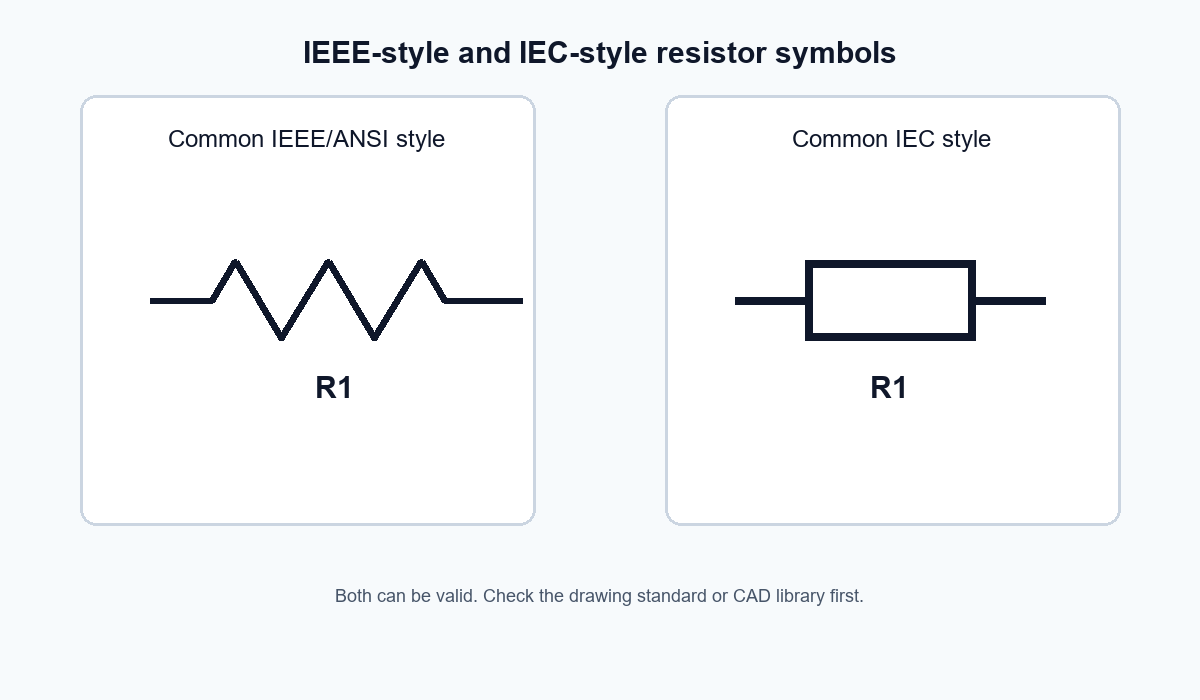
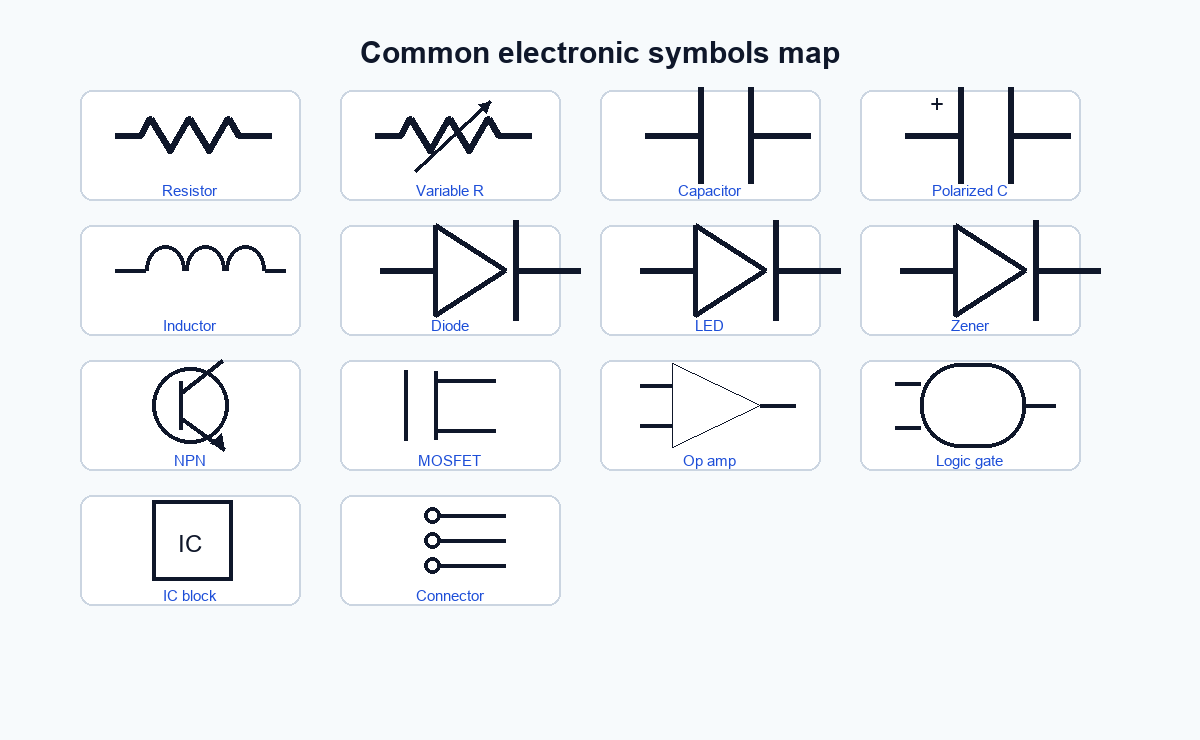
The most common symbols include wires, junctions, grounds, cells, batteries, AC and DC sources, resistors, capacitors, inductors, transformers, switches, fuses, circuit breakers, diodes, LEDs, transistors, integrated circuits, logic gates, meters, motors, and lamps. Symbols are often standardized, but the exact appearance can vary by region, industry, CAD library, and standard family. A resistor, for example, may appear as a zigzag line in many IEEE-style diagrams or as a rectangle in many IEC-style diagrams. If you are reading a schematic, do not memorize symbols as isolated icons. Read them together with reference designators, pin names, net labels, polarity marks, component values, and the surrounding circuit context.
What Are Electrical Symbols and Electronic Symbols?
Electrical and electronic symbols are the visual language of circuit documentation. Instead of drawing a real resistor body, a battery pack, a switch housing, or an IC package, a schematic uses abstract symbols that show what each element does in the circuit.
That abstraction is useful because schematics are not meant to show physical layout. They are meant to show electrical relationships:
| Diagram element | What it helps you understand |
|---|---|
| Component symbol | The type or function of a part |
| Wires and junctions | Which points are electrically connected |
| Ground and supply symbols | Reference nodes and power rails |
| Reference designators | Which physical component the symbol represents |
| Pin numbers and labels | How a symbol maps to a package or connector |
| Values and ratings | Resistance, capacitance, voltage, tolerance, and other design details |
In practice, the symbol alone rarely tells the full story. A capacitor symbol may show whether the capacitor is polarized, but the value, voltage rating, dielectric type, and footprint usually come from the bill of materials, component label, datasheet, or CAD library metadata.
Electrical Symbols vs. Electronic Symbols
The phrase "electrical symbols" is often used broadly, but there is a useful distinction:
| Category | Common focus | Typical examples |
|---|---|---|
| Electrical symbols | Power distribution, wiring, protection, loads, controls, field devices | Earth ground, circuit breaker, fuse, motor, transformer, contactor, switch, outlet |
| Electronic symbols | Circuit-level components and signal functions | Resistor, capacitor, diode, LED, transistor, op-amp, logic gate, IC, crystal |
The boundary is not rigid. A switch can appear in both electrical and electronic diagrams. A transformer may appear in a power schematic, an audio circuit, or an isolated DC-DC converter. The right way to interpret the symbol depends on the diagram type and the surrounding labels.
Why Symbol Standards Matter
Symbol standards exist so engineers, technicians, students, manufacturers, and CAD tools can communicate consistently. The International Electrotechnical Commission points users to IEC 60617 for graphical symbols used in electrotechnical diagrams. IEEE/ANSI 315-1975 is another widely cited reference for graphic symbols and class designation letters used on electrical and electronics diagrams.
That does not mean every schematic you see will look identical. Legacy drawings, regional practices, company CAD libraries, education sites, and hobbyist schematics may use different symbol styles. The important habit is to identify the standard or library behind the drawing before treating a symbol as universal.
For published engineering documentation, use the standard required by your industry, customer, country, or CAD environment. For educational content, make clear whether you are showing IEC-style, IEEE/ANSI-style, or simplified learning symbols.
Common Electrical and Electronic Symbols
The table below describes common symbol appearances in plain language. It is not a substitute for an official standard, but it is a practical reading guide.
| Symbol or component | Typical appearance | What it means | Reading tip |
|---|---|---|---|
| Wire or conductor | Straight line | Electrical connection path | Lines that cross are not always connected; look for junction dots or bridge notation. |
| Junction | Dot at crossing or connection point | Conductors are electrically connected | A dot usually means connection; absence of a dot can mean no connection depending on drawing style. |
| No connection | Crossing lines without dot, bridge, or no-connect mark | Conductors are not connected | Older drawings may use a line "jump"; modern schematics often rely on dots and net labels. |
| Cell | One long and one short parallel line | Single electrochemical source | The long line usually marks the positive terminal in basic circuit notation. |
| Battery | Multiple long/short line pairs | Multiple cells or a battery source | Check voltage label and polarity; the symbol alone does not give capacity. |
| DC voltage source | Circle or source symbol with plus/minus marks | Direct current source | Confirm polarity and reference ground before powering a circuit. |
| AC voltage source | Circle or source symbol with sine-wave mark | Alternating current source | Check RMS voltage, frequency, and isolation in the drawing notes. |
| Ground / earth | Ground symbol variants | Reference node, earth connection, chassis, or signal return | Do not assume all ground symbols mean the same physical node. |
| Resistor | Zigzag line or rectangle | Limits current, sets bias, divides voltage | Look for value, tolerance, power rating, and package. |
| Variable resistor / potentiometer | Resistor with arrow or wiper | Adjustable resistance or voltage divider | A three-terminal potentiometer is not the same as a two-terminal rheostat connection. |
| Capacitor | Two parallel plates | Stores charge; blocks DC in many applications | Polarity matters for electrolytic and some tantalum capacitors. |
| Polarized capacitor | One plate marked plus or curved/straight plate style | Capacitor with required polarity | Check voltage rating and orientation before assembly. |
| Inductor | Coil or looped line | Stores energy in a magnetic field | Current rating, saturation current, and DC resistance matter in real designs. |
| Transformer | Two coils with magnetic coupling marks | Transfers energy between windings | Dot markings and winding polarity can matter. |
| Switch | Break or movable contact in a conductor | Opens or closes a circuit | SPST, SPDT, NO, and NC labels change the meaning. |
| Fuse | Small element in series, often boxed or marked | Overcurrent protection | Symbol does not specify current rating, voltage rating, speed, or breaking capacity. |
| Circuit breaker | Switch/protection symbol variant | Resettable overcurrent protection | Use official electrical drawings for exact breaker type. |
| Diode | Triangle/arrow-like body pointing to a line, depending style | Allows current mainly in one direction | Orientation and polarity are critical. |
| LED | Diode symbol with arrows pointing outward | Light-emitting diode | Current limiting is usually required. |
| Zener diode | Diode symbol with modified cathode line | Voltage reference or clamp | Zener voltage and power rating must be checked. |
| Transistor | BJT, FET, MOSFET, or JFET symbol | Switching or amplification device | The arrow, gate, drain, source, collector, emitter, and body diode details matter. |
| Operational amplifier | Triangle with inputs and output | High-gain amplifier block | Supply pins may be hidden in simplified schematics. |
| Integrated circuit | Rectangle or multi-unit symbol | Packaged circuit or logic/function block | Pin numbers, pin names, and package drawing must match the datasheet. |
| Logic gate | AND, OR, NOT, NAND, NOR, XOR shapes | Boolean logic function | A small bubble usually indicates inversion. |
| Ammeter / voltmeter | Circle with A or V | Measurement instrument | Meter placement changes what is measured. |
| Motor | Circle with M or motor notation | Converts electrical energy into mechanical motion | Check motor type, phase, rating, and control method. |
| Lamp / indicator | Circle with cross, lamp mark, or indicator symbol | Light source or indicator | Pilot lights, LEDs, and lamps may use different symbols. |
How to Read a Schematic Without Getting Lost
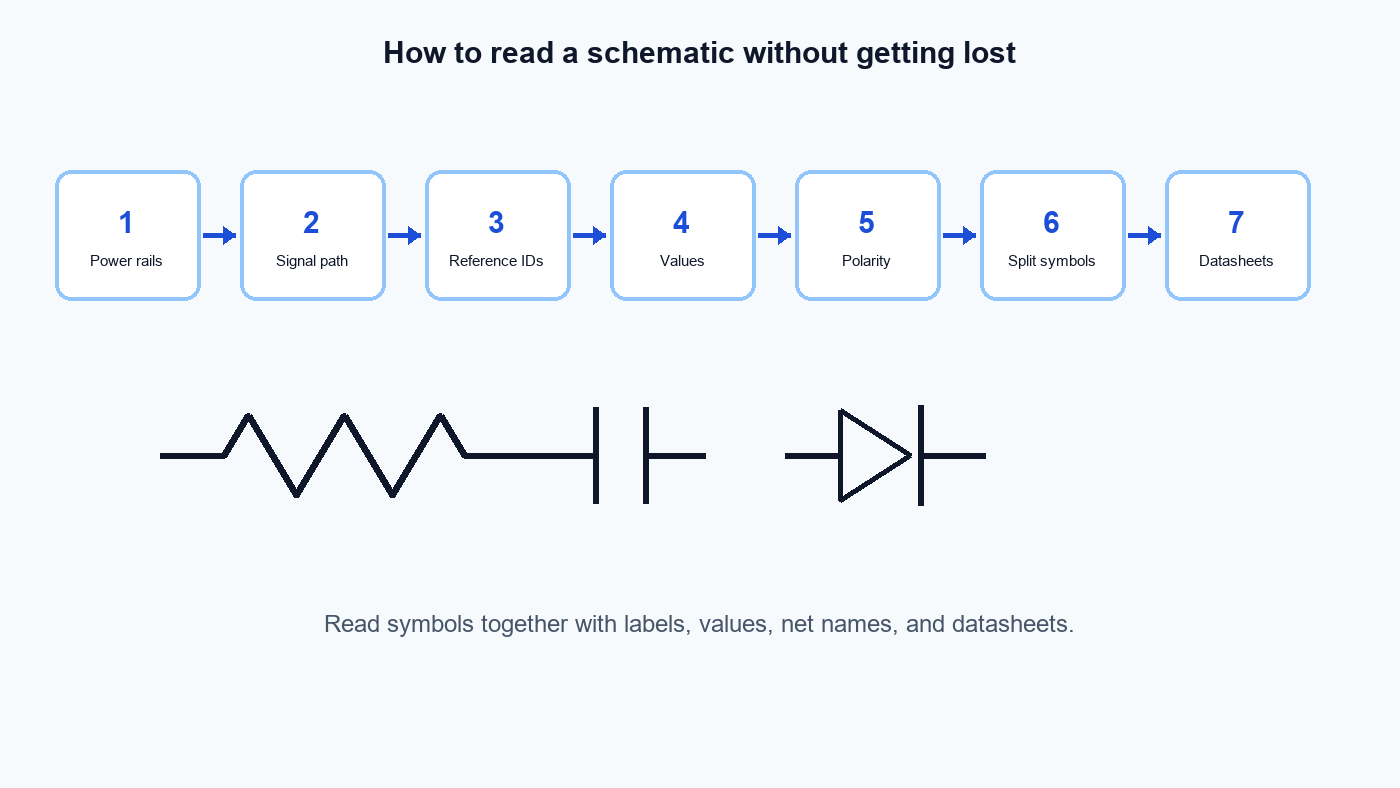
A symbol chart is helpful, but real schematics are read as systems. Use this order:
Find the power rails Identify supply labels such as VCC, VDD, +5 V, +12 V, AC line, neutral, chassis, earth, and signal ground.
Trace the main current or signal path Start from the input or supply, follow the wires and net labels, and watch where the path branches.
Match symbols with reference designators R means resistor in many schematics, C means capacitor, D means diode, Q often means transistor, U or IC means integrated circuit, J or P often marks connectors.
Read values and ratings "R1" tells you which resistor it is; "10 k" tells you the resistance. The symbol does not replace the value.
Check polarity and orientation Diodes, LEDs, electrolytic capacitors, transistors, ICs, relays, transformers, and connectors can fail or behave incorrectly if orientation is misunderstood.
Look for hidden or split symbols Multi-part components may be split across the schematic. Op-amp supply pins and IC power pins may be shown on a different sheet.
Use the datasheet or CAD library for final verification A schematic symbol may be simplified. The datasheet and PCB footprint decide how the physical part is connected.
Electrical Symbols That Are Easy to Misread
Some symbol mistakes are harmless in a classroom worksheet but expensive in engineering work. Watch these closely:
| Misread symbol or convention | Why it matters | What to verify |
|---|---|---|
| Ground vs. earth vs. chassis | These may represent different reference or safety points | Check whether the drawing separates signal ground, protective earth, and enclosure/chassis. |
| Crossing wires | A line crossing is not always a junction | Look for junction dots, bridge marks, net names, or CAD conventions. |
| Polarized capacitors | Reversed polarity can damage components | Check plus/minus marking, datasheet, PCB silkscreen, and BOM. |
| Diode and LED orientation | Direction controls conduction or light emission | Confirm anode/cathode and current path. |
| Transistor arrows | NPN/PNP and device type change circuit behavior | Check pinout, package, and datasheet symbol. |
| Relay coils and contacts | Coils and contacts may be shown separately | Match relay contact numbers and coil reference designators. |
| Connector symbols | A connector symbol may hide mechanical pin order | Verify pin numbers and mating connector orientation. |
| IC symbols | Pins may be rearranged for schematic clarity | Do not infer physical pin location from schematic placement. |
| Fuse and breaker symbols | Symbol does not define protection performance | Check current rating, voltage rating, interrupt rating, and speed curve. |
| IEC vs. IEEE symbol style | Different standards can draw the same function differently | Confirm the drawing standard before correcting a symbol. |
Electrical Symbols for Power, Protection, and Wiring
Electrical diagrams often focus on power flow, safety, switching, wiring, and loads. Common symbols in this group include:
Power source symbols for AC supplies, DC supplies, cells, and batteries
Ground, earth, chassis, and reference symbols
Switches, pushbuttons, selectors, and contacts
Fuses, circuit breakers, isolators, and protective devices
Transformers, motors, lamps, heaters, solenoids, and relays
Terminals, connectors, cable markers, and wiring junctions
When reading these drawings, do not stop at the symbol. A motor symbol, for example, tells you there is a motor function, but it does not tell you phase count, voltage, current, enclosure type, control method, overload protection, or wiring practice. Those details come from labels, schedules, datasheets, nameplates, and project standards.
Electronic Symbols for Circuit Design
Electronic schematics usually focus on signal behavior and component-level relationships. Common symbols include:
Resistors, potentiometers, thermistors, and photoresistors
Capacitors, polarized capacitors, and variable capacitors
Inductors, transformers, and ferrites
Diodes, LEDs, Zener diodes, Schottky diodes, and bridge rectifiers
BJTs, MOSFETs, JFETs, and IGBTs
Op-amps, comparators, voltage regulators, oscillators, and crystals
Logic gates, flip-flops, multiplexers, and digital ICs
Connectors, test points, jumpers, headers, and shields
Electronic symbols are often simplified for readability. A voltage regulator may be drawn as a three-pin block even if the real package has a thermal pad, enable pin, feedback network, or exposed pad. An op-amp may appear as a triangle while its power pins are shown elsewhere. Always reconcile the schematic with the datasheet and layout footprint.
How International Standards Differ
International differences usually appear in symbol style and drawing conventions rather than in the basic electrical idea.
The resistor is the classic example: many US-oriented learning materials show a zigzag resistor, while many IEC-style diagrams show a rectangle. Ground symbols also vary depending on whether the node is protective earth, chassis, signal common, or a functional reference. Switch, contact, relay, and industrial control symbols can also differ across standards and industries.
For a student or hobbyist, this means you should learn both common styles. For an engineer, it means you should not mix styles casually in formal documentation. For a manufacturer, distributor, or technical publisher, it means symbol charts should identify the convention used and should avoid implying that one regional style is always the only correct symbol.
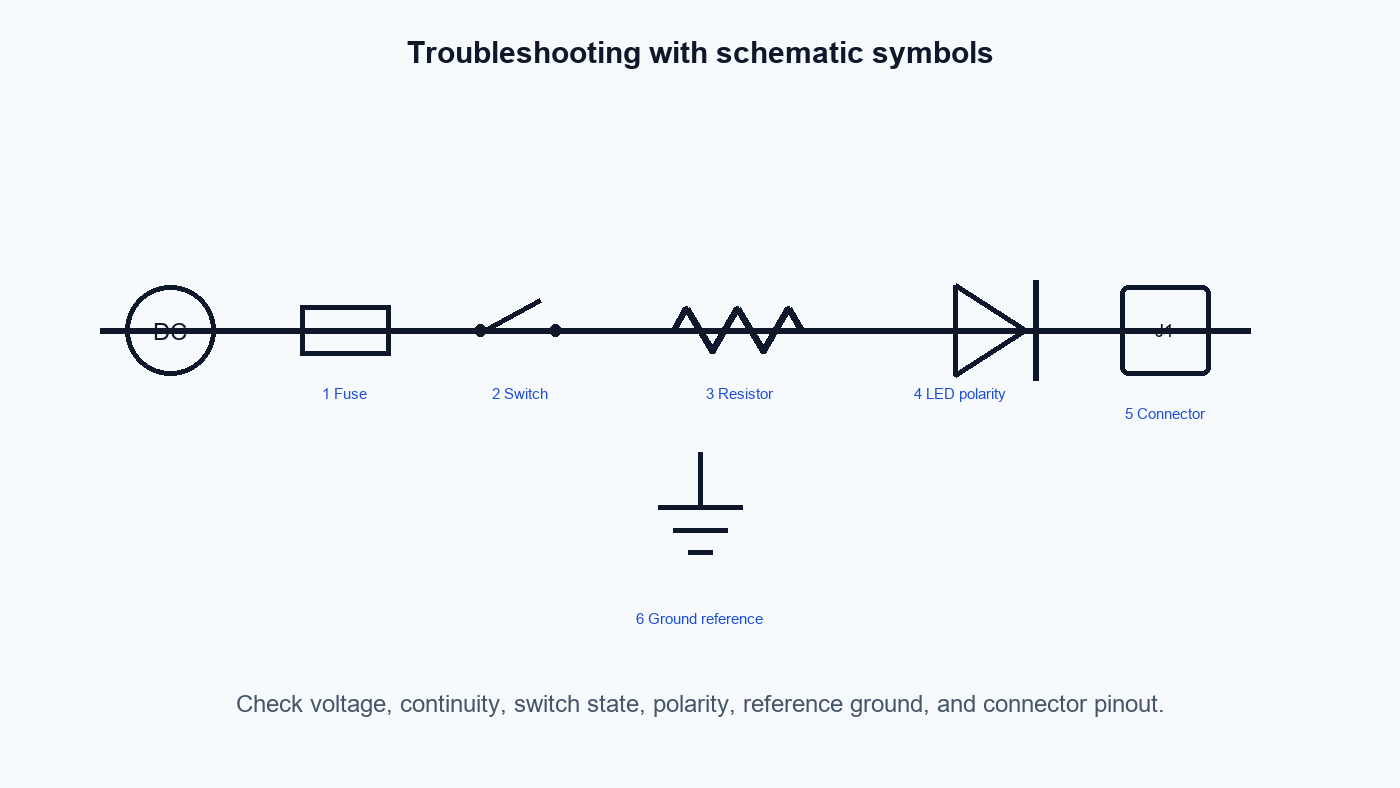
How Symbols Help Troubleshooting
Symbols are not just for design. They help troubleshooting because they show expected circuit function:
A fuse symbol tells you where overcurrent protection should interrupt a fault.
A switch symbol shows where a circuit should open or close.
A diode symbol tells you where current should mainly flow in one direction.
A ground symbol tells you what node is used as a reference or return path.
A connector symbol tells you where signals leave one board or system and enter another.
A test point symbol or label tells you where a technician can measure a signal.
Good troubleshooting starts by converting the schematic into questions:
| Schematic clue | Troubleshooting question |
|---|---|
| Power source symbol | Is the correct voltage present? |
| Fuse or breaker | Is protection open, tripped, or undersized? |
| Switch/contact | Is the contact changing state when expected? |
| Diode or LED | Is the polarity correct? |
| Ground reference | Are measurements using the correct reference node? |
| Connector | Is the signal present on the correct pin? |
| IC symbol | Are supply, enable, reset, and input pins in valid states? |
Common Mistakes When Using Symbol Charts
Symbol charts are useful, but they can mislead if used without context.
Treating a symbol chart as a standard A web chart may be educational, simplified, outdated, or vendor-specific. Use official standards or your CAD library rules for formal documentation.
Ignoring reference designators The symbol says "capacitor"; the reference designator, value, BOM, and datasheet identify the actual part.
Assuming schematic shape equals physical package A schematic symbol may place pins for readability, not to match physical pin order.
Mixing IEC and IEEE styles without explanation Mixed styles can be confusing in documentation, especially for teams across regions.
Copying symbols from image search Image search results can contain errors, inconsistent notation, and copyrighted charts. Redraw symbols or use licensed CAD libraries.
Forgetting polarity and pin orientation Diodes, electrolytic capacitors, transistors, connectors, and ICs should be verified against datasheets and footprints.
Practical Checklist for Reading Electrical and Electronic Symbols
Use this checklist before trusting your interpretation of a circuit diagram:
Identify the diagram type: schematic, wiring diagram, single-line diagram, PCB schematic, or construction drawing.
Check the drawing standard or CAD library if it is stated.
Separate power symbols from signal symbols.
Identify all ground symbols and confirm whether they are the same node.
Follow net labels as well as wires.
Match each symbol to its reference designator.
Read values, ratings, tolerances, and notes.
Verify polarity for diodes, LEDs, polarized capacitors, batteries, transistors, ICs, and connectors.
Look for split components, hidden power pins, and multi-sheet references.
Use official datasheets before building, repairing, or replacing a real circuit.
For formal documentation, verify symbols against the required IEC, IEEE/ANSI, national, customer, or company standard.
FAQ
What are the most common electronic symbols used in circuit diagrams?
The most common electronic symbols are wires, junctions, resistors, capacitors, inductors, diodes, LEDs, transistors, integrated circuits, op-amps, logic gates, connectors, power sources, and ground symbols. In real schematics, these symbols are paired with reference designators, values, pin numbers, and net labels.
Are electrical symbols and electronic symbols the same?
They overlap, but they are not always used the same way. Electrical symbols often focus on wiring, power, protection, switching, motors, transformers, and installation diagrams. Electronic symbols often focus on circuit-board components, semiconductor devices, logic functions, and signal processing.
Why do resistor symbols look different?
Different standards and traditions use different resistor drawings. A zigzag resistor is common in many IEEE/ANSI-style educational and US-oriented schematics. A rectangular resistor is common in many IEC-style drawings. The function is the same, but documentation should stay consistent with its chosen standard.
How do international standards differ for electrical symbols?
International standards differ in graphic style, classification, and drawing conventions. IEC 60617 is used as an official source for graphical symbols in electrotechnical diagrams. IEEE/ANSI 315-1975 is a widely cited standard for graphic symbols and class designation letters in electrical and electronics diagrams. Always check the standard required by your project.
Can I use symbols from Google Images in a blog or datasheet?
Do not assume that image-search symbol charts are free to reuse. Many charts are copyrighted, and some are inaccurate or inconsistent. For a blog, create original line art. For engineering documentation, use licensed CAD libraries or the required official standard resources.
How do symbols help in troubleshooting circuits?
Symbols show the expected function of each circuit element. A fuse symbol tells you where protection should open, a diode symbol shows intended current direction, a switch symbol shows control state, and ground symbols show reference nodes. Troubleshooting becomes easier when you combine symbols with voltage measurements, continuity checks, labels, and datasheets.
Sources and references used for this guide
IEC Graphics & figures Source type: Official standards organization page Used for: Confirming that IEC directs users to IEC 60617 for graphical symbols in electrotechnical diagrams. Caution: The page does not provide a free full symbol chart; use the official IEC database or licensed standard access for formal work.
IEC 60617 database description via SIS Source type: Standards distributor page Used for: Confirming that IEC 60617 contains graphical symbols for electrotechnical diagrams and that the database is the official source. Caution: Treat as a standards metadata source, not as the full standard content.
IEEE/ANSI 315-1975 - IEEE SA Source type: Official IEEE standards page Used for: Confirming the existence and scope of IEEE/ANSI 315-1975 for graphic symbols and class designation letters used on electrical and electronics diagrams. Caution: Verify current status and project requirements before using it as the controlling standard.
Units & Symbols for Electrical & Electronic Engineers - IET Source type: Professional engineering institution PDF Used for: Background on electrical and electronic units, symbols, abbreviations, and engineering notation. Caution: Useful reference material, but not a complete graphical-symbol standard for circuit diagrams.
How to Read a Schematic - SparkFun Learn Source type: Educational electronics tutorial Used for: Practical schematic-reading workflow and common beginner symbol categories. Caution: Educational source, not a formal standard.
A Guide to Basic Electrical Symbols - RS Source type: Distributor educational guide Used for: Practical examples of electrical symbols and reading guidance. Caution: Vendor educational content; do not treat as the official standard.
Circuit Symbols - Electronics Club Source type: Educational electronics reference Used for: Common circuit symbol examples and beginner-friendly explanations. Caution: Educational reference only; verify formal symbols against project standards.
Electrical Symbols | Electronic Symbols - RapidTables Source type: Online reference chart Used for: Cross-checking common symbol categories surfaced repeatedly by AI search results. Caution: Convenient web reference, not a standards authority.
Basic Schematic Symbols - Electronics Tutorials Source type: Educational electronics reference Used for: Common schematic symbol categories and practical descriptions. Caution: Use for learning and editorial context; use official standards for controlled documentation.
Electronic symbol - Wikipedia Source type: Background encyclopedia source Used for: General background and terminology cross-checking from AI-cited sources. Caution: Do not use as a final authority for engineering standards or symbol correctness.
 UTMEL
UTMEL
We are the professional distributor of electronic components, providing a large variety of products to save you a lot of time, effort, and cost with our efficient self-customized service. careful order preparation fast delivery service
 Pull-Down Circuit Guide: Working Principle, Resistor Value, Circuit Design, and ApplicationsUTMEL26 June 2026458
Learn how pull-down circuits work, how to choose a pull-down resistor value, and how to design reliable microcontroller inputs, MOSFET gates, reset pins, and sensor interfaces.
Read More Smd Components Outlook 2026: Supply, Lead Times, and Sourcing OptionsUTMEL21 July 2026832
The 2026 electronic component market faces a selective shortage driven by AI infrastructure and electric vehicles. While active ICs face lead times up to 55 weeks, commodity SMD passives remain stable at 12–20 weeks. This procurement guide details key trends in MLCCs and circuit protection, outlining actionable strategy solutions like dual-sourcing and flexible footprints to mitigate supply chain risks.
Read More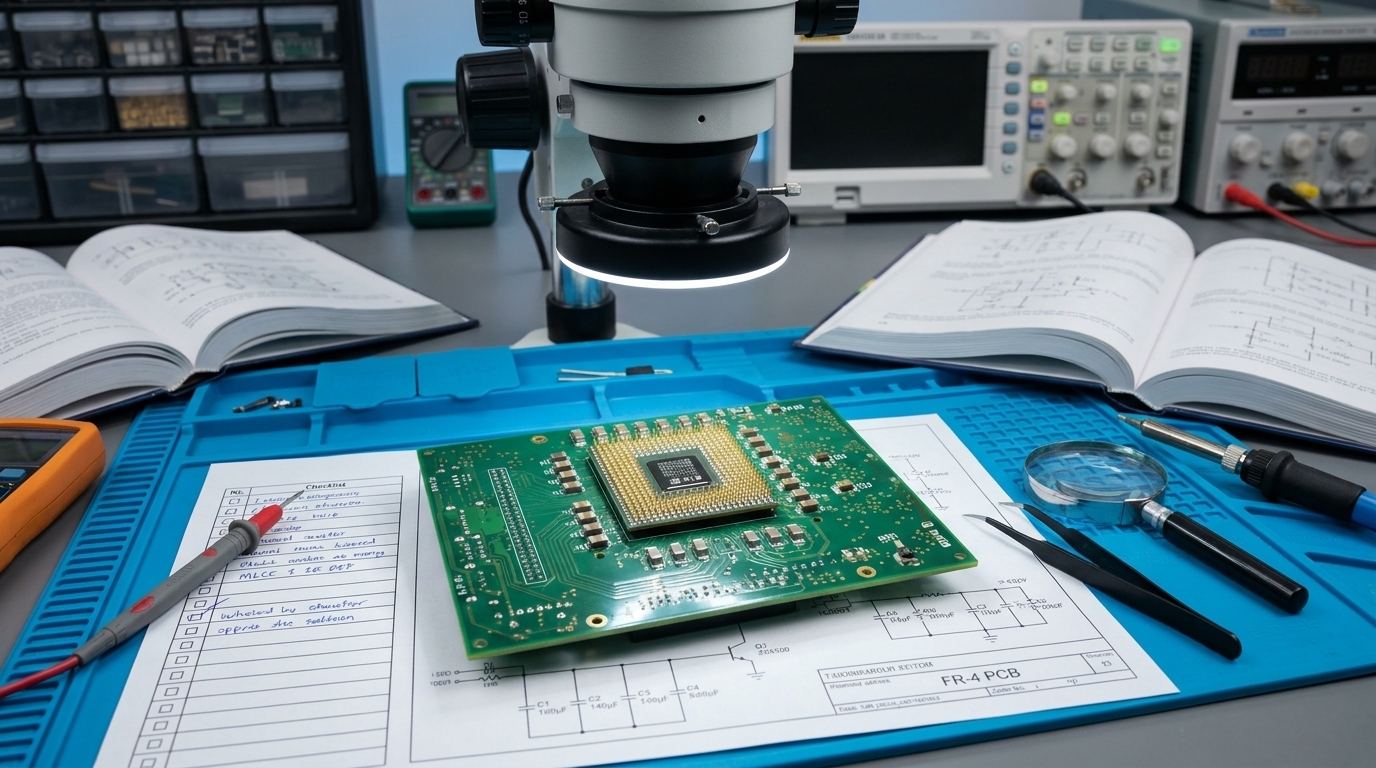 Decoupling Capacitor Placement Guide: Maximizing Power Integrity in High-Speed Digital PCBsUTMEL12 August 2026433
This technical guide details how to optimize decoupling capacitor layout to maximize Power Integrity (PI) in high-speed digital PCBs. It explains how switching ICs induce power rail noise, the physics of parasitic loop inductance, and the impact of stackup plane separation. Layout engineers will find practical strategies for via placement, anti-resonance mitigation across multi-value capacitor networks, and sourcing reliable low-ESR MLCCs.
Read More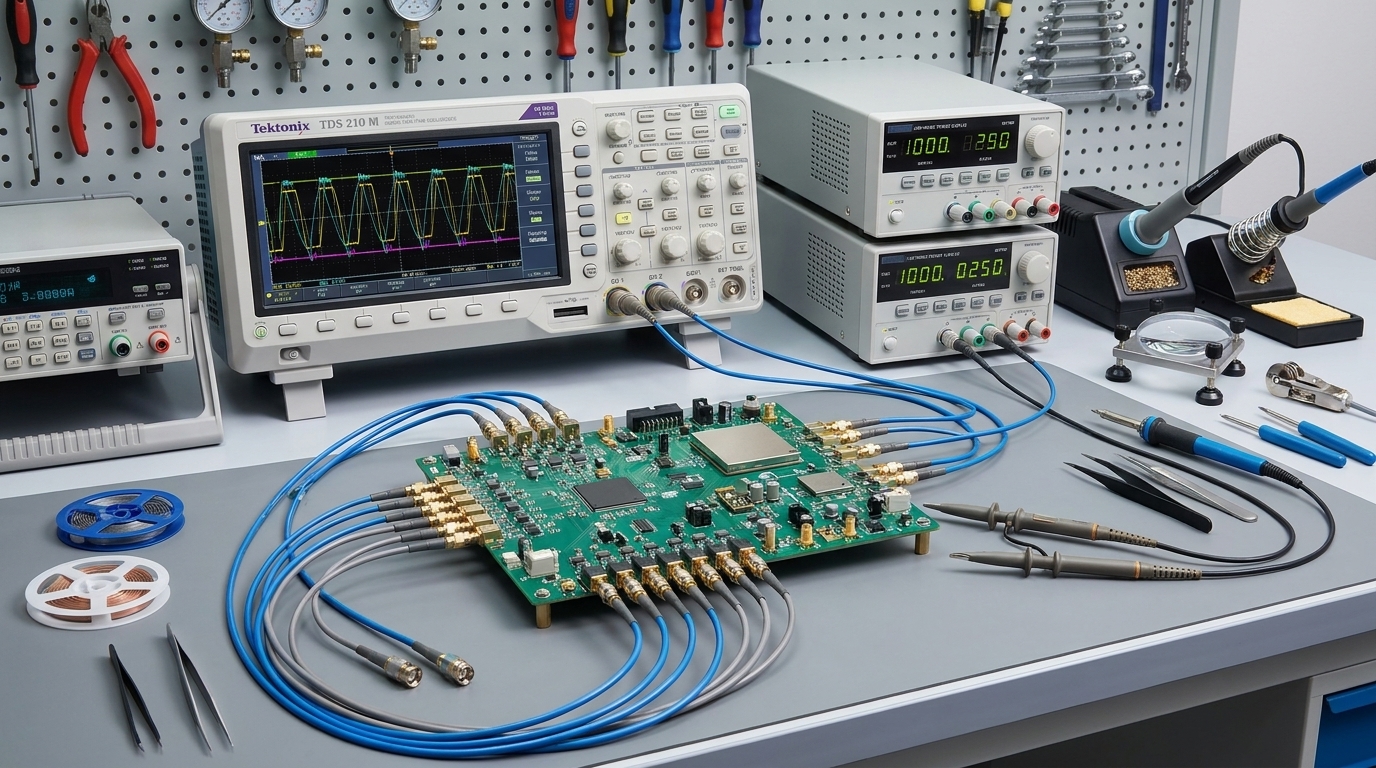 sar-adc-reference-driver-selection-managing-dynamic-kickback-noise-loop-stabilityUTMEL17 September 202660
Precision SAR ADCs present high-speed dynamic switched-capacitor loads that demand instantaneous transient currents during bit trials. This guide details how to size local decoupling capacitors accounting for MLCC DC bias derating, stabilize reference buffers using dual-loop in-loop compensation, and minimize multiplicative noise degradation. It also provides layout directives and dynamic bench verification protocols across sampling rate sweeps and burst modes.
Read More HF PCB Circuit Design 10 QuestionsUTMEL16 March 20225505
Hello everyone, I am Rose. Today I want to give you a full explanation about PCB design. I Hope the following ten questions will give you a satisfied answer.
Read More
Subscribe to Utmel !
![AM1LS-1205SJZTR]() AM1LS-1205SJZTR
AM1LS-1205SJZTRaimtec
![AM10BRW-2415DZ]() AM10BRW-2415DZ
AM10BRW-2415DZaimtec
![AM1SR-1203SJZ]() AM1SR-1203SJZ
AM1SR-1203SJZaimtec
![AM1DR-2405SH30JZ]() AM1DR-2405SH30JZ
AM1DR-2405SH30JZaimtec
![AM1DS-1209SH30JZ]() AM1DS-1209SH30JZ
AM1DS-1209SH30JZaimtec
![AM1LS-2405DH30JZ]() AM1LS-2405DH30JZ
AM1LS-2405DH30JZaimtec
![AM2LS-2412SJZ]() AM2LS-2412SJZ
AM2LS-2412SJZaimtec
![AM1SS-1212SJZ]() AM1SS-1212SJZ
AM1SS-1212SJZaimtec
![AM1LS-0524SH30JZ]() AM1LS-0524SH30JZ
AM1LS-0524SH30JZaimtec
![AM1DR-1515SH30JZ]() AM1DR-1515SH30JZ
AM1DR-1515SH30JZaimtec