

 Product
 Brand
Brand Articles
 Tools
Tools
PL-USB2-BLASTER Cable: Pinout, Datasheet, Block Diagram


CABLE PROGRAMMING USB
The PL-USB2-BLASTER belongs to Intel® FPGA Download Cable. This article will unlock its pinout, datasheet, block diagram, connection and more details about PL-USB2-BLASTER.

Understanding and utilizing USB Blaster and JTAG to configure Intel FPGAs
PL-USB2-BLASTER Pinout

PL-USB2-BLASTER Pinout
| Pin | Signal Name |
| 1 | DCL |
| 2 | GND |
| 3 | CONF_ DONE |
| 4 | Vocc (TRGT) |
| 5 | nCONF IG |
| 6 | nCE |
| 7 | DATAOUT |
| 8 | nCs |
| 9 | ASDI |
| 10 | GND |
PL-USB2-BLASTER Introduction
The PL-USB2-BLASTER belongs to Intel® FPGA Download Cable. The Intel ® FPGA Download Cable interfaces a USB port on a host computer to an FPGA mounted on a printed circuit board. The cable sends configuration data from the host computer to a standard 10 -pin header connected to the FPGA, You can use the Intel FPGA Download Cable to iteratively download configuration data to a system during prototyping or to program data into the system during production.
PL-USB2-BLASTER Block Diagram
The following figure shows the block diagram of PL-USB2-BLASTER
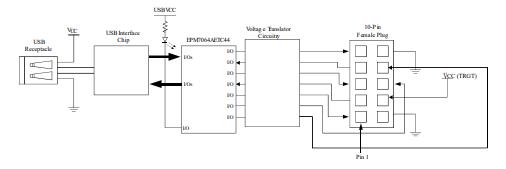
PL-USB2-BLASTER Block Diagram
PL-USB2-BLASTER Using
To start using the Intel FPGA Download Cable, you must install the drivers on your system and set up the hardware in the Intel Quartus® Prime software. Intel recommends that you use the latest version of the Intel Quartus Prime software. To program or configure the device, connect the host system to the device board using the Intel FPGA Download Cable and initiate the programming or configuration using the Intel Quartus Prime Programmer. You can also use the cable with the Intel Quartus Prime Signal Tap Logic Analyzer for logic analysis.
PL-USB2-BLASTER Cable-to-Board Connection
Disconnect the power cable from the device board.
Connect the Intel FPGA Download Cable to your PC.
Plug the Intel FPGA Download Cable into the 1 0-pin header on the device board.
Connect the power cable to the device board. The Found New Hardware wizard may open and prompt you to install a new hardware driver, Close the wizard and follow the steps provided in subsequent sections to install the hardware driver.
To disconnect the Intel FPGA Download Cable from the device board, follow these steps to ensure that the cable is not damaged.
a. Remove power from the device board.
b. Unplug the Intel FPGA Download Cable from the board.
c. Unplug the Intel FPGA Download Cable from your PC.

Cable-to-Board Connection
PL-USB2-BLASTER Dimension
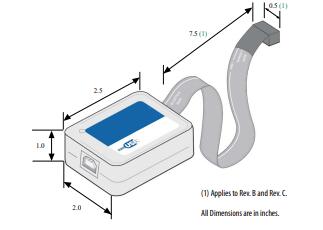
PL-USB2-BLASTER Dimension
Datasheet PDF
- Datasheets :
- PCN Packaging :
What does a USB Blaster do?
A USB port download cable that allows PC users to program and configure devices in-system.
What is the difference between USB Blaster and USB Blaster II?
A: The main difference is the JTAG circuit, the UBT(USB Blaster Download Cable) supports the USB Blaster I circuit and the JTAG Voltage: 2.5V ~ 3.3V. The AUB2 (USB-Blaster II Download Cable) supports USB Blaster II circuit and JTAG Voltage: 5.0-V TTL, 3.3-V LVTTL/LVCMOS, Single-ended I/O standards from 1.5 V to 3.3 V.
How do I install a USB-Blaster driver?
Plug the USB-Blaster download cable into your PC. The Found New Hardware dialogue box appears.
Select Locate and install driver software (recommended).
Select Don't search online.
When you are prompted to Insert the disc that came with your USB-Blaster, select I don’t have the disc. Show me other options.
Select Browse my computer for driver software (advanced) when you see the Windows couldn’t find driver software for your device dialogue box.
Click Browse, and browse to the <Path to Quartus Prime installation>\drivers\usb-blaster directory. Note: Do not select the x32 or x64 directories.
Click OK.
Select the Include subfolders option, and click Next.
If you are prompted Windows can’t verify the publisher of this driver software, select Install this driver software anyway in the Window Security dialogue box. The installation wizard guides you through the installation process.
When The software for this device has been successfully installed dialogue box appears, click Close.
To complete your installation, set up programming hardware in the Intel Quartus Prime software.
What do you need to start using the Intel FPGA Download Cable?
Install the drivers on your system and set up the hardware in the Intel Quartus® Prime software.
What does Intel recommend you use to start using the Intel FPGA Download Cable?
The latest version of the Intel Quartus Prime software.
 ADALM2000 Analog Device: Advanced Active Learning Module USB
11 January 20222844
 STUSB4500 USB PD Controller: Pinout, Features and Datasheet
06 January 202213114
![The Guide to BFW10 30V N-Channel JFET [Datasheet]](https://res.utmel.com/Images/Article/6a2ddfe6-f3b4-4bba-88df-9090bebad922.jpg) The Guide to BFW10 30V N-Channel JFET [Datasheet]
The Guide to BFW10 30V N-Channel JFET [Datasheet]30 March 202225510
 STM32F413CGU6 Microcontroller: Performance, Features and Applications
16 June 2025533
 1N914 vs. 1N4148: What Difference is between 1N914 and 1N4148?
23 November 202111887
 MSP430FE42x Mixed Signal Microcontroller: Comprehensive Technical Overview
29 February 2024215
 TL064 Operational Amplifier: Features, Pinout and Datasheet
16 July 20214486
 TDA7000 FM Receiver: Circuit, Datasheet pdf and Replacement
04 December 202110209
 What is Mini LED?
08 December 20206760
 STMicroelectronics: The European Powerhouse in Silicon Carbide Semiconductor Technology
05 October 20233518
 How much do you know about VR Technology?
01 September 20212479
 NPN Transistors and PNP Transistors
29 October 202010274
 RF Switches Guide: Types, Specifications & Applications
03 July 20255168
 Optimizing Energy Exchange with Vehicle-to-Grid Technology
25 April 20233384
 Types, Working, and Selection of DC Motor
27 March 202518868
 BMW CEO: The Car Chip Problem Will Not Be Solved Until 2023
12 April 20226081
Intel
In Stock
United States
China
Canada
Japan
Russia
Germany
United Kingdom
Singapore
Italy
Hong Kong(China)
Taiwan(China)
France
Korea
Mexico
Netherlands
Malaysia
Austria
Spain
Switzerland
Poland
Thailand
Vietnam
India
United Arab Emirates
Afghanistan
Åland Islands
Albania
Algeria
American Samoa
Andorra
Angola
Anguilla
Antigua & Barbuda
Argentina
Armenia
Aruba
Australia
Azerbaijan
Bahamas
Bahrain
Bangladesh
Barbados
Belarus
Belgium
Belize
Benin
Bermuda
Bhutan
Bolivia
Bonaire, Sint Eustatius and Saba
Bosnia & Herzegovina
Botswana
Brazil
British Indian Ocean Territory
British Virgin Islands
Brunei
Bulgaria
Burkina Faso
Burundi
Cabo Verde
Cambodia
Cameroon
Cayman Islands
Central African Republic
Chad
Chile
Christmas Island
Cocos (Keeling) Islands
Colombia
Comoros
Congo
Congo (DRC)
Cook Islands
Costa Rica
Côte d’Ivoire
Croatia
Cuba
Curaçao
Cyprus
Czechia
Denmark
Djibouti
Dominica
Dominican Republic
Ecuador
Egypt
El Salvador
Equatorial Guinea
Eritrea
Estonia
Eswatini
Ethiopia
Falkland Islands
Faroe Islands
Fiji
Finland
French Guiana
French Polynesia
Gabon
Gambia
Georgia
Ghana
Gibraltar
Greece
Greenland
Grenada
Guadeloupe
Guam
Guatemala
Guernsey
Guinea
Guinea-Bissau
Guyana
Haiti
Honduras
Hungary
Iceland
Indonesia
Iran
Iraq
Ireland
Isle of Man
Israel
Jamaica
Jersey
Jordan
Kazakhstan
Kenya
Kiribati
Kosovo
Kuwait
Kyrgyzstan
Laos
Latvia
Lebanon
Lesotho
Liberia
Libya
Liechtenstein
Lithuania
Luxembourg
Macao(China)
Madagascar
Malawi
Maldives
Mali
Malta
Marshall Islands
Martinique
Mauritania
Mauritius
Mayotte
Micronesia
Moldova
Monaco
Mongolia
Montenegro
Montserrat
Morocco
Mozambique
Myanmar
Namibia
Nauru
Nepal
New Caledonia
New Zealand
Nicaragua
Niger
Nigeria
Niue
Norfolk Island
North Korea
North Macedonia
Northern Mariana Islands
Norway
Oman
Pakistan
Palau
Palestinian Authority
Panama
Papua New Guinea
Paraguay
Peru
Philippines
Pitcairn Islands
Portugal
Puerto Rico
Qatar
Réunion
Romania
Rwanda
Samoa
San Marino
São Tomé & Príncipe
Saudi Arabia
Senegal
Serbia
Seychelles
Sierra Leone
Sint Maarten
Slovakia
Slovenia
Solomon Islands
Somalia
South Africa
South Sudan
Sri Lanka
St Helena, Ascension, Tristan da Cunha
St. Barthélemy
St. Kitts & Nevis
St. Lucia
St. Martin
St. Pierre & Miquelon
St. Vincent & Grenadines
Sudan
Suriname
Svalbard & Jan Mayen
Sweden
Syria
Tajikistan
Tanzania
Timor-Leste
Togo
Tokelau
Tonga
Trinidad & Tobago
Tunisia
Turkey
Turkmenistan
Turks & Caicos Islands
Tuvalu
U.S. Outlying Islands
U.S. Virgin Islands
Uganda
Ukraine
Uruguay
Uzbekistan
Vanuatu
Vatican City
Venezuela
Wallis & Futuna
Yemen
Zambia
Zimbabwe
![PL-ETH2-BLASTER]() PL-ETH2-BLASTER
PL-ETH2-BLASTERIntel
![ITPCCAUSBAMCM]() ITPCCAUSBAMCM
ITPCCAUSBAMCMIntel
![PL-ENET-BLASTERZ]() PL-ENET-BLASTERZ
PL-ENET-BLASTERZIntel
![PL-USB-BLASTER-RCN]() PL-USB-BLASTER-RCN
PL-USB-BLASTER-RCNIntel
![PL-BYTEBLASTER2N]() PL-BYTEBLASTER2N
PL-BYTEBLASTER2NIntel
![PL-USB-BLASTER]() PL-USB-BLASTER
PL-USB-BLASTERIntel
![PL-MASTERBLASTER]() PL-MASTERBLASTER
PL-MASTERBLASTERIntel
![PL-APU]() PL-APU
PL-APUIntel
![PL-USB-BLASTER-RB]() PL-USB-BLASTER-RB
PL-USB-BLASTER-RBIntel


