

 Product
 Brand
Brand Articles
 Tools
Tools
CAP1188 Sensor: Diagram, Pinout, and Datasheet [Video&FAQ]


Capacitive Sensor CAP1188 24 Pin 24-TFQFN Exposed Pad
The CAP1188, which uses RightTouch® technology, is a multi-channel capacitive touch sensor with numerous LED drivers. This article mainly introduces Diagram, Pinout, Datasheet and other detailed information about Microchip Technology CAP1188.
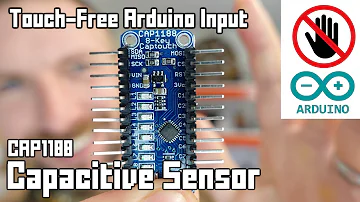
Arduino Capacitive Touch-Free Touch Sensor Tutorial
CAP1188 Description
The CAP1188, which uses RightTouch® technology, is a multi-channel capacitive touch sensor with numerous LED drivers. It has eight (8) individually programmable capacitive touch sensor inputs for use in touch sensor applications. To compensate for slow environmental changes, each sensor input automatically recalibrates.
The CAP1188 additionally includes eight (8) LED drivers with full-on/off, variable rate blinking, dimming, and breathing capabilities. When a touch is detected, each of the LED drivers can be coupled to one of the sensor inputs and triggered. A host controller can also be used to control each LED driver individually.
Multiple Pattern Touch recognition is included into the CAP1188. allowing the user to pick a specific set of buttons to be touched at the same time. A status bit is set and an interrupt is generated if this pattern is detected.
The CAP1188 also comes with circuitry and support for improved sensor proximity detection.
Multiple power states are available on the CAP1188, all of which operate at low quiescent currents. One or more capacitive touch sensor inputs are active in the Standby state of operation, and all LEDs may be utilised. When a touch is detected, the WAKE/SPI MOSI pin is used to wake up the system.
Deep Sleep is the lowest power state, drawing 5uA of electricity on average. No sensor inputs are active in this state. The device will be awakened by driving the WAKE/SPI MOSI pin or by using communications.
CAP1188 Pinout
The CAP1188 Pinout is shown as follows.
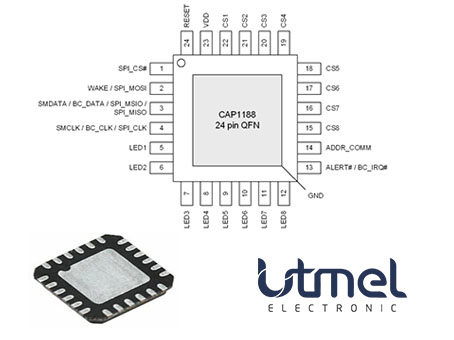
Pinout
| Pin Number | Pin Name | Description |
| 1 | SPI_CS# | Active low chip-select for SPI bus |
| 2 | WAKE / SPI_-MOSI | WAKE - Active high wake / interrupt output - Standby power state - requires pull-down resistor |
| WAKE - Active high wake input Deep Sleep power state - requires pull-down resistor | ||
| SPI_MOSI - SPI Master-Out-Slave-In port when used in normal mode | ||
| 3 | SMDATA / SPI_MSIO / SPI_MISO | SMDATA - Bi-directional, open-drain SMBus data - requires pull-up resistor |
| SPI_MSIO - SPI Master-Slave-In-Out bidirectional port when used in bi-directional mode | ||
| SPI_MISO - SPI Master-In-Slave-Out port when used in normal mode | ||
| 4 | SMCLK / BC_-CLK / SPI_-CLK | SMCLK - SMBus clock input - requires pull-up resistor |
| SPI_CLK - SPI clock input | ||
| 5 | LED1 | Open drain LED 1 driver (default) |
| Push-pull LED 1 driver | ||
| 6 | LED2 | Open drain LED 2 driver (default) |
| Push-pull LED 2 driver | ||
| 7 | LED3 | Open drain LED 3 driver (default) |
| Push-pull LED 3 driver | ||
| 8 | LED4 | Open drain LED 4 driver (default) |
| Push-pull LED 4 driver | ||
| 9 | LED5 | Open drain LED 5 driver (default) |
| Push-pull LED 5 driver | ||
| 10 | LED6 | Open drain LED 6 driver (default) |
| Push-pull LED 6 driver | ||
| 11 | LED7 | Open drain LED 7driver (default) |
| Push-pull LED 7 driver | ||
| 12 | LED8 | Open drain LED 8 driver (default) |
| Push-pull LED 8 driver | ||
| 13 | ALERT# | ALERT# - Active low alert / interrupt output for SMBus alert or SPI interrupt - requires pull-up resis tor (default) |
| ALERT - Active high push-pull alert / interrupt out put for SMBus alert or SPI interrupt | ||
| 14 | ADDR_COMM | Address / communications select pin - pull-down resistor determines address / communications mechanism |
| 15 | CS8 | Capacitive Touch Sensor Input 8 |
| 16 | CS7 | Capacitive Touch Sensor Input 7 |
| 17 | CS6 | Capacitive Touch Sensor Input 6 |
| 18 | CS5 | Capacitive Touch Sensor Input 5 |
| 19 | CS4 | Capacitive Touch Sensor Input 4 |
| 20 | CS3 | Capacitive Touch Sensor Input 3 |
| 21 | CS2 | Capacitive Touch Sensor Input 2 |
| 22 | CS1 | Capacitive Touch Sensor Input 1 |
| 23 | VDD | Positive Power supply |
| 24 | RESET | Active high soft reset for system - resets all regis ters to default values. |
| Bottom Pad | GND | Ground |
CAP1188 CAD Model

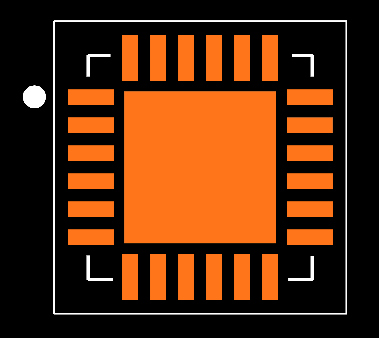
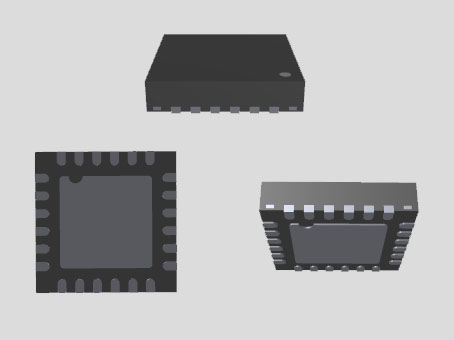
CAP1188 Features
• Eight (8) Capacitive Touch Sensor Inputs
- Programmable sensitivity
- Automatic recalibration
- Individual thresholds for each button
• Proximity Detection
• Multiple Button Pattern Detection
• Calibrates for Parasitic Capacitance
• Analog Filtering for System Noise Sources
• Press and Hold feature for Volume-like Applications
• Multiple Communication Interfaces
- SMBus / I2C compliant interface
- SPI communications
- Pin selectable communications protocol and multiple slave addresses (SMBus / I2C only)
• Low Power Operation
- 5uA quiescent current in Deep Sleep
- 50uA quiescent current in Standby (1 sensor input monitored)
- Samples one or more channels in Standby
• Eight (8) LED Driver Outputs
- Open Drain or Push-Pull
- Programmable blink, breathe, and dimness controls
- Can be linked to Capacitive Touch Sensor inputs
• Dedicated Wake output flags touches in low power state
• System RESET pin
• Available in 24-pin 4mm x 4mm RoHS compliant QFN package
Specifications
- TypeParameter
- Factory Lead Time7 Weeks
- Mount
In electronic components, the term "Mount" typically refers to the method or process of physically attaching or fixing a component onto a circuit board or other electronic device. This can involve soldering, adhesive bonding, or other techniques to secure the component in place. The mounting process is crucial for ensuring proper electrical connections and mechanical stability within the electronic system. Different components may have specific mounting requirements based on their size, shape, and function, and manufacturers provide guidelines for proper mounting procedures to ensure optimal performance and reliability of the electronic device.
Surface Mount - Mounting Type
The "Mounting Type" in electronic components refers to the method used to attach or connect a component to a circuit board or other substrate, such as through-hole, surface-mount, or panel mount.
Surface Mount - Package / Case
refers to the protective housing that encases an electronic component, providing mechanical support, electrical connections, and thermal management.
24-TFQFN Exposed Pad - Number of Pins24
- Operating Temperature
The operating temperature is the range of ambient temperature within which a power supply, or any other electrical equipment, operate in. This ranges from a minimum operating temperature, to a peak or maximum operating temperature, outside which, the power supply may fail.
-40°C~125°C - Packaging
Semiconductor package is a carrier / shell used to contain and cover one or more semiconductor components or integrated circuits. The material of the shell can be metal, plastic, glass or ceramic.
Tape & Reel (TR) - Published2003
- JESD-609 Code
The "JESD-609 Code" in electronic components refers to a standardized marking code that indicates the lead-free solder composition and finish of electronic components for compliance with environmental regulations.
e3 - Part Status
Parts can have many statuses as they progress through the configuration, analysis, review, and approval stages.
Active - Moisture Sensitivity Level (MSL)
Moisture Sensitivity Level (MSL) is a standardized rating that indicates the susceptibility of electronic components, particularly semiconductors, to moisture-induced damage during storage and the soldering process, defining the allowable exposure time to ambient conditions before they require special handling or baking to prevent failures
3 (168 Hours) - ECCN Code
An ECCN (Export Control Classification Number) is an alphanumeric code used by the U.S. Bureau of Industry and Security to identify and categorize electronic components and other dual-use items that may require an export license based on their technical characteristics and potential for military use.
EAR99 - TypeButtons
- Terminal Finish
Terminal Finish refers to the surface treatment applied to the terminals or leads of electronic components to enhance their performance and longevity. It can improve solderability, corrosion resistance, and overall reliability of the connection in electronic assemblies. Common finishes include nickel, gold, and tin, each possessing distinct properties suitable for various applications. The choice of terminal finish can significantly impact the durability and effectiveness of electronic devices.
Matte Tin (Sn) - annealed - Voltage - Supply
Voltage - Supply refers to the range of voltage levels that an electronic component or circuit is designed to operate with. It indicates the minimum and maximum supply voltage that can be applied for the device to function properly. Providing supply voltages outside this range can lead to malfunction, damage, or reduced performance. This parameter is critical for ensuring compatibility between different components in a circuit.
3V~3.6V - Peak Reflow Temperature (Cel)
Peak Reflow Temperature (Cel) is a parameter that specifies the maximum temperature at which an electronic component can be exposed during the reflow soldering process. Reflow soldering is a common method used to attach electronic components to a circuit board. The Peak Reflow Temperature is crucial because it ensures that the component is not damaged or degraded during the soldering process. Exceeding the specified Peak Reflow Temperature can lead to issues such as component failure, reduced performance, or even permanent damage to the component. It is important for manufacturers and assemblers to adhere to the recommended Peak Reflow Temperature to ensure the reliability and functionality of the electronic components.
NOT SPECIFIED - Time@Peak Reflow Temperature-Max (s)
Time@Peak Reflow Temperature-Max (s) refers to the maximum duration that an electronic component can be exposed to the peak reflow temperature during the soldering process, which is crucial for ensuring reliable solder joint formation without damaging the component.
NOT SPECIFIED - Base Part Number
The "Base Part Number" (BPN) in electronic components serves a similar purpose to the "Base Product Number." It refers to the primary identifier for a component that captures the essential characteristics shared by a group of similar components. The BPN provides a fundamental way to reference a family or series of components without specifying all the variations and specific details.
CAP1188 - Operating Supply Voltage
The voltage level by which an electrical system is designated and to which certain operating characteristics of the system are related.
3.3V - Interface
In electronic components, the term "Interface" refers to the point at which two different systems, devices, or components connect and interact with each other. It can involve physical connections such as ports, connectors, or cables, as well as communication protocols and standards that facilitate the exchange of data or signals between the connected entities. The interface serves as a bridge that enables seamless communication and interoperability between different parts of a system or between different systems altogether. Designing a reliable and efficient interface is crucial in ensuring proper functionality and performance of electronic components and systems.
I2C, SMBus, SPI - Operating Supply Current
Operating Supply Current, also known as supply current or quiescent current, is a crucial parameter in electronic components that indicates the amount of current required for the device to operate under normal conditions. It represents the current drawn by the component from the power supply while it is functioning. This parameter is important for determining the power consumption of the component and is typically specified in datasheets to help designers calculate the overall power requirements of their circuits. Understanding the operating supply current is essential for ensuring proper functionality and efficiency of electronic systems.
500μA - Load Capacitance
the amount of capacitance measured or computed across the crystal terminals on the PCB. Frequency Tolerance. Frequency tolerance refers to the allowable deviation from nominal, in parts per million (PPM), at a specific temperature, usually +25°C.
400pF - Number of Inputs8
- Touchscreen
A touchscreen is a type of input device that allows users to interact with electronic devices by touching the display screen directly with their fingers or a stylus. It is a user-friendly interface that enables users to navigate through menus, input data, and perform various functions by simply touching the screen. Touchscreens can be found in a wide range of electronic devices such as smartphones, tablets, laptops, and interactive kiosks. They are designed to be intuitive and responsive, providing a more engaging and efficient user experience compared to traditional input methods like keyboards and mice. Touchscreens can be either resistive or capacitive, each with its own advantages and limitations in terms of accuracy, sensitivity, and durability.
Capacitive - Proximity Detection
A proximity sensor is a non-contact sensor that detects the presence of an object (often referred to as the “target”) when the target enters the sensor’s field. Depending on the type of proximity sensor, sound, light, infrared radiation (IR), or electromagnetic fields may be utilized by the sensor to detect a target.
Yes - RoHS Status
RoHS means “Restriction of Certain Hazardous Substances” in the “Hazardous Substances Directive” in electrical and electronic equipment.
ROHS3 Compliant - Lead Free
Lead Free is a term used to describe electronic components that do not contain lead as part of their composition. Lead is a toxic material that can have harmful effects on human health and the environment, so the electronics industry has been moving towards lead-free components to reduce these risks. Lead-free components are typically made using alternative materials such as silver, copper, and tin. Manufacturers must comply with regulations such as the Restriction of Hazardous Substances (RoHS) directive to ensure that their products are lead-free and environmentally friendly.
Lead Free
Parts with Similar Specs
- ImagePart NumberManufacturerPackage / CaseNumber of InputsNumber of PinsInterfaceRoHS StatusPart StatusMounting TypeTechnologyView Compare
![CAP1188-1-CP-TR]()
CAP1188-1-CP-TR
24-TFQFN Exposed Pad
8
24
I2C, SMBus, SPI
ROHS3 Compliant
Active
Surface Mount
-
![ATSAMD09D14A-MUT]()
24-VFQFN Exposed Pad
-
24
I2C, LIN, SMBus, SPI, UART, USART
ROHS3 Compliant
Active
Surface Mount
CMOS
![MKL03Z8VFK4]()
24-VFQFN Exposed Pad
-
-
I2C, SMBus
ROHS3 Compliant
Active
Surface Mount
CMOS
![S9KEAZN8AMFK]()
24-UFQFN Exposed Pad
-
-
-
ROHS3 Compliant
Active
Surface Mount
CMOS
![PCA9539BS,118]()
24-VFQFN Exposed Pad
-
-
-
ROHS3 Compliant
Active
Surface Mount
CMOS


CAP1188 Functional Block Diagram
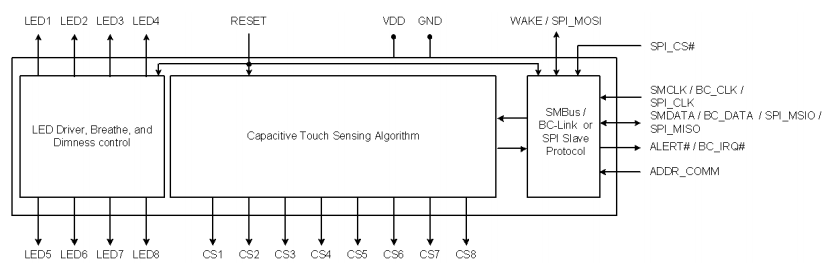
System Diagram for CAP1188

CAP1188 Alternatives
| Part Number | Description | Manufacturer |
| CAP1188-1-CP-TRDRIVERS AND INTERFACES | LED Driver | SMSC |
CAP1188 Applications
• Desktop and Notebook PCs
• LCD Monitors
• Consumer Electronics
• Appliances
CAP1188 Package
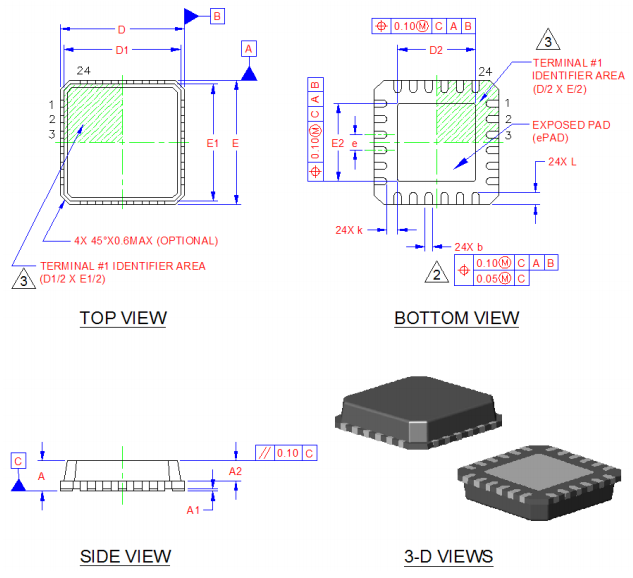
CAP1188 Manufacturer
Microchip Technology Inc. is a leading provider of microcontroller and analog semiconductors, delivering low-risk product development, reduced overall system cost, and faster time to market to thousands of customers across the world. Microchip, based in Chandler, Arizona, provides excellent technical support as well as consistent delivery and quality.
Trend Analysis
Datasheet PDF
- PCN Packaging :
- ConflictMineralStatement :
- Datasheets :
What technology does the CAP1188 use?
RightTouch® technology.
How many individually programmable capacitive touch sensor inputs does the CAP1188 have?
Eight (8).
What does the CAP1188 compensate for?
Slow environmental changes.
What can each of the LED drivers be coupled to when a touch is detected?
One of the sensor inputs and triggered.
What can be used to control each LED driver individually?
Host controller.
What is included in the CAP1188?
Multiple Pattern Touch recognition.
What is the purpose of the CAP1188?
Allowing the user to pick a specific set of buttons to be touched at the same time.
What happens if a pattern is detected on the CAP1188?
A status bit is set and an interrupt is generated if this pattern is detected.
What does the CAP1188 support?
Improved sensor proximity detection.
What power states are available on the CAP1188?
Multiple power states.
What state is one or more capacitive touch sensor inputs active in?
Standby state of operation.
What is used to wake up the system when a touch is detected?
WAKE/SPI MOSI pin.
What is the lowest power state?
Deep Sleep.
How will the device be awakened?
By driving the WAKE/SPI MOSI pin or by using communications.
![SA15 TVS DIODE 15VWM 24.4VC DO15[FAQ]: Datasheet, Features, and Applications](https://res.utmel.com/Images/Article/842c249e-4640-4601-b47d-33a2290d80f7.jpg) SA15 TVS DIODE 15VWM 24.4VC DO15[FAQ]: Datasheet, Features, and Applications
SA15 TVS DIODE 15VWM 24.4VC DO15[FAQ]: Datasheet, Features, and Applications09 March 2022411
 STM32H743VIT6 Microcontroller: 480MHz, 100-LQFP, Pinout and Datasheet
10 February 202210478
 STM32F429IIT6 STMicroelectronics: Specification, Datasheet, Manufacturer And Features
11 April 2022874
![EL817 Optocoupler: Package, Pinout, and Datasheet [Video&FAQ]](https://res.utmel.com/Images/Article/2f9938a7-2162-45f2-8022-d496898f2c6e.png) EL817 Optocoupler: Package, Pinout, and Datasheet [Video&FAQ]
EL817 Optocoupler: Package, Pinout, and Datasheet [Video&FAQ]18 October 202112017
 Audio Amplifier IC LM386:Where/How to use?
05 May 202210803
 An In-Depth Look at the LTC6602IUF#TRPBF Active Filter: Features, Applications, and Reference Designs
06 March 2024129
 Renesas MCF5235CVM100 Microcontroller: Comprehensive Technical Overview
29 February 2024118
 STM32H747XIH6 Microcontroller: Features, Applications and Datasheet
26 December 20236311
 What is a PIN Diode?
04 February 20219265
 MOSFET vs. IGBT: Characteristics, Structure and Market Analysis
25 December 202520791
 Filter Circuit: Types, Characteristics and Principles
01 December 20218784
 Top 10 Companies in the IoT Industry
17 January 20221199
 Analog-to-Digital Converters (ADCs): Decrypting Resolutions and Sampling Rates
24 February 20224618
 Neural Processing Unit (NPU) Explained
15 October 202559826
 What is a variable capacitor?
16 April 202560975
 Volkswagen CFO: Chip Supply Shortage Will Continue Until 2024
11 April 20224732
Microchip Technology
In Stock: 182
United States
China
Canada
Japan
Russia
Germany
United Kingdom
Singapore
Italy
Hong Kong(China)
Taiwan(China)
France
Korea
Mexico
Netherlands
Malaysia
Austria
Spain
Switzerland
Poland
Thailand
Vietnam
India
United Arab Emirates
Afghanistan
Åland Islands
Albania
Algeria
American Samoa
Andorra
Angola
Anguilla
Antigua & Barbuda
Argentina
Armenia
Aruba
Australia
Azerbaijan
Bahamas
Bahrain
Bangladesh
Barbados
Belarus
Belgium
Belize
Benin
Bermuda
Bhutan
Bolivia
Bonaire, Sint Eustatius and Saba
Bosnia & Herzegovina
Botswana
Brazil
British Indian Ocean Territory
British Virgin Islands
Brunei
Bulgaria
Burkina Faso
Burundi
Cabo Verde
Cambodia
Cameroon
Cayman Islands
Central African Republic
Chad
Chile
Christmas Island
Cocos (Keeling) Islands
Colombia
Comoros
Congo
Congo (DRC)
Cook Islands
Costa Rica
Côte d’Ivoire
Croatia
Cuba
Curaçao
Cyprus
Czechia
Denmark
Djibouti
Dominica
Dominican Republic
Ecuador
Egypt
El Salvador
Equatorial Guinea
Eritrea
Estonia
Eswatini
Ethiopia
Falkland Islands
Faroe Islands
Fiji
Finland
French Guiana
French Polynesia
Gabon
Gambia
Georgia
Ghana
Gibraltar
Greece
Greenland
Grenada
Guadeloupe
Guam
Guatemala
Guernsey
Guinea
Guinea-Bissau
Guyana
Haiti
Honduras
Hungary
Iceland
Indonesia
Iran
Iraq
Ireland
Isle of Man
Israel
Jamaica
Jersey
Jordan
Kazakhstan
Kenya
Kiribati
Kosovo
Kuwait
Kyrgyzstan
Laos
Latvia
Lebanon
Lesotho
Liberia
Libya
Liechtenstein
Lithuania
Luxembourg
Macao(China)
Madagascar
Malawi
Maldives
Mali
Malta
Marshall Islands
Martinique
Mauritania
Mauritius
Mayotte
Micronesia
Moldova
Monaco
Mongolia
Montenegro
Montserrat
Morocco
Mozambique
Myanmar
Namibia
Nauru
Nepal
New Caledonia
New Zealand
Nicaragua
Niger
Nigeria
Niue
Norfolk Island
North Korea
North Macedonia
Northern Mariana Islands
Norway
Oman
Pakistan
Palau
Palestinian Authority
Panama
Papua New Guinea
Paraguay
Peru
Philippines
Pitcairn Islands
Portugal
Puerto Rico
Qatar
Réunion
Romania
Rwanda
Samoa
San Marino
São Tomé & Príncipe
Saudi Arabia
Senegal
Serbia
Seychelles
Sierra Leone
Sint Maarten
Slovakia
Slovenia
Solomon Islands
Somalia
South Africa
South Sudan
Sri Lanka
St Helena, Ascension, Tristan da Cunha
St. Barthélemy
St. Kitts & Nevis
St. Lucia
St. Martin
St. Pierre & Miquelon
St. Vincent & Grenadines
Sudan
Suriname
Svalbard & Jan Mayen
Sweden
Syria
Tajikistan
Tanzania
Timor-Leste
Togo
Tokelau
Tonga
Trinidad & Tobago
Tunisia
Turkey
Turkmenistan
Turks & Caicos Islands
Tuvalu
U.S. Outlying Islands
U.S. Virgin Islands
Uganda
Ukraine
Uruguay
Uzbekistan
Vanuatu
Vatican City
Venezuela
Wallis & Futuna
Yemen
Zambia
Zimbabwe
![AT42QT1010-TSHR]() AT42QT1010-TSHR
AT42QT1010-TSHRMicrochip Technology
![AT42QT1040-MMHR]() AT42QT1040-MMHR
AT42QT1040-MMHRMicrochip Technology
![AT42QT1011-TSHR]() AT42QT1011-TSHR
AT42QT1011-TSHRMicrochip Technology
![QT60240-ISG]() QT60240-ISG
QT60240-ISGMicrochip Technology
![AT42QT1012-TSHR]() AT42QT1012-TSHR
AT42QT1012-TSHRMicrochip Technology
![AT42QT1010-MAHR]() AT42QT1010-MAHR
AT42QT1010-MAHRMicrochip Technology
![AT42QT2120-MMHR]() AT42QT2120-MMHR
AT42QT2120-MMHRMicrochip Technology
![AT42QT1070-MMHR]() AT42QT1070-MMHR
AT42QT1070-MMHRMicrochip Technology
![AT42QT2120-XU]() AT42QT2120-XU
AT42QT2120-XUMicrochip Technology
![AT42QT2120-MMH]() AT42QT2120-MMH
AT42QT2120-MMHMicrochip Technology


